
Why FACEIT Requires Verification (and What It Unlocks)
FACEIT didn't roll out ID checks just to create extra steps—the system is designed to eliminate smurfing, multi-accounting, and account trading. The verification infrastructure is powered by Daon, a digital identity specialist, enforcing a strict rule: one person, one account.
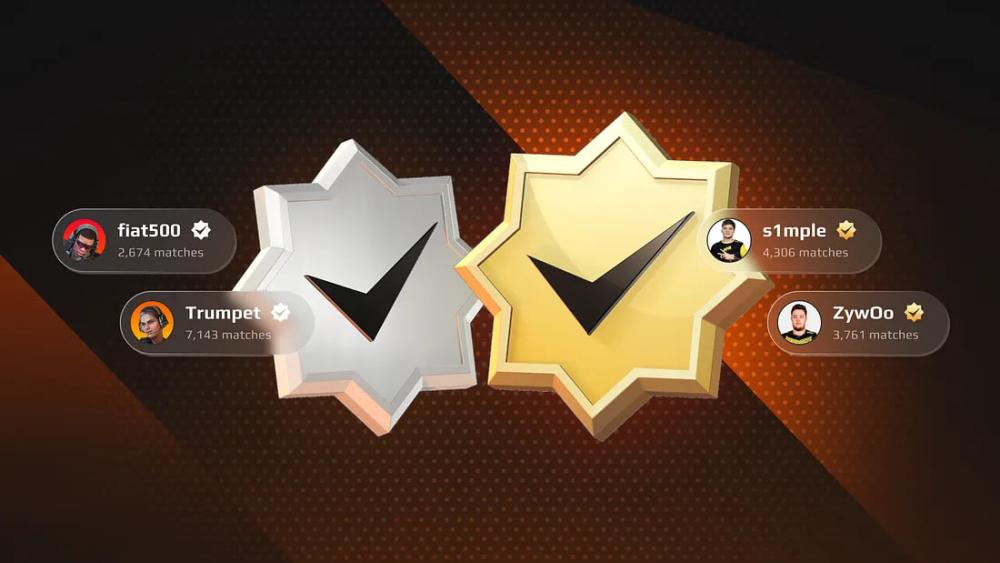
Completing the process earns your profile one of two verification badges, both visible to everyone on the platform:
White Badge: The standard verification badge granted to all everyday players who pass the identity check.
Gold Badge: Reserved exclusively for verified esports pros, major streamers, and public figures to prevent impersonation.
While basic free matchmaking technically remains open to unverified users, FACEIT continues to gate its best competitive features behind verified status:
| Feature | Unverified Account | Verified Account |
| Standard Matchmaking | Available | Available |
| Premium Match Queue | Locked | Unlocked |
| Official FACEIT Tournaments | Mostly locked | Unlocked |
| Profile Verification Badge | None | White Badge |
| Selfie Recheck Eligibility | No | Yes |
How to Verify Your FACEIT Account in CS2: Step by Step
You only need to verify your FACEIT profile once—the badge applies across your entire account, covering CS2, Dota 2, and every other supported title.
Open Verification Settings: Log in to FACEIT on your desktop browser, go to Account Settings, navigate to the Verification tab, and click to begin.
Scan the QR Code: Point your smartphone’s camera at the QR code on your monitor. This opens the secure Daon verification portal directly in your mobile browser (no app download needed).
Capture a Selfie: Follow the on-screen prompts to take a clear, passport-style selfie. Keep a neutral expression, face the light directly, and remove glasses, hats, or gaming headsets.
Scan Your ID Document: Use your phone's camera to photograph the required page or front/back sides of your physical ID.
Once submitted, your status will switch to "In progress." Leave the tab alone—do not cancel or restart the verification. After processing finishes, refresh your browser page and your white badge will appear. Remember that FACEIT strictly enforces a limit of one verified account per individual.
Can You Verify on FACEIT Without a Passport?
You cannot bypass identity verification without an official document, but a passport isn't your only option. Depending on your country of residence, FACEIT accepts several forms of government-issued identification:
| Document Type | Accepted? | Key Requirements |
| Passport | Yes | Accepted globally as the universal standard |
| National ID Card | Country-dependent | Must be listed on FACEIT's supported documents page |
| Driver's License | Country-dependent | Must be listed on FACEIT's supported documents page |
| Expired ID | No | Must be valid on the date of submission |
| Digital Copy / Screenshot | No | Physical original document is mandatory |
| Another Person's ID | No | Strict violation resulting in a permanent ban |
How Long Does Verification Take?
Waiting for approval can be nerve-wracking if you are trying to register for a tournament before lock-in. Under normal server loads, verification takes anywhere from a few minutes to a few hours. During peak evening hours, queue processing alone can take 15 minutes or longer.
As long as your dashboard displays "In progress," your submission is active in the queue. Avoid starting over, and simply refresh your profile page periodically to see if the badge has populated.
What Is the FACEIT Selfie Recheck?
To stop players from verifying accounts with borrowed IDs and selling them on third-party markets, FACEIT introduced the Selfie Recheck system in November 2025. The platform can randomly or triggered by unusual account activity ask you to re-confirm your identity before queuing.
When triggered, a notification banner appears on your dashboard and blocks you from joining matches until resolved. Fortunately, you do not need to scan your ID again—you simply scan a QR code and take a fresh live selfie.
Is FACEIT Verification Mandatory?
Strictly speaking, verification is still free and optional if you only care about standard unranked or basic matchmaking queues. However, in practice, an unverified account is heavily restricted:
You cannot enter Premium Match queues.
You are barred from official tournaments and open qualifiers.
FACEIT can force mandatory verification on any account flagged for smurfing, boosting, or suspicious behavior.
If you want a competitive environment with fewer smurfs and access to tournament play, verifying your account is practically essential.
Common FACEIT Verification Errors & How to Fix Them
When a submission fails, FACEIT usually displays a specific error reason. Almost every rejection comes down to one of these six easily fixable issues:
Country Mismatch Error: The country selected in the Daon prompt doesn't match your ID. Fix: Restart the flow and manually select the exact country that issued your document.
Face Not Recognized / Poor Lighting: Glare, shadows, or dim lighting obscured your facial features. Fix: Move to a well-lit room facing a light source directly, remove glasses/hats, and retake the selfie.
Invalid Document Scan: You scanned the wrong side of an ID card or cut off the edges of your passport's photo page. Fix: Ensure all four corners of the ID are clearly visible and scan both front and back if prompted.
Unsupported Device: Your smartphone camera or OS is too old for the web scanner. Fix: Use a newer phone borrowed from a friend or family member.
QR Code Won't Load: Ad-blockers or browser extensions are blocking the verification script. Fix: Disable extensions or switch to a clean browser (like Chrome or Edge) on your PC.
Stuck on "In Progress": The verification completed in the background, but the webpage didn't auto-update. Fix: Manually reload the browser tab instead of restarting the process.
If you've resolved these issues and still encounter failures, open a ticket with FACEIT Support for a manual review.
FAQ
How long does FACEIT verification take?
Most checks clear within a few minutes, though high traffic can stretch processing to a few hours. If your status says "In progress," wait patiently and refresh the page later rather than restarting.
Can I verify on FACEIT without a passport?
Yes. While a government-issued ID is mandatory, FACEIT accepts national ID cards and driver's licenses in many countries. Your document must be physical, original, and unexpired.
Is FACEIT verification mandatory for CS2?
You can play basic matchmaking without it, but verification is required for Premium Match queues, most official tournaments, and any account flagged by FACEIT's anti-smurf systems.
Why does my FACEIT verification keep failing?
The most common culprits are selecting the wrong country before scanning, taking a selfie in poor lighting, scanning the wrong side of your ID, or using an outdated smartphone. Fixing those four factors resolves nearly all rejections.


Yorum yaz