
Zamrożone CS2 ustawienia myszy - czułość i DPI
Obecnie David gra na Razer Deathadder V4 Pro Black. To nowa mysz popularnej marki, zaprojektowana specjalnie z myślą oe-sporcie. Łączy tę wysokowydajną mysz z tradycyjną rozdzielczością 400 DPI i czułością w grach na poziomie 2,0, uzyskując efektywną wartość DPI (eDPI) wynoszącą 800. To eDPI jest idealnym rozwiązaniem dla profesjonalnych strzelców, zapewniając mu stabilność przy blokowaniu długich kątów, a jednocześnie umożliwiając płynne obracanie się o 180 stopni, gdy na miejscu wybuchnie chaos. Kiedy jest zmuszony do podniesienia broni z lunetą, nieznacznie zmniejsza prędkość śledzenia, ustawiając czułość zoomu na poziomie 0,8, zapewniając maksymalną kontrolę i precyzyjną regulację pikseli.
Mysz: Razer Deathadder V4 Pro czarna
DPI: 400
Czułość: 2
eDPI: 800
Czułość zoomu: 0.8
Hz: 4000
Czułość systemu Windows: 6
Te ustawienia są całkiem przydatne, więc możesz je wypróbować bez żadnych wątpliwości. Są bardzo grywalne i odpowiednie. Nie wiesz, jak działają ustawienia myszy? Sprawdź nasz przewodnik here.
Zamrożone ustawienia celownika dla CS2
mrożony celownik jest klasycznym statycznym i kolorowym cyjanem. Można ją włączyć wpisując kod celownika CSGO-X8H4M-ZM6qT-qi3Ow-e4Peb-wLsuL lub ręcznie kopiując następujące parametry:
Styl: klasyczny statyczny
Podążaj za odrzutem: Nie
Kropka: Nie.
Długość: 1
Grubość: 1
Różnica: -4
Zarys: Nie
Kolor (RGB): Cyjan
Czerwony: 0
Zielony: 255
Niebieski: 168
Alfa: Tak
Wartość alfa: 255
Styl T: Nie
Luka w rozmieszczonej broni: Nie
Szerokość snajpera: 0
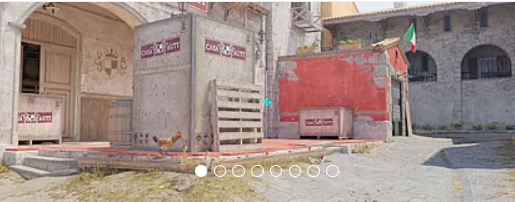
Jego celownik pasuje do graczy, którzy lubią grać na jasnych ustawieniach ekranu. Ale ogólnie rzecz biorąc, jest dość wszechstronny, więc możesz bezpiecznie wypróbować go w dowolnym otoczeniu. Jeśli chcesz poznać inne opcje, zapoznaj się z naszym przewodnikiem po najlepszych CS2 kodach celownika here.
Zamrożone ustawienia wideo dla CS2
Podobnie jak zdecydowana większość profesjonalistów pierwszej klasy, Frost wybiera współczynnik proporcji 4:3 zamiast natywnego 16:9. Grając w rozciągniętej rozdzielczości 1280x960, modele graczy wydają się znacznie szersze na ekranie, tworząc większe cele wizualne, dzięki czemu śledzenie i utrzymywanie małych kątów wydaje się znacznie bardziej spójne. Jako uzupełnienie tego, jego zaawansowane ustawienia wideo są mocno zoptymalizowane pod kątem konkurencyjnej przejrzystości i maksymalnej liczby klatek na sekundę w porównaniu z czystą wiernością wizualną.
Utrzymuje globalną jakość cieni na wysokim poziomie —, kluczowe ustawienie w CS2 umożliwiające wykrywanie cieni wroga, zanim skręcą róg, jednocześnie zmniejszając szczegóły cieniowania i cząstek do niskiego, aby zminimalizować bałagan na ekranie podczas chaotycznych akcji. Aby wygładzić postrzępione krawędzie, które naturalnie występują przy rozciągniętej rozdzielczości, korzysta z 4x MSAA. Wreszcie, aby zapewnić absolutnie najniższe możliwe opóźnienie wejściowe, włączona jest funkcja NVIDIA Reflex, podczas gdyV-Sync iG-Sync są całkowicie wyłączone.
Zwiększ kontrast graczy: Włączone
Szczegóły modelu/tekstury: Średnie
Szczegóły shaderów: Niskie
Szczegóły cząstek: Niskie
Filtrowanie tekstur: anizotropowe 4x
Antyaliasing: 4x MSAA
Jakość cieni: wysoka
Dynamiczne cienie: wszystkie
Okluzja otoczenia: średnia
FidelityFX Super rozdzielczość: wyłączona (najwyższa jakość)
Synchronizacja pionowa: wyłączona
Niskie opóźnienie NVIDIA Reflex: Włączone
NVIDIAG-Sync: wyłączona
Wysoki zakres dynamiki: jakość
Rozdzielczość: 1280*960
Współczynnik proporcji: 4:3 rozciągnięty
Tryb: Pełny ekran
Tryb skalowania: rozciągnięty
Jasność: 112 %
Zamrożone ustawienia monitora dla CS2
Aby mieć pewność, że nigdy nie straci celu podczas szybkich akcji, Frost korzysta ze standardowego w branży monitora ZOWIE XL2566K, monitora 360 Hz, znanego z panelu TN klasye-sportowej. Aby zyskać przewagę w widoczności, podkręca swój Black eQualizer do 15, natychmiast oświetlając notorycznie ciemne rogi na mapach takich jak Mirage i Ancient, bez wysadzania jaśniejszych obszarów ekranu. Podczas gdy wielu graczy sztucznie zwiększa swoje nasycenie, Frost utrzymuje swoją intensywność kolorów na zrównoważonym poziomie 10, opierając się na swoim dostosowanym profilu obrazu FPS 1 i CS2#naturalnie żywym oświetleniu, dzięki czemu modele graczy wyróżniają się.
Tutaj znajdziesz zamrożone ustawienia monitora:
DyAc: Premium
Czarny eQualizer: 15
Intensywność kolorów: 10
Niskie niebieskie światło: 0
Tryb obrazu: FPS 1
Jasność: 60
Kontrast: 50
Ostrość: 7
Gamma: Gamma 3
Temperatura barwowa: Normalna
AMA: Premium
Zamrożone ustawienia modelu widoku dla CS2
Słowacka gwiazda ma ustawienia modelu widoku podobne do ustawień wielu innych profesjonalnych graczy CS2. Ma przesunięcie poziome wynoszące 2,5 i przesunięcie pionowe wynoszące -1,5. Te ustawienia ułatwiają celowanie i strzelanie oraz zapewniają, że model broni nie zasłania zbyt dużego pola widzenia.
viewmodel_fov 68
viewmodel_offset_x 2.5
viewmodel_offset_y 0
viewmodel_offset_z -1.5
viewmodel_presetpos 2
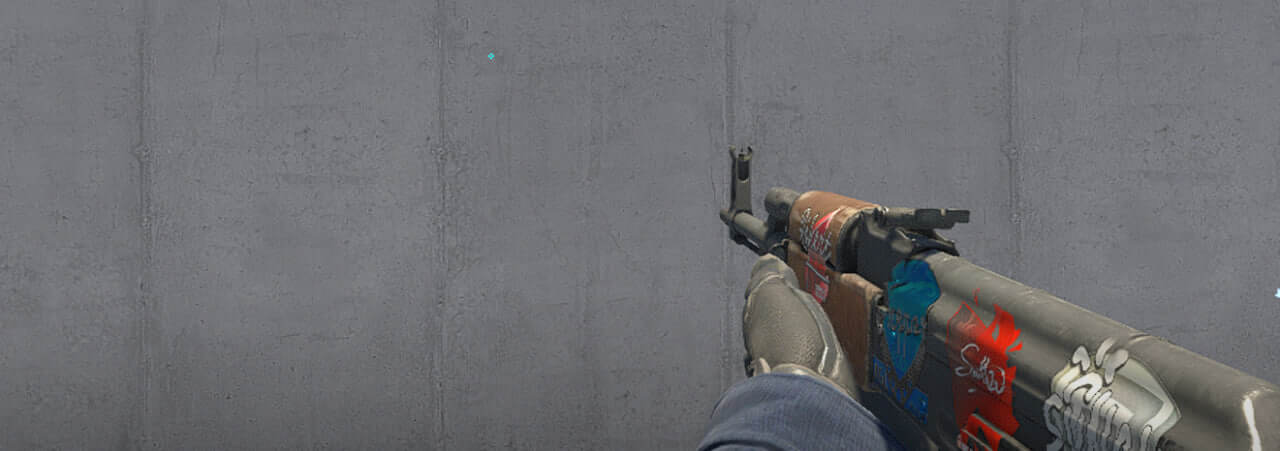
Przydatne jest również nauczenie się, jak działa viewmodel settings, aby dostosować je do swoich preferencji.
Zamrożone opcje uruchamiania dla CS2
Odtwarzacz FaZe Clan ma dość domyślne, ale ważne ustawienia uruchamiania:
-freq 360 +rate 786432 +fps_max 500 -tickrate 128
Jeśli szukasz najlepszych opcji uruchamiania CS2, sprawdź nasze guide.
Zamrożone ustawienia radaru dla CS2
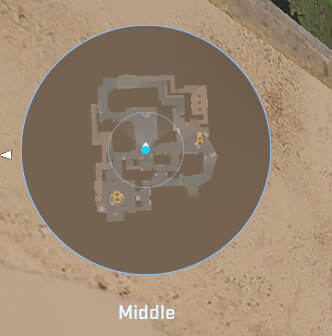
Jego radar centruje gracza i jednocześnie się obraca. Użyj poniższych ustawień, aby wypróbować na własnej skórze, jak wygląda zabawa z zamrożonym radar settings.
Radar centruje gracza: Tak
Radar się obraca: Tak
Przełącz kształt z tablicą wyników: Tak
Rozmiar wyświetlacza radaru: 0.9
Powiększenie mapy: 0.4
Zamrożone ustawienia audio dla CS2
mrożone Ustawienia audio w CS2 zostały dostrojone w celu uzyskania maksymalnej przejrzystości i świadomości pozycji. Prawdopodobnie używa słuchawek stereo z niskim pogłosem i wzmocnionymi wysokimi częstotliwościami, aby usłyszeć kroki i strzały.
Głośność główna: 100 %
Urządzenie audio: domyślne
Profil EQ: Naturalny
Izolacja L/R: 0 %
Korekcja perspektywy: Tak
Odtwarzaj dźwięk podczas gry w tle: Nie
Głośność menu głównego: 20 %
Objętość początkowa rundy: 0 %
Objętość akcji rundy: 0 %
Objętość zakończenia rundy: 40 %
Objętość MVP: 30 %
Objętość bomby/zakładnika: 20 %
Dziesięć sekund głośności ostrzeżenia: 20 %
Głośność kamery śmierci: 30 %
Wycisz muzykę MVP, gdy gracze obu drużyn żyją: Nie
Mrożone skiny
Zwycięzca turnieju Major ma jeden z najdroższych ekwipunków wśród CS2 graczy. Lista prestiżowych skinów obejmuje:
Wykorzystaj kolekcję Frozen jako inspirację lub wybierz inne skiny według własnego gustu na Skin.Land. Tutaj znajdziesz szeroki wybór skinów od profesjonalnych graczy. kolekcje, które możesz kupić szybko, bezpiecznie i po przystępnej cenie.







Z komentarzem