

Verwendet CS2 Roheingaben?
Raw Input ist ein System, das es Counter-Strike 2 ermöglicht, Bewegungsdaten direkt vom Hardwaresensor deiner Maus zu lesen und dabei das Windows-Betriebssystem vollständig zu umgehen. Ohne diese direkte Kommunikationsleitung werden deine Maussignale zuerst durch Windows gefiltert, das seine eigenen Empfindlichkeitsmultiplikatoren anwenden oder eine integrierte Mausbeschleunigung einbauen kann (oft als "Zeigerpräzision verbessern" bezeichnet).
Durch die Erfassung der Rohdaten garantiert das Spiel eine reine 1:1-Übersetzung deiner körperlichen Bewegungen. Das bedeutet, wenn du mit der Maus genau fünf Zentimeter über dein Pad streichst, wird im Spiel immer die gleiche Rotation erzielt, unabhängig von der Geschwindigkeit deines Wischs. Für Wettkampfspieler, die auf punktgenaue Schüsse und akribische Sprühübertragungen angewiesen sind, ist dieser ungefilterte Input die absolute Grundlage für mechanische Konsistenz.
So aktivierst du die Roheingabe in CS2
In Counter-Strike 2 ist die Roheingabe standardmäßig aktiviert und fest in die Spiel-Engine einprogrammiert, sodass du sie nicht manuell aktivieren musst.
Anders als in CS:GO, wo Spieler den Befehl m_rawinput 1 verwenden oder eine Einstellung im Menü umschalten mussten, umgeht CS2 nativ die Mauseinstellungen deines Betriebssystems (z. B. Windows "Zeigerpräzision verbessern"), um maximale Genauigkeit und Konsistenz zu gewährleisten.
Da das Spiel die unverarbeiteten Sub-Tick-Daten immer direkt von deiner Maus-Hardware liest, sind die alten Roheingabebefehle völlig veraltet. Wenn dir dein Ziel nicht ganz so gut vorkommt oder du versuchst, ein altes Setup zu reproduzieren, kannst du sicher sein, dass du bereits echte Roheingaben erhältst. Jede weitere Feinabstimmung muss über die DPI deiner physischen Maus oder deine Empfindlichkeitseinstellungen im Spiel erfolgen.
CS2 Roheingabebefehle erklärt
Während Spieler häufig die Entwicklerkonsole öffnen und nach älteren Befehlen wie m_rawinput 1 oder m_customaccel suchen, hat Counter-Strike 2 die Art und Weise, wie Mausdaten unter der Haube verarbeitet werden, völlig neu geschrieben.
In CS2 geben diese Variablen den Fehler "Befehl nicht gefunden" zurück, da die Source-2-Engine von Valve Roheingaben auf Systemebene erzwingt, um ihrer Sub-Tick-Architektur Rechnung zu tragen. Anstatt darauf zu warten, dass die Server-Tickrate des Spiels deine Cursorposition abtastet, verfolgt CS2 ständig die Abfragerate deiner Maushardware in Echtzeit und erfasst die genaue Mikrosekunde, die du anklicken oder bewegst.
Da die Engine diesen hochpräzisen, unverfälschten Strom physischer Daten benötigt, um ordnungsgemäß zu funktionieren, werden die Windows-Zeigereinstellungen und die Mausbeschleunigung des Betriebssystems automatisch umgangen. Folglich erfolgt die Feinabstimmung deiner Eingabekonsistenz nicht mehr in der Konsole; Stattdessen basiert es ausschließlich darauf, die Abfragerate deiner Maus (z. B. 1000 Hz oder 4000 Hz) mit einem sauberen, nicht beschleunigten DPI-Profil in der nativen Software deiner Maus abzugleichen.
Wenn Sie eine alte CS:GO config.cfg- oder autoexec.cfg-Datei migrieren, werden alle Zeilen, die m_rawinput oder ältere Beschleunigungsvariablen enthalten, einfach von CS2 ignoriert, ohne dass deine anderen Bindungen unterbrochen werden.
So funktioniert die Mauseingabe in CS2
In Counter-Strike 2 sind Mauseingaben untrennbar mit der Sub-Tick-Architektur des Spiels verknüpft, was die Art und Weise, wie die Source 2-Engine die Bewegung des Spielers interpretiert, grundlegend verändert. Anstatt auf den nächsten gerenderten Frame oder Server-Tick zu warten, um die Position des Fadenkreuzes abzutasten, ruft CS2 kontinuierlich rohe Positionsdaten direkt von der Maus-Hardware mit seiner nativen Abfragerate ab und weist jedem Streichen und Klicken einen genauen Zeitstempel im Mikrosekundenbereich zu.
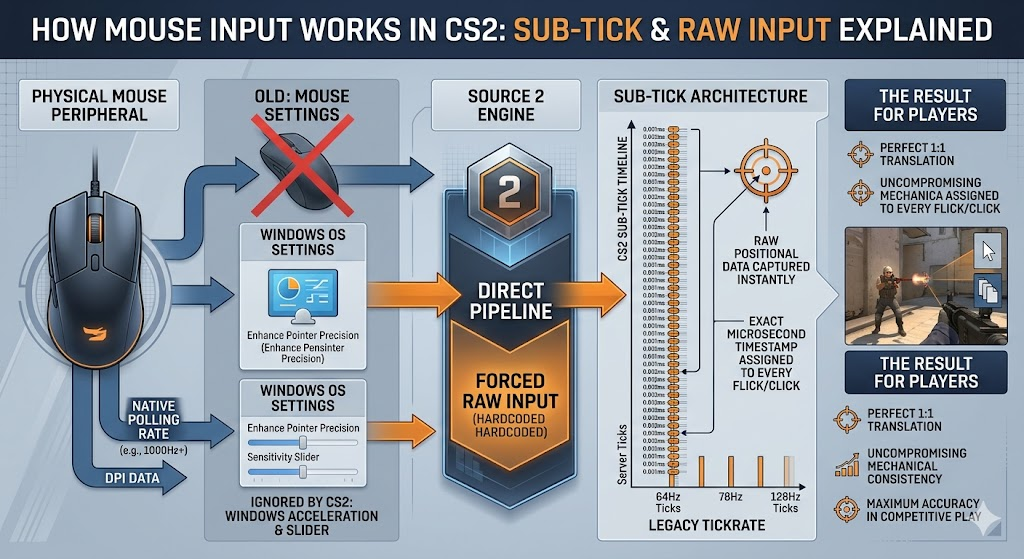
Um die absolute Integrität dieser Daten zu gewährleisten, erzwingt die Source 2-Engine die Roheingabe auf einem fest codierten, unveränderlichen Niveau und erstellt so eine direkte Pipeline zwischen deinem Peripheriegerät und dem Spiel. Diese strikte Hardware-zu-Engine connection umgeht vollständig alle Windows-Betriebssystemeinstellungen.
Daher werden externe Variablen wie der Windows-Empfindlichkeitsschieberegler oder die notorisch inkonsistente "Zeigerpräzision verbessern" (Mausbeschleunigung auf Betriebssystemebene) vom Spiel vollständig ignoriert. Durch die Beseitigung dieser Störungen durch das Betriebssystem sorgt CS2 für eine perfekte 1:1-Übersetzung deiner physischen DPI- und Polling-Daten und sorgt so für die kompromisslose mechanische Konsistenz, die auf höchstem Wettbewerbsniveau erforderlich ist.
Kannst du die Roheingabe in CS2 deaktivieren?
Nein, du kannst die Roheingabe in Counter-Strike 2 nicht deaktivieren.
Als Valve das Spiel auf die Source 2-Engine umstellte, wurde die Möglichkeit, diese Funktion umzuschalten, dauerhaft entfernt, wodurch ältere Konsolenbefehle wie m_rawinput 0 völlig funktionsunfähig wurden. Da die Sub-Tick-Architektur des Spiels für jede Aktion einen exakten, mikrosekundengenauen Zeitstempel erfordert, verlangt die Engine eine ununterbrochene, unverfälschte Datenzufuhr direkt von deiner Maus-Hardware.
Dieses fest codierte System bedeutet, dass CS2 immer die Windows-Betriebssystemeinstellungen und die Mausbeschleunigung auf Softwareebene umgeht. Folglich können sich Spieler, die ihr Zielgefühl anpassen möchten, nicht mehr darauf verlassen, Roheingaben oder benutzerdefinierte Beschleunigungskurven über die Entwicklerkonsole umzuschalten; Alle Anpassungen müssen jetzt ausschließlich über die DPI-Profile deiner physischen Maus und den Empfindlichkeitsregler im Spiel vorgenommen werden.







Kommentar schreiben