
Twistzz CS2 hiiren asetukset - herkkyys ja DPI
Hiiriasetusten suhteen Twistzz luottaa kokoonpanoon, joka tarjoaa täydellisen tasapainon mikrosäädön tarkkuuden ja luotettavan pyyhkäisykyvyn välillä. Tällä hetkellä hän pelaa klassisella 400 DPI:llä yhdistettynä pelin sisäiseen herkkyyteen 1,7, jolloin kokonaiseDPI on 680. Vaikka jotkut ammattilaispelaajat nojaavat spektrin ääripäihin, Twistzz'n kokoonpano osuu ihanteelliseen makeaan pisteeseen maailmanluokan riflerille ja IGL:lle — se sallii uskomattoman sulavan seurannan ja terävät, pikselintarkat pääosumat uhraamatta hänen liikemekaniikkaansa.
Varmistaakseen maksimaalisen vasteen ja nollaviiveen laitteistollaan (tyypillisesti huippuluokan Razer-hiiri, kuten DeathAdder tai Viper V4 Pro), hän käyttää räjähtävän nopeaa 4000 Hz:n kyselytaajuutta. Niitä kytkinhetkiä varten, jolloin hänen on otettava iso vihreä ase käteensä, hänen zoomausherkkyytensä on asetettu arvoon 1,1, mikä antaa hänelle vain ripauksen lisänopeutta tähystyksen aikana.
Hiiri: Razer Viper V4 Pro White
DPI: 400
Herkkyys: 2.3
eDPI: 920
Zoomausherkkyys: 1.1
Hz: 4000
Windowsin herkkyys: 6
Etkö tiedä kuinka hiiren asetukset toimivat? Tutustu oppaaseemme here.
Twistzz crosshair -asetukset CS2
Brasilialaisen pelaajan hiusristikko on klassinen staattinen ja vihreä. Voit ottaa sen käyttöön syöttämällä hiusristikkokoodin CSGO-VjF2S-HLdS4-jSpcw-GrdHu-2yDRE tai kopioimalla seuraavat parametrit manuaalisesti:
Tyyli: Classic Static
Seuraa rekyyliä: Ei
Piste: Ei.
Pituus: 1
Paksuus: 0
Väli: -7
Outline: Ei
Väri (RGB): Mukautettu
Punainen: 0
Vihreä: 255
Sininen: 135
Alfa: Kyllä
Alfa-arvo: 255
T-tyyli: Ei
Käytetty aseväli: Kyllä
Sniper-leveys: 0
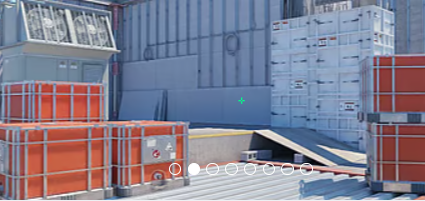
Etkö pidä hänen hiusristikkostaan? Ei hätää, jos haluat tutustua muihin vaihtoehtoihin, katso oppaastamme parhaat CS2 hiusristikkokoodit here.
Twistzz-videoasetukset CS2
Kuten monet Counter-Strike-veteraanit, Twistzz asettaa raakakuvanopeuden ja visuaalisen selkeyden etusijalle graafisen tarkkuuden edelle ja pelaa peliä klassisella 4:3-kuvasuhteella 1280x960-resoluutiolla. Pelaamalla venytettynä mustilla palkkeilla, pelaajamallit näyttävät hieman leveämmiltä ja liikkuvat nopeammin ruudulla, mikä monien ammattilaisten mielestä helpottaa seuraamista ja maaliin osumista. Maksimoidakseen FPS:n ja vähentääkseen syöttöviivettä korkean panoksen otteluissa Team Liquidillä useimmat hänen edistyneistä video-asetuksistaan, kuten Global Shadow Quality ja Model/Texture Detail, pidetään Low tai Medium/ium -tilassa.
Hän ei kuitenkaan hylkää kokonaan visuaalista laatua. Twistzz käyttää tyypillisesti 8x MSAA:ta (Multisampling Anti-Aliasing) tasoittaakseen rosoisia reunoja ja varmistaakseen, että pikselöidyt näköviivat eivät pilaa pitkän kantaman kaksintaisteluja. Yhdistettynä korkean virkistystaajuuden monitoriin nämä asetukset luovat sulavan, häiriöttömän visuaalisen kokemuksen, joka on räätälöity tiukasti kilpailun dominointiin.
Tehosta pelaajien kontrastia: käytössä
Mallin/tekstuurin yksityiskohdat: Matala
Varjostimen yksityiskohta: Matala
Hiukkasten yksityiskohdat: alhainen
Tekstuurisuodatus: Anisotrooppinen x16
Anti-aliasing: 4x MSAA
Varjon laatu: Matala
Dynaamiset varjot: Kaikki
Ambient Okkluusio: Keskinkertainen
FidelityFX Super Resolution: Ei käytössä (korkein laatu)
V-Sync: Pois käytöstä
NVIDIA Reflex Low Latency: Pois käytöstä
NVIDIAG-Sync: Pois käytöstä
Suuri dynaaminen alue: Laatu
Resoluutio: 1280*960
Kuvasuhde: 4:3 venytetty
Tila: Koko näyttö
Skaalaustila: Venytetty
Kirkkaus: 92 %
Twistzz-näytön asetukset CS2
Kuten suurin osa huipputason ammattilaissoittimista Counter-Strike-pelaajista, Twistzz käyttää näyttöään ZOWIE-laitteistoa, erityisesti ZOWIE XL2546K:ta, joka toimii 240 Hz:n virkistystaajuudella. Vaikka monitori itsessään tarjoaa uskomattoman sujuvan seurannan, sen sisäiset asetukset antavat hänelle todellisen kilpailuedun.
Hän käyttää ZOWIE:n patentoitua DyAc (Dynamic Accuracy) -asetusta, joka on asetettu Premium-tilaan, mikä vähentää merkittävästi liikkeen epäterävyyttä intensiivisen rekyyliohjauksen ja lyönnin aikana pitäen vihollisen siluetit terävinä. Varmistaakseen, että pelaajat eivät helposti sulautuisi Miragen tai Infernon kaltaisten karttojen tummiin kulmiin, hän nostaa Black eQualizer -laitteensa arvoon 12 ja asettaa Color Vibrance -asetukseksi 12—saamalla pelaajamallit poksahtamaan harmaata taustaa vasten.
Hän käyttää FPS 1 -kuvatilaa yhdistettynä maksimikirkkauteen 100 ja Gamma 3:een erinomaisen yleisnäkyvyyden saavuttamiseksi. Lopuksi hänen värilämpötilansa on räätälöity (punainen 91, vihreä 91, sininen 100), ja AMA (Advanced Motion Acceleration) on asetettu arvoon High minimoimaan haamukuvia nopeiden kameran liikkeiden aikana.
Täältä löydät Twistzzin näyttöasetukset:
DyAc: Premium
Musta eQualizer: 12
Värin eloisuus: 12
Matala sininen valo: 0
Kuvatila: FPS 1
Kirkkaus: 100
Kontrasti: 50
Terävyys: 8
Gamma: Gamma 3
Värilämpötila: Käyttäjän määrittelemä
AMA: Korkea
Twistzz-näkymämallin asetukset CS2
Kanadalaisen mallin asetukset ovat samanlaisia kuin monissa muissa CS2 ammattilaissoittimissa. Sen vaakapoikkeama on 2,5 ja pystypoikkeama -1,5. Nämä asetukset tekevät tähtäyksestä ja ampumisesta käteviä ja varmistavat, että asemalli ei peitä liikaa näkökenttää.
viewmodel_fov 68
viewmodel_offset_x 2.5
viewmodel_offset_y 0
viewmodel_offset_z -1.5
viewmodel_presetpos 2
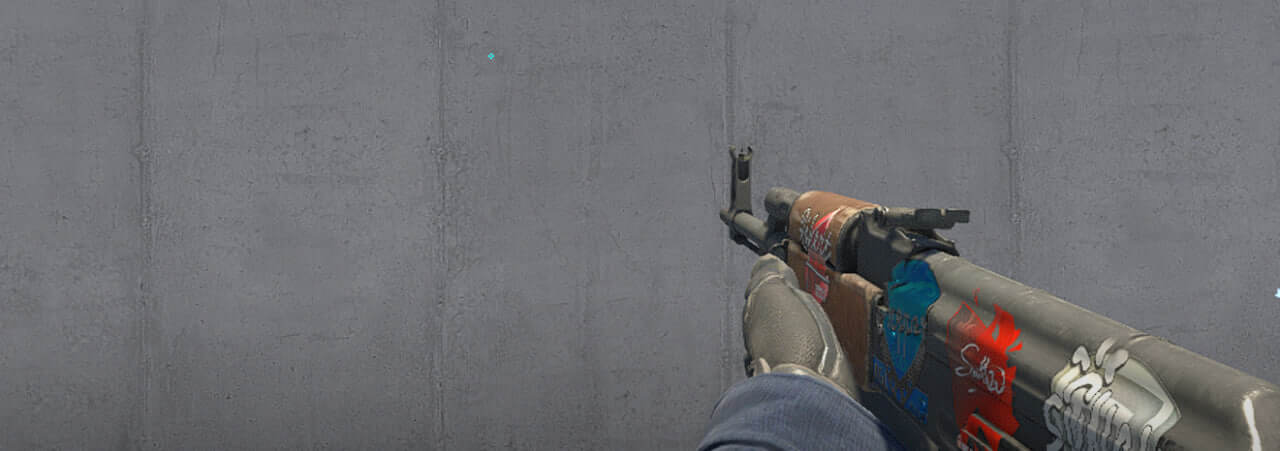
'On myös hyödyllistä oppia, kuinka viewmodel settings muokataan niitä mieltymystesi mukaan.
Twistzz Launch Options for CS2
Twistzzillä on joitain käynnistysvaihtoehtoja, jotka auttavat heitä toimimaan korkeimmalla tasolla.
-novid -tickrate 128 -allow_third_party_software -noreflex
Jos etsit parhaita CS2 käynnistysvaihtoehtoja, tutustu guide.
Twistzz-tutkaasetukset CS2
Hänen tutkansa keskittää soittimen ja pyörii samanaikaisesti. Käytä seuraavia asetuksia kokeillaksesi itse, miltä Twistzz radar settings kanssa pelaaminen tuntuu.
Tutkakeskukset Pelaaja: Kyllä
Tutka pyörii: Kyllä
Vaihda muoto tulostaululla: Kyllä
Tutka Hudin koko: 1.15
Kartan zoomaus: 0.4
Twistzz-ääniasetukset: CS2
Counter-Strike 2:ssa vihollisen askeleiden ja hyötypudotuksen havaitseminen voi merkitä eroa kytkimen voittamisen ja eliminoimisen välillä. Saavuttaakseen eliittitilannetietoisuutensa Twistzz luottaa SteelSeries Arctis Nova Pro Wireless -kuulokkeisiin, jotka tunnetaan koskemattomasta korkealaatuisesta äänestä.
Jos haluat toistaa hänen kilpailevan äänimaailmansa pelissä, sinun tulee asettaa EQ-profiilisi Crisp. Tämä asetus parantaa erityisesti keski- ja korkeataajuisia ääniä, jolloin askeleet ja aseiden uudelleenlataukset on paljon helpompi eristää kaaoksen läpi - ja se toimii pelin sisäisenä vastineena mukautetun SteelSeries Sonar "Twistzz-profiilin" kanssa, jonka hän auttoi popularisoimaan CS:GO aikakaudella.
Suuntaäänen tarkkuuden saamiseksi L/R (vasen/oikea) -eristyksen pitäminen 50–70 %:n välillä saavuttaa täydellisen tasapainon. Tämän avulla voit selvästi erottaa, kummalta puolelta vihollinen työntää ilman, että ääni tuntuu häiritsevältä tai luonnottomalta erillään. Varmista lopuksi, että Perspective Correction -asetuksena on Kyllä; tämä säätää saapuvia ääniä dynaamisesti nykyisen näkökentän perusteella, mikä varmistaa, että hiusristikkosi ja korvasi ovat aina täydellisesti synkronoituja heiluttaessa tiukkaa nurkkaa.
Twistzz skins
Ei pitäisi olla yllätys, että yksi Pohjois-Amerikan CS-historian palkituimmista pelaajista ylpeilee perintönsä arvoisella inventory. Twistzz loadout on korkean tason keräilyn mestarikurssi, joka sisältää joitain halutuimmista harvinaisuuksista ja pelin erityisistä pattern muunnelmista's economy. His signature melee setup typically pairs an ultra-rare M9 Bayonet | Doppler (Ruby) or a Butterfly Knife | Gamma Doppler (Emerald) with Specialist Gloves | Crimson Kimono—specifically seeking out those highly with Specialist Gloves | Crimson Kimono—specifically seeking out those highly toivottavaa markkinoiden huippu6. palkkiot.
Ensisijaisiin kivääreihinsä hän tuo esiin ehdottomia raskaita osumia, tapping the Covert-tier AK-47 | Wild Lotus or the AK-47 | Gold Arabesque on theT-side, while relying on the legendary Contraband-status M4A4 | Howl on defense. When he occasionally wields the big green ase, ses usually his striking AWP | Desert Hydra. These aren't just flashy cosmetics; they ovat eliittiä, huipputason keräilyesineitä, jotka vastaavat täydellisesti moninkertaisen Intel Grand Slam -mestarin arvostusta.







Kirjoita kommentti