
karrigan CS2 musinställningar - sensitivity och DPI
För att utföra sin exakta taktiska vision förlitar sig karrigan på en stadig och kontrollerad muskonfiguration som gynnar konsistens framför snabba, flashiga snärtar. Han spelar för närvarande med en DPI på 400 och en sensitivity i spelet på 1,8, vilket resulterar i en total eDPI på 720 (även om han ibland byter till 800 DPI med en sensitivity på 0.9 till 0.95, vilket håller honom i samma 720–eDPI-intervall). Hans zoom-sensitivity är låst till standard 1.0, vilket säkerställer en tillförlitlig 1:1-känsla när den används med vapen som AUG eller AWP.
Som avrundning av sin siktmekanik kör karrigan vanligtvis en 1000Hz eller 4000Hz pollingfrekvens, beroende på om han använder Razer DeathAdder V3 HyperSpeed eller Viper V3 Pro, och håller sin Windows-sensitivity på 4. Denna inställning med lägre sensitivity är typisk för veteranledare inom spel och den perfekta stabiliteten som krävs för cross-Game-ledare. mikrojusteringar under stort turneringstryck.
Mus: Razer DeathAdder V3 HyperSpeed
DPI: 800
Sensitivity: 0.9
eDPI: 720
Zoom-sensitivity: 1
Hz: 1000
Windows-sensitivity: 6
Vet inte hur musinställningar fungerar? Kolla in vår guide here.
karrigan crosshair settings för CS2
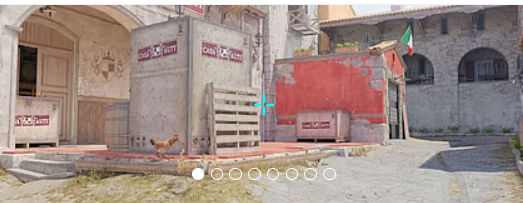
Om du vill prova den exakta inriktningen av IEM Cologne Major-mästaren, kan du importera hans senaste crosshair-kod direkt till dina inställningar: CSGO-D6dUn-aMsd3-YtsC6-ZHMPB-mzxsP
Stil: Klassisk statisk
Följ rekyl: Nej
Punkt: Nej.
Längd: 2.5
Tjocklek: 1
Glapp: -4
Översikt: Nej
Färg (RGB): Anpassad
Röd: 255
Grönt: 255
Blå: 255
Alfa: Ja
Alfavärde: 200
T-stil: Nej
Utplacerat vapengap: Nej
Prickskyttens bredd: 0
Gillar inte hans crosshair? Inga bekymmer, om du vill utforska andra alternativ, kolla in vår guide för de bästa CS2 crosshair-koderna here.
karrigan videoinställningar för CS2
För att garantera maximala bildhastigheter och tydlig synlighet för motståndarna använder karrigan en kraftigt optimerad videokonfiguration. Liksom många Counter-Strike-veteraner föredrar han ett bildförhållande på 4:3 med en upplösning på 1280x960, spelad på Stretched-skalning för att få fiendens spelarmodeller att se lite bredare ut. Han håller sin totala ljusstyrka på 93 % och aktiverar Boost Player Contrast för att säkerställa att mål sticker ut mot kartbakgrunder.
I sina avancerade videoinställningar balanserar karrigan rå prestanda med avgörande konkurrensfördelar. Han ställer in Global Shadow Quality till High och Dynamic Shadows till Alla, vilket är viktigt för att upptäcka fiendens skuggor runt hörnen innan de svänger.
För att minska onödig visuell röran och bibehålla hög FPS, drops Model/Texture Detail, Shader Detail, and Particle Detail to Low. Han förlitar sig på 8x MSAA för kantutjämning och anisotropisk 8x för texturfiltrering för att jämna ut taggiga kanter, tillsammans med Medium Ambient Oclusion och Quality High Dynamic Range. Slutligen, för att minimera ingångsfördröjningen, inaktiverar han V-Sync och FidelityFX Super Resolution samtidigt som NVIDIA Reflex Low Latency är aktiverat.
Boost Players Contrast: Aktiverad
Modell/texturdetalj: Låg
Shader Detail: Låg
Partikeldetalj: Låg
Texturfiltrering: Anisotropisk 8x
Anti-Aliasing: 8x MSAA
Skuggkvalitet: Hög
Dynamiska skuggor: Alla
Omgivningsocklusion: Medium
FidelityFX Super Resolution: Inaktiverad (högsta kvalitet)
V-Sync: Inaktiverad
NVIDIA Reflex Low Latency: Inaktiverad
NVIDIA G-Sync: Inaktiverad
High Dynamic Range: Kvalitet
Upplösning: 1280x960
Bildförhållande: 4:3
Läge: Helskärm
Skalningsläge: Sträckt
Ljusstyrka: 93 %
karrigan monitorinställningar för CS2
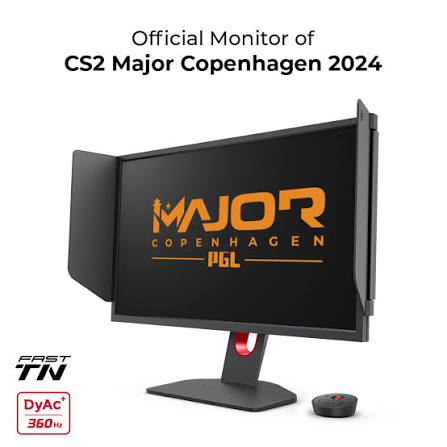
För att bibehålla visuell klarhet under kaotiska avrättningar och snabba måldueller förlitar sig karrigan på industristandarden ZOWIE XL2566K, en 24,5-tums bildskärm med en enorm uppdateringsfrekvens på 360 Hz.
Här kan du hitta karrigan monitorinställningar:
DyAc: Premium
Svart eQualizer: 10
Färgstyrka: 11
Lågt blått ljus: 0
Bildläge: FPS 1
Ljusstyrka: 75
Kontrast: 50
Skärpa: 6
Gamma: Gamma 3
Färgtemperatur: Användardefinierad
Röd: 93
Grön: 93
Blå: 100
AMA: Högt
karrigan viewmodel inställningar för CS2
För att ytterligare öppna upp sin perifera syn, maximerar han vapnets synfält med ett viewmodel_fov på 68, och låser in dessa värden med en viewmodel_presetpos på 2. Denna specifika kombination minskar visuella röran, trycker in geväret i det nedre högra hörnet av skärmen och säkerställer att hans fokus förblir helt och hållet på mitten av motståndarens anrop, läser upp, läser upp platsen.
viewmodel_offset_x 2.5
viewmodel_offset_y 0
viewmodel_offset_z -1.5
viewmodel_presetpos 2
Det är också användbart att lära sig hur viewmodel settings arbetar för att anpassa dem efter dina önskemål.
karrigan lanseringsalternativ för CS2
karrigan använder inte något av startalternativen för närvarande.
Om du letar efter de bästa CS2 lanseringsalternativen, kolla in vår guide.
karrigan radarinställningar för CS2
Hans radar centrerar spelaren och roterar samtidigt. Använd följande inställningar för att själv prova hur det känns att spela med karrigan radar settings .
Radar centrerar spelaren: Ja
Radarn roterar: Ja
Växla form med resultattavla: Nej
Radar Skin Storlek: 1.2
Kartzoom: 0.4
karrigan ljudinställningar för CS2
Ljud är utan tvekan den mest kritiska informationskällan för en ledare i spelet, och karrigan säkerställer att han aldrig missar ett fotsteg eller en granatnål genom att använda högklassig ljudutrustning och optimerade inställningar i spelet. Han litar på SteelSeries Arctis Nova Pro-headsetet (ofta Wireless White-utgåvan eller in-ear-monitorer som Sennheiser IE 300 för LAN-miljöer), känt för sin exceptionella klarhet och exakta rumsliga ljud. I CS2, där riktningsljud är av största vikt, använder de flesta proffsen Crisp EQ-profilen för att förstärka högfrekventa ljud från fotsteg och omladdningar, genom att skära igenom den leriga basen från explosioner. För hans ljudbild ger en standard L/R-isolering runt 50 % till 60 % en naturlig men exakt riktningsblandning, samtidigt som perspektivkorrigering gör det betydligt lättare att spåra rörliga mål runt hörn. För att säkerställa att hans kommunikation med laget är felfri håller han distraherande huvudmeny och musik med runda åtgärder dämpad—lämnar bara den viktiga tio sekunders varningsvolymen något uppskruvad— så att han kan fokusera helt på samtal i mitten av rundan och läsa motståndarens rotationer.
Karrigan skins
Även om karrigan hyllas mer för sitt taktiska geni än flashiga individuella spelningar, är hans CS2 inventory onekligen toppklass och packad med några av de mest eftertraktade föremålen i spelet.







Skriv kommentar