
eingefroren CS2 Mauseinstellungen – Empfindlichkeit und DPI
Derzeit spielt David mit Razer Deathadder V4 Pro Black. Dies ist eine neue Maus einer beliebten Marke, die speziell für denE-Sport entwickelt wurde. Er kombiniert diese Hochleistungsmaus mit einer herkömmlichen 400 DPI und einer Spielempfindlichkeit von 2,0 und erreicht so eine effektive DPI (eDPI) von 800. Diese eDPI ist genau das Richtige für professionelle Schützen und gibt ihm die Stabilität, um lange Winkel zu fixieren, während er dennoch flüssige 180-Grad-Drehungen ermöglicht, wenn auf einer Baustelle Chaos ausbricht. Wenn er gezwungen wird, eine Waffe mit Zielfernrohr in die Hand zu nehmen, reduziert er seine Verfolgungsgeschwindigkeit leicht mit einer Zoomempfindlichkeit von 0,8, um maximale Kontrolle für präzise Pixelanpassungen zu gewährleisten.
Maus: Razer Deathadder V4 Pro Schwarz
DPI: 400
Empfindlichkeit: 2
eDPI: 800
Zoomempfindlichkeit: 0,8
Hz: 4000
Windows-Empfindlichkeit: 6
Diese Einstellungen sind sehr nützlich, sodass du sie ohne Zweifel ausprobieren kannst. Du bist sehr spielbar und geeignet. Du weißt nicht, wie die Mauseinstellungen funktionieren? Schau dich unseren Leitfaden here an.
eingefrorene Fadenkreuzeinstellungen für CS2
Das gefrorene Fadenkreuz ist ein klassisches statisches und farbiges Cyan. Du kannst es aktivieren, indem du den Fadenkreuzcode CSGO-X8H4M-ZM6qT-qi3Ow-e4Peb-wLsuL eingeben oder die folgenden Parameter manuell kopierst:
Stil: Klassisch statisch
Rückstoß folgen: Nein
Punkt: Nein.
Länge: 1
Dicke: 1
Abstand: -4
Gliederung: Nein
Farbe (RGB): Cyan
Rot: 0
Grün: 255
Blau: 168
Alpha: Ja
Alpha-Wert: 255
T-Stil: Nein
Abstand der eingesetzten Waffen: Nein
Scharfschützenbreite: 0
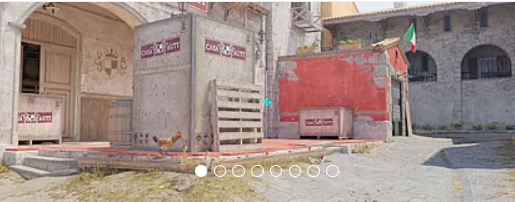
Sein Fadenkreuz eignet sich für Spieler, die gerne auf hellen Bildschirmeinstellungen spielen. Aber im Allgemeinen ist es recht vielseitig, sodass du es bedenkenlos in jeder Umgebung ausprobieren kannst. Wenn du andere Optionen erkunden möchtest, schau dich unseren Leitfaden mit den besten CS2 Fadenkreuzcodes here an.
eingefrorene Videoeinstellungen für CS2
Wie die überwiegende Mehrheit der erstklassigen Profis entscheidet sich Frozen für ein Seitenverhältnis von 4:3 anstelle des nativen 16:9. Durch das Spielen mit einer gestreckten Auflösung von 1280 x 960 erscheinen die Spielermodelle deutlich breiter auf dem Bildschirm, wodurch größere visuelle Ziele entstehen, wodurch sich das Verfolgen und Halten enger Winkel weitaus konsistenter anfühlt. Ergänzend dazu sind seine erweiterten Videoeinstellungen stark auf konkurrenzfähige Klarheit und maximale Bildraten gegenüber reiner visueller Wiedergabetreue optimiert.
Er hält die globale Schattenqualität auf "Hoch" —, eine entscheidende Einstellung in CS2, um gegnerische Schatten zu erkennen, bevor sie eine Kurve schlagen, während er die Shader- und Partikeldetails auf "Niedrig" herunterdreht, um bei chaotischen Ausführungen die Unordnung auf dem Bildschirm zu minimieren. Um die gezackten Kanten zu glätten, die bei einer gestreckten Auflösung natürlicherweise auftreten, setzt er auf 4x MSAA. Um schließlich die absolut geringstmögliche Eingangsverzögerung zu gewährleisten, ist NVIDIA Reflex aktiviert, währendV-Sync undG-Sync strikt deaktiviert sind.
Spielerkontrast steigern: Aktiviert
Modell-/Texturdetail: Mittel
Shader-Detail: Niedrig
Partikeldetail: Niedrig
Texturfilterung: Anisotrop 4x
Anti-Aliasing: 4x MSAA
Schattenqualität: Hoch
Dynamische Schatten: Alle
Umgebungsokklusion: Mittel
FidelityFX Super Resolution: Deaktiviert (höchste Qualität)
V-Sync: Deaktiviert
NVIDIA Reflex Low Latency: Aktiviert
NVIDIAG-Sync: Deaktiviert
Hoher Dynamikbereich: Qualität
Auflösung: 1280*960
Seitenverhältnis: 4:3 gestreckt
Modus: Vollbild
Skalierungsmodus: Gestreckt
Helligkeit: 112 %
eingefrorene Monitoreinstellungen für CS2
Um sicherzustellen, dass er bei rasanten Ausführungen nie den Überblick über ein Ziel verliert, verlässt sich Frozen auf den Industriestandard ZOWIE XL2566K, einen 360-Hz-Monitor, der für sein TN-Panel inE-Sport-Qualität bekannt ist. Um sich einen Vorteil bei der Sichtbarkeit zu verschaffen, erhöht er seinen Black eQualizer auf 15 und beleuchtet so notorisch dunkle Ecken auf Karten wie Mirage und Ancient, ohne die helleren Bereiche des Bildschirms auszublenden. Während viele Spieler ihre Sättigung künstlich erhöhen, hält Frozen seine Farbvibranz bei ausgeglichenen 10 und verlässt sich dabei auf sein individuelles FPS-1-Bildprofil und CS2#s natürlich lebendige Beleuchtung, um die Spielermodelle hervorstechen zu lassen.
Hier findest du eingefrorene Monitoreinstellungen:
DyAc: Premium
Schwarzer eQualizer: 15
Farbbrillanz: 10
Wenig blaues Licht: 0
Bildmodus: FPS 1
Helligkeit: 60
Kontrast: 50
Schärfe: 7
Gamma: Gamma 3
Farbtemperatur: Normal
AMA: Premium
eingefrorene Viewmodel-Einstellungen für CS2
Der slowakische Star verfügt über Ansichtsmodelleinstellungen, die denen vieler anderer CS2 Profispieler ähneln. Es hat einen horizontalen Versatz von 2,5 und einen vertikalen Versatz von -1,5. Diese Einstellungen erleichtern das Zielen und Schießen und stellen sicher, dass das Waffenmodell das Sichtfeld nicht zu sehr einschränkt.
viewmodel_fov 68
viewmodel_offset_x 2.5
viewmodel_offset_y 0
viewmodel_offset_z -1.5
viewmodel_presetpos 2
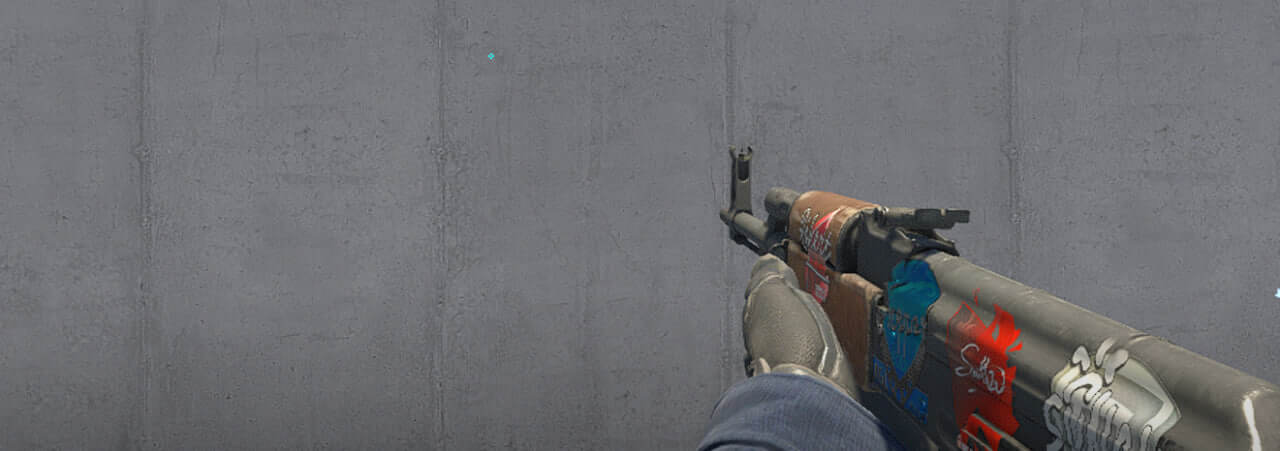
Es ist auch hilfreich zu erfahren, wie viewmodel settings funktioniert, um sie an deine Vorlieben anzupassen.
eingefrorene Startoptionen für CS2
Der FaZe-Clan-Player verfügt über recht standardmäßige, aber wichtige Starteinstellungen:
-freq 360 +rate 786432 +fps_max 500 -tickrate 128
Wenn du nach den besten CS2 Startoptionen suchst, siehst du dir unsere guide an.
eingefrorene Radareinstellungen für CS2
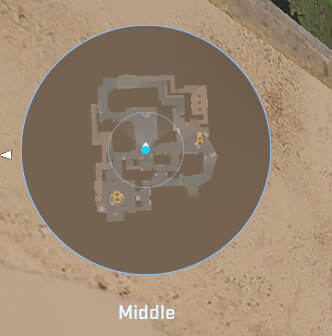
Sein Radar zentriert den Spieler und dreht sich gleichzeitig. Nutze die folgenden Einstellungen, um selbst auszuprobieren, wie sich das Spielen mit dem Frozen radar settings anfühlt.
Radar zentriert den Spieler: Ja
Radar dreht sich: Ja
Form mit Anzeigetafel umschalten: Ja
Radar-Hud-Größe: 0,9
Kartenzoom: 0,4
eingefrorene Audioeinstellungen für CS2
Die Audioeinstellungen von Frozen in CS2 sind auf maximale Klarheit und Positionserkennung abgestimmt. Er verwendet wahrscheinlich Stereokopfhörer mit geringem Hall und verstärkten hohen Frequenzen, um Schritte und Schüsse zu hören.
Master-Lautstärke: 100 %
Audiogerät: Standard
EQ-Profil: Natürlich
L/R-Isolierung: 0 %
Perspektivkorrektur: Ja
Audio abspielen, wenn das Spiel im Hintergrund läuft: Nein
Hauptmenü-Lautstärke: 20 %
Rundenstartvolumen: 0 %
Rundenaktionsvolumen: 0 %
Rundes Endvolumen: 40 %
MVP-Volumen: 30 %
Bomben-/Geiselvolumen: 20 %
Zehn-Sekunden-Warnlautstärke: 20 %
Lautstärke der Todeskamera: 30 %
MVP-Musik stumm schalten, wenn Spieler beider Teams am Leben sind: Nein
gefrorene Skins
Der Major-Gewinner verfügt über eines der teuersten Inventare unter den CS2-Spielern. Die Liste der Prestige-Skins besteht aus:
Lass dir von der Frozen'-Kollektion inspirieren oder wähle unter Skin.Land andere Skins nach deinem Geschmack aus. Hier findest du eine große Auswahl an Skins von Profispielern. Kollektionen, die Sie schnell, sicher und zu einem erschwinglichen Preis kaufen können.







Kommentar schreiben