
¿Qué es la sobrecarga de XP en CS2?
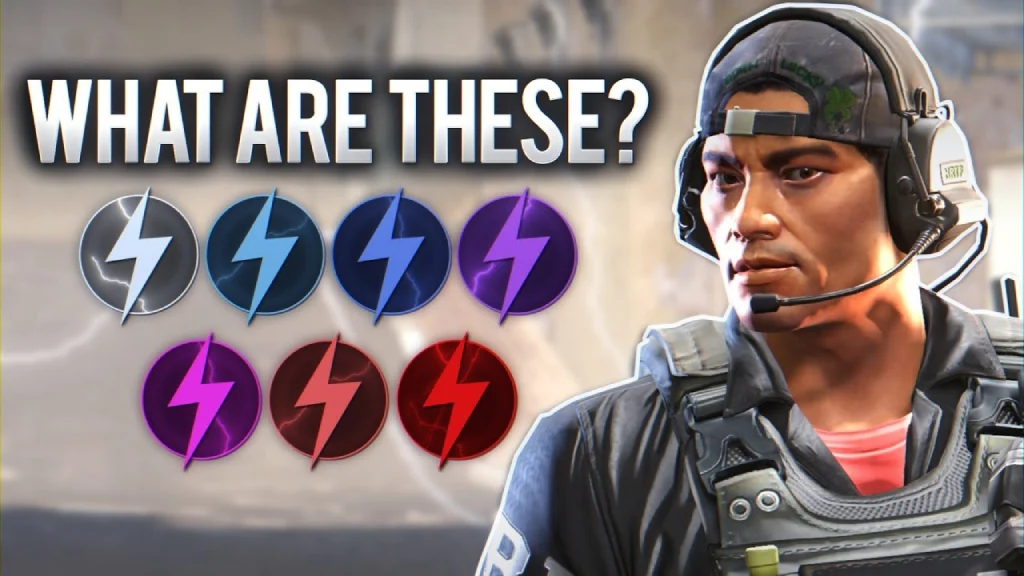
La sobrecarga de XP en CS2 es el estado que recibe un jugador cuando consigue 11 166 XP en una semana. El sistema se añadió el 6 de febrero de 2024 con la actualización "A Call to Arms", que revisó a fondo la mecánica de progresión del perfil en Counter-Strike 2.
En corto: Valve puso un tope a la cantidad de experiencia con valor completo que puedes ganar por semana. Cuando se alcanza ese umbral entra en juego la sobrecarga de XP. Todo lo que el jugador gane por encima del límite se acredita con un coeficiente reductor enorme.
Dicho de forma sencilla, la sobrecarga de XP en CS2 es a la vez un límite al farmeo de experiencia y una especie de recompensa para los jugadores más activos. Al llegar al límite aparece un icono especial junto al nick en el perfil, en el killfeed y en la tabla de puntuaciones. Cuanto más tiempo mantenga un jugador el estado, más raro se vuelve ese icono.
¿Cómo funciona la sobrecarga de XP en CS2?
Para entender cómo funciona la sobrecarga de XP en CS2 hay que desglosar la estructura semanal de experiencia. Queda así:
Los primeros 4500 XP de la semana se acreditan con un bonus ×3: un incentivo para entrar y jugar unas cuantas partidas.
Los siguientes 3000 XP llegan al ritmo estándar ×1.
A partir de ahí se acaba la velocidad normal. Si el jugador sigue farmeando y llega a la marca de 11 166 XP, se activa la sobrecarga de XP en CS2 y, desde ese momento, cada partida posterior acredita la experiencia con un coeficiente de solo 0,175×. El progreso baja prácticamente a cero.
Conviene entender una cosa: el umbral de 11 166 XP no es la cifra que hay que ganar desde cero con coeficiente ×1. Se cuenta a lo largo de todas las partidas de la semana, incluido el periodo con bonus. Toda la experiencia obtenida con multiplicadores suma al total. Así que el tiempo de juego real necesario para llegar a la sobrecarga ronda las 6-10 horas con farmeo activo, menos de lo que parece.
Qué pasa con la experiencia una vez superado el límite
Al entrar en estado de sobrecarga de XP en CS2, todos los bonus y multiplicadores se desactivan automáticamente. Se acabó el bonus de la primera partida, los multiplicadores por modo y las recompensas de misiones: nada. Solo 0,175× de la experiencia estándar por ronda. Puedes jugar cuanto quieras, pero la ganancia de XP será casi nula. El progreso se congela en la práctica hasta el siguiente reinicio.
Niveles e iconos de la sobrecarga de XP en CS2
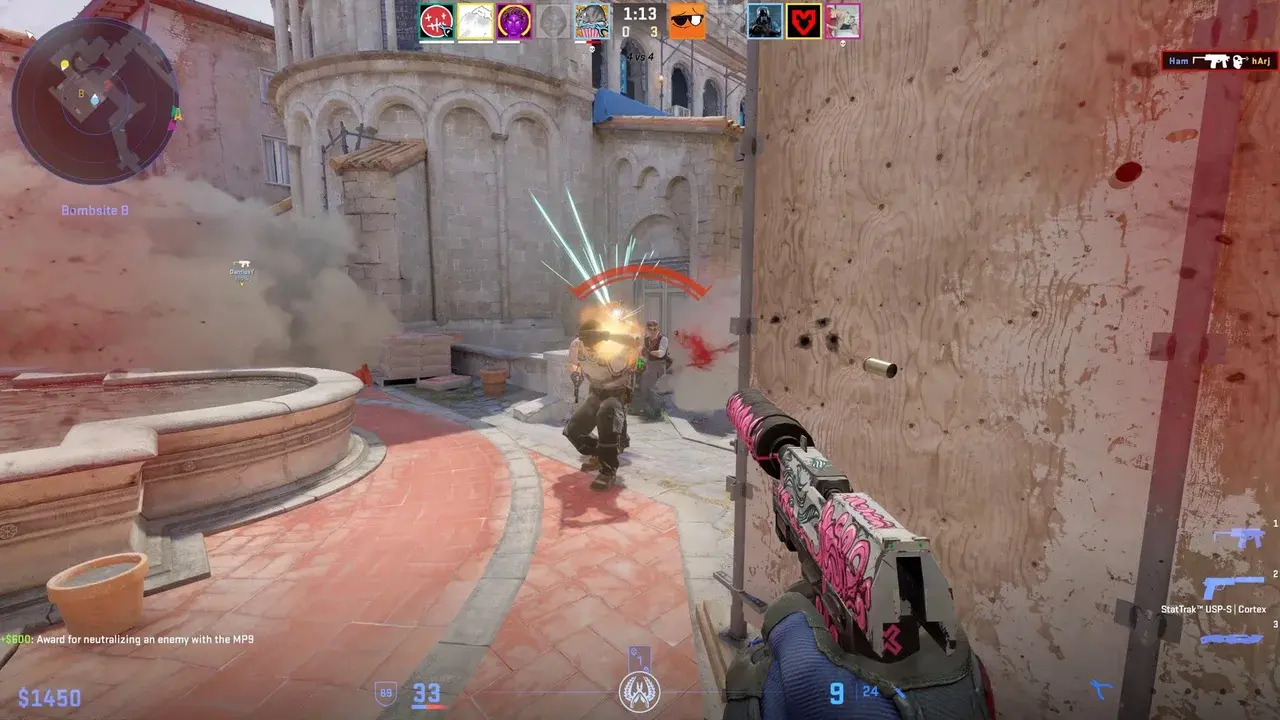
Aquí es donde la cosa se pone interesante. Los niveles de sobrecarga de XP en CS2 no son una única insignia, sino toda una progresión de siete escalones principales.
Cada escalón tiene su propio nombre, color y diseño de icono. Los colores de la sobrecarga de XP en CS2 cambian a medida que sube el rango: del gris apagado al morado vibrante con efectos visuales. Esta es la lista completa de niveles, de menor a mayor:
Common: insignia gris básica, se otorga desde la primera semana de sobrecarga.
Uncommon: con un tono verdoso.
Rare: azul.
Mythical: morada.
Legendary: con un acento dorado.
Ancient: rojiza, se nota bastante.
Unusual: la más rara, con un brillo especial.
Pero la cosa no se queda en siete escalones. Cada nivel principal tiene insignias intermedias, básicamente subrangos dentro de un mismo escalón. Si cuentas todos los iconos juntos, la progresión completa de la sobrecarga de XP en CS2 abarca 32 semanas seguidas. Son ocho meses de farmeo continuo sin fallar ni una.
Los propios iconos de sobrecarga de XP en CS2 recuerdan estilísticamente a las medallas anuales de servicio: la misma lógica de «cuanto más juegas, más bonita es la insignia». Es puramente cosmético: el icono no da ninguna ventaja jugable, pero en la comunidad de CS2 se convirtió enseguida en una especie de marca de «uno de los nuestros», de jugador que de verdad se sienta a jugar cada semana.
¿Para qué sirve la sobrecarga de XP en CS2?
La respuesta honesta a para qué sirve la sobrecarga de XP en CS2 decepciona un poco. A nivel funcional, este estado no da casi nada más allá del icono. Ni bonus de puntuación, ni drops más rápidos, ni privilegios en el matchmaking.
¿La sobrecarga de XP afecta a la puntuación y a Prime?
No. Si la sobrecarga de XP afecta a la estrella de experiencia en CS2 es una de las dudas más habituales. La respuesta es tajante: el estado de sobrecarga no afecta a la estrella de XP, ni a la puntuación competitiva en Premier o Competitivo, Prime ni a ninguna mecánica de juego. No es un boost. Es un estado cosmético.
Las ventajas reales de la sobrecarga de XP en CS2 se limitan a dos cosas: primero, un icono junto al nick (que indica a los demás jugadores que esa persona dedica de verdad mucho tiempo al juego); segundo, la posibilidad de desbloquear el siguiente nivel de icono siempre que el estado se renueve cada semana. Y poco más.
Hay un efecto indirecto: mientras el jugador avanza hacia el umbral de la sobrecarga recibe el Care Package, una caja semanal con skins, cajas y grafitis gratuitos. Pero el Care Package está ligado a completar el progreso de la estrella de experiencia, no a la sobrecarga en sí. Son dos cosas que corren en paralelo.
¿Cuándo se reinicia la sobrecarga de XP en CS2?

Ahora que ya sabemos cuánto dura la sobrecarga de XP en CS2, vamos a la pregunta principal: cuándo se reinicia.
El reinicio ocurre cada semana junto con la actualización de los drops semanales. La hora exacta es entre el martes y el miércoles, a las 00:00 UTC.
Tras el reinicio, el contador de experiencia se pone a cero, vuelve el bonus ×3 y el ciclo empieza de nuevo. Si el jugador logra ganar otra vez 11 166 XP antes del siguiente reinicio, el estado de sobrecarga se prolonga una semana más y el icono sube al siguiente nivel.
Detalle clave: la racha máxima posible de sobrecarga de XP en CS2 es de 32 semanas consecutivas sin fallar ninguna. Si te saltas aunque sea una semana y no alcanzas el umbral, el nivel vuelve a cero. No hay «memoria» de los logros anteriores: tendrás que empezar de nuevo desde Common.
FAQ sobre la sobrecarga de XP en CS2
¿Cuánto dura la sobrecarga de XP?
La sobrecarga de XP en CS2 dura exactamente hasta el siguiente reinicio semanal, es decir, un máximo de siete días desde que recibes el estado. Si el reinicio ya ha pasado y el jugador no ha conseguido volver a ganar 11 166 XP, el estado desaparece hasta la próxima. No se puede acelerar el reinicio a mano, ni poner el contador a cero antes de tiempo, ni «adelantar» la semana de ningún modo. Solo queda esperar.
Cómo conseguir la sobrecarga de XP en CS2
Aquí no hay ninguna mecánica especial: solo tienes que ganar 11 166 XP en una semana. Este es el desglose aproximado por modo de juego:
En Premier y Competitivo, cada ronda ganada da 30 XP. El máximo de una partida de Premier ronda los 480 XP (con prórroga), y en Competitivo, 390 XP. Así que, con victorias estables, hacen falta unas 12-15 partidas en los modos competitivos.
En Deathmatch obtienes 0,2 XP por punto: es un modo bueno para calentar y puede dar una experiencia decente si tienes nivel.
Casual da 4 XP por punto, pero el ritmo sigue siendo más bajo que en Competitivo.
Wingman reparte 15 XP por ronda, con un máximo de 135 por partida: funciona bien para quien juega en pareja.
Contando el bonus ×3 de los primeros 4500 XP, y jugando activamente a Premier o Competitivo, la respuesta a cuántas partidas hacen falta para llegar a la sobrecarga de XP en CS2 es de unas 12-17 partidas por semana. Con un farmeo óptimo, eso son entre 6 y 10 horas de juego. El nivel más alto de sobrecarga de XP en CS2 es Unusual, que exige 32 semanas seguidas.
Cómo quitar o eliminar la sobrecarga de XP en CS2
Quitarse de encima la sobrecarga de XP en CS2 tampoco es una opción: eliminar el estado a mano o desactivar la experiencia reducida es imposible. No hay comando de consola ni ajuste en el menú. La única forma de volver a la acreditación normal de XP es esperar al reinicio semanal del martes al miércoles.
De vez en cuando circula por internet el mito de que cambiar de modo o abandonar una partida «reinicia» la sobrecarga antes de tiempo. Es falso. El sistema depende estrictamente de un temporizador y ninguna acción dentro del juego lo altera.
¿Se puede ocultar la sobrecarga de XP en CS2?
Ocultar la sobrecarga de XP en CS2 no es posible. El icono se muestra automáticamente a todo el que alcanza el umbral y no se puede quitar de la interfaz. Los demás jugadores ven el icono junto al nick en el killfeed, en la tabla de puntuaciones y en el perfil de Steam: en todas partes donde aparezca el nombre de usuario.
Esto generó debate en la comunidad justo después del lanzamiento del sistema: algunos jugadores percibían el icono como una etiqueta pública no deseada y otros, como un motivo de orgullo. Valve no ha cambiado de postura: la insignia sigue siendo siempre visible y no tiene ajustes de privacidad.
Cómo comprobar el estado de sobrecarga de XP en CS2
El estado se ve en varios sitios a la vez:
Primero, en el perfil del menú principal de CS2: el icono de sobrecarga aparece junto al nick en cuanto se alcanza el umbral.
Segundo, en la tabla de puntuaciones dentro de la propia partida: el icono sale junto al nick en la tabla.
Tercero, en el killfeed: con cada baja, el icono acompaña al nombre del jugador.
Cuarto, en la página de perfil de Steam: el icono lo ven los demás jugadores que visiten el perfil.
Si no hay icono, significa que aún no has llegado a la sobrecarga de XP y puedes seguir farmeando al ritmo estándar. No hay una página de estadísticas aparte ni una notificación: es simplemente un marcador visual que está o no está.
¿Quieres mejorar tu inventario de CS2 a buen precio? En Skin.Land encontrarás skins de CS2 a precios de mercado, desde las asequibles hasta las piezas de coleccionista más raras.






Escriba un comentario