
molodoy CS2 Configuración del mouse: sensibilidad y DPI
Como muchos AWPers profesionales, molodoy utiliza una configuración de mouse equilibrada que ofrece tanto la microprecisión necesaria para mantener ángulos cerrados como la velocidad requerida para disparos rápidos reactivos. Juega a 400 DPI con una sensibilidad en el juego de 2.0, lo que le da un DPI efectivo (eDPI) de 800. Su sensibilidad de zoom está configurada en el estándar 1.0, lo que garantiza que su memoria muscular se traduzca perfectamente cuando se mira.
Este punto óptimo de 800 eDPI es increíblemente común en los niveles más altos de Counter-Strike, lo que le permite usar movimientos amplios del brazo para grandes giros y ajustes precisos de la muñeca para rastrear objetivos. Para mantener la entrada sin procesar y sin acelerar, molodoy combina estas configuraciones con una frecuencia de sondeo del mouse de 1000 Hz y la sensibilidad estándar de Windows de 6/11.
Ratón: ZOWIE EC-2-DW
PPP: 400
Sensibilidad: 2
eDPI: 800
Sensibilidad de zoom: 1
Hz: 1000
Sensibilidad de Windows: 6
¿No sabes cómo funcionan las configuraciones del mouse? Consulte nuestra guía aquí.
Configuración de la mira de molodoy para CS2
La mira de molodoy es heredada y de color cian. Puede habilitarlo ingresando un código en forma de cruz CSGO-qnD6M-ytJKu-ecbnu-fqLzq-4jTiA, o copiando los siguientes parámetros manualmente:
Estilo: Estático Clásico
Seguir retroceso: No
Dot: No
Longitud: 1
Espesor: 0
Brecha: -3
Esquema: Sí
Color (RGB): personalizado
Rojo: 255
Verde: 255
Azul: 255
Alfa: Sí
Valor alfa: 255
Estilo T: No
Brecha de armas desplegadas: No
Ancho de francotirador: 1
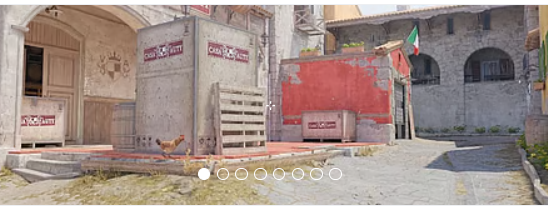
¿No te gusta su punto de mira? No se preocupe, si desea explorar otras opciones, consulte nuestra guía para conocer los mejores códigos de mira CS2 aquí.
Configuración de vídeo molodoy para CS2
Cuando se trata de su configuración de video, molodoy prioriza un equilibrio entre la velocidad de fotogramas máxima y una fidelidad visual clara, asegurando que los modelos de personajes se destaquen claramente en el entorno. Juega en una relación de aspecto ampliada clásica de 4:3 con una resolución de 1280x960, un elemento básico entre los AWPers profesionales porque hace que los modelos de los jugadores parezcan más anchos y más fáciles de enfocar.
Ejecuta el juego en modo de pantalla completa con Boost Player Contrast habilitado para mejorar aún más la visibilidad en áreas más oscuras del mapa. Para su configuración de gráficos avanzada, opta por Alta calidad de sombra global y Altos detalles de modelo/textura, que ayudan a detectar sombras dinámicas del jugador y rastrear movimientos sutiles, mientras mantiene el Anti-Aliasing de muestreo múltiple (MSAA) en 4x para suavizar los bordes irregulares sin sacrificar el rendimiento general.
Para garantizar un retraso de entrada mínimo, desactiva estrictamenteV-Sync y NVIDIAG-Sync, lo que permite que su sistema de gama alta expulse el máximo de fotogramas posibles para utilizar plenamente su monitor ZOWIE de 600 Hz.
Aumentar el contraste de los jugadores: habilitado
Detalle de modelo/textura: Alto
Detalle del sombreador: Alto
Detalle de partículas: alto
Filtrado de texturas: bilineal
Antialiasing: Anisotrópico 2x
Calidad de la sombra: Alta
Sombras dinámicas: todas
Oclusión ambiental: media
Súper resolución FidelityFX: deshabilitada (calidad más alta)
V-Sync: deshabilitado
NVIDIA Reflex de baja latencia: habilitado
NVIDIAG-Sync: deshabilitado
Alto rango dinámico: calidad
Resolución: 1280*960
Relación de aspecto: 4:3 estirado
Modo: Pantalla completa
Modo de escala: estirado
Brillo: 70%
Configuración del monitor molodoy para CS2
Para aprovechar al máximo el rendimiento de su sistema, molodoy utiliza el monitor ZOWIE XL2586X+ de primera línea, que funciona a una frecuencia de actualización vertiginosa de 600 Hz. En Counter-Strike, ver a los enemigos claramente a través de la utilidad y en los rincones oscuros es tan importante como la velocidad de fotogramas sin procesar, por lo que ajusta la configuración integrada de su monitor para maximizar la visibilidad.
Establece el modo de imagen en Película y aumenta la intensidad del color hasta 20, lo que hace que los modelos de los jugadores resalten vívidamente contra la geometría del mapa.
Su Black eQualizer está configurado en 10, lo que evita que los enemigos se mezclen con sombras oscuras sin borrar el resto de la pantalla. Fundamentalmente, ejecuta la tecnología DyAc (precisión dinámica) de ZOWIE en la configuración "Premium", que reduce drásticamente el desenfoque de movimiento durante los movimientos rápidos de la cámara y el fuerte retroceso, lo que permite que sus ojos sigan perfectamente los objetivos en movimiento mientras mantiene ángulos agresivos con el AWP.
Aquí puede encontrar la configuración del monitor molodoy:
DyAc: Premium
Ecualizador negro: 10
Intensidad del color: 20
Luz azul baja: 0
Modo de imagen: Película
Brillo: 80
Contraste: 70
Nitidez: 5
Gama: Gama 2
Temperatura de color: Normal
AMA: alto
Molodoy Configuración del modelo de vista para CS2
El joven prodigio tiene configuraciones de modelo de vista similares a las de muchos otros CS2 jugadores profesionales. Tiene un desplazamiento horizontal de 2,5 y un desplazamiento vertical de -1,5. Estas configuraciones hacen que apuntar y disparar sea conveniente y garantizan que el modelo de arma no obstruya demasiado el campo de visión.
viewmodel_fov 68
viewmodel_offset_x 2.5
viewmodel_offset_y 0
viewmodel_offset_z -1.5
viewmodel_presetpos 1
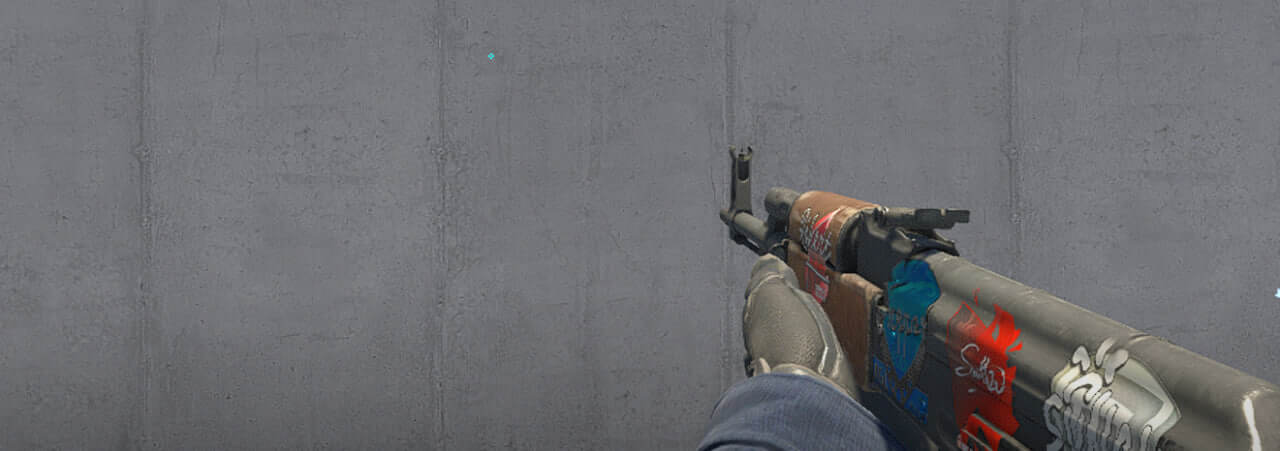
' también es útil aprender cómo funciona viewmodel settings para ajustarlos a sus preferencias.
Opciones de inicio de molodoy para CS2
A pesar de ser un representante de la nueva generación de jugadores, a quienes les gusta usar diferentes configuraciones para aumentar el rendimiento, molodoy no usa ningún tipo de opciones de inicio comunes para CS2.
Si está buscando las mejores CS2 opciones de lanzamiento, consulte nuestra guía.
Configuración de radar molodoy para CS2
Su radar centra al jugador y gira al mismo tiempo. Utiliza las siguientes configuraciones para probar usted mismo cómo se siente jugar con el molodoy radar settings.
El radar centra al jugador: Sí
El radar está girando: Sí
Alternar forma con marcador: Sí
Tamaño del HUD del radar: 1
Ampliación del mapa: 0,7
Configuración de audio molodoy para CS2
La configuración de audio de molodoy en CS2 está ajustada para lograr máxima claridad y conciencia posicional. Probablemente use auriculares estéreo con baja reverberación y altas frecuencias potenciadas para escuchar pasos y disparos.
Volumen maestro: 0,5
Volumen de música: 0
Volumen de voz: 0,4
Dispositivo de audio: Auriculares Logitech G Pro X 2
Calidad de audio: alta
Procesamiento de audio 3D: deshabilitado
skins jóvenes
Como AWPer estrella, molodoy cuenta con un inventory que refleja perfectamente su estatus de alto perfil, seleccionado con algunos de los artículos más exclusivos de la economía de skins CS2. Su colección, valorada en más de 30.000 dólares, está respaldada por un par de rifles de francotirador legendarios: un impecable AWP Gungnir y un clásico AWP Dragon Lore.
Utiliza la colección molodoy como inspiración o elija otras skins a su gusto en Skin.Land. Aquí encontrarás una amplia selección de skins de jugadores profesionales. colecciones, disponibles para que las compre de forma rápida, segura y a un precio asequible.







Escriba un comentario