
kyousuke의 CS2 마우스 설정 - 감도와 DPI
kyousuke는 프로 선수들 사이에서 가장 인기 있는 마우스 중 하나인 Logitech G Pro X Superlight 2 Magenta, 즉 핑크 모델을 사용합니다. 실력이 검증된 꽤 좋은 기기죠. 훌륭한 센서와 형태, 좋은 글라이드, 그리고 휠까지. 그야말로 완벽합니다.
마우스: Logitech G Pro X Superlight 2 Magenta
DPI: 800
감도: 1.28
eDPI: 1024
줌 감도: 1
Hz: 1000
Windows 감도: 6
전반적으로 그는 모든 플레이어, 특히 오래된 유저들 사이에서 매우 인기 있는 상당히 평범한 마우스 설정을 씁니다. 마우스가 높은 폴링 레이트를 지원함에도 kyousuke는 평범한 1000HZ로 플레이하는 걸 선호합니다.
이 설정은 꽤 유용해서 망설임 없이 시도해 볼 수 있습니다. 매우 무난하고 잘 맞죠. 마우스 설정이 어떻게 작동하는지 모르겠다면 저희 가이드를 여기에서 확인하세요.
kyousuke의 CS2 크로스헤어 설정
ropz의 크로스헤어는 정적이며 Cyan 색상입니다. kyousuke 크로스헤어 코드 CSGO-8nb3d-Et6WE-QsF6B-V3E7j-WphrM을 입력하거나, 아래 파라미터를 수동으로 복사해 적용할 수 있습니다:
스타일: Classic static
반동 따라가기: 아니오
가운데 점: 아니오
길이: 1
두께: 1
간격: -4
외곽선: 아니오
색상 (RGB): Cyan
알파: 예
알파 값: 255
T 스타일: 아니오
무기별 간격 적용: 아니오
스나이퍼 너비: 1
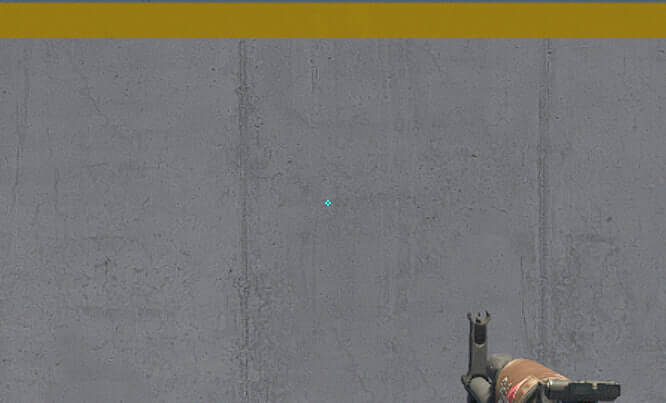
그의 크로스헤어는 밝은 화면 설정에서 플레이하는 걸 좋아하는 플레이어에게 잘 맞습니다. 하지만 대체로 활용도가 높아 어떤 설정에서도 안심하고 써 볼 수 있습니다. 다른 옵션을 살펴보고 싶다면 최고의 CS2 크로스헤어 코드에 대한 저희 가이드를 여기에서 확인하세요.
kyousuke의 CS2 화면 설정
kyousuke는 상당히 평범한 화면 설정으로 플레이합니다. 지금 게임에서 이 설정들이 최고이기 때문에 다른 e스포츠 선수들을 그대로 따라 했을 수도 있습니다.. 높은 텍스처 설정은 게임에 영향을 주지 않으므로 대부분의 텍스처 설정은 낮음입니다. kyousuke의 해상도 역시 다른 플레이어들 사이에서 매우 인기 있습니다: 1280x960의 4:3 stretched죠.
플레이어 대비 강화: 켜짐
모델/텍스처 디테일: 낮음
셰이더 디테일: 낮음
파티클 디테일: 낮음
텍스처 필터링: Bilinear
안티에일리어싱: 8x MSAA
그림자 품질: 낮음
동적 그림자: 전체
앰비언트 오클루전: 꺼짐
FidelityFX Super Resolution: 꺼짐 (최고 품질)
수직 동기화(V-Sync): 꺼짐
NVIDIA Reflex Low Latency: 꺼짐
NVIDIA G-Sync: 꺼짐
High Dynamic Range: 품질
FidelityFX Super Resolution: 꺼짐 (최고 품질)
해상도: 1280*960
화면비: 4:3 stretched
모드: 전체 화면
스케일링 모드: 늘림(Stretched)
밝기: 100%
kyousuke의 CS2 모니터 설정
이 Falcons 선수는 현재 BenQ Zowie XL2546K 모니터를 사용합니다. 다소 오래됐지만 DyAc+ 기술이 적용된 좋은 244hz 모니터죠. 그의 화면 설정은 많은 플레이어에게 잘 맞으니 주저 말고 시도해 보세요.
여기서 kyousuke의 모니터 설정을 확인할 수 있습니다:
DyAc: Premium
Black eQualizer: 15
Color Vibrance: 15
Low Blue Light: 0
화면 모드: Standard
밝기: 100
대비: 60
선명도: 7
감마: Gamma 2
색 온도: Normal
AMA: 높음
kyousuke의 CS2 뷰모델 설정
이 어린 천재의 뷰모델 설정은 다른 많은 CS2 프로 선수들과 비슷합니다. 가로 오프셋은 2.5, 세로 오프셋은 -1.5입니다. 이 설정은 조준과 사격을 편하게 해 주고 무기 모델이 시야를 지나치게 가리지 않도록 해 줍니다.
viewmodel_fov 68
viewmodel_offset_x 2.5
viewmodel_offset_y 0
viewmodel_offset_z -1.5
viewmodel_presetpos 1
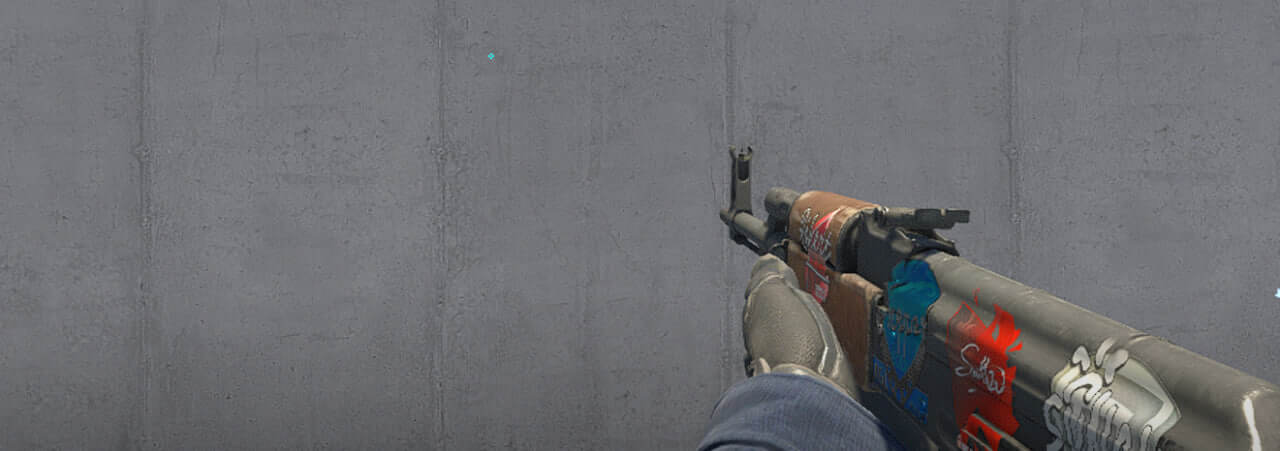
자신의 취향에 맞게 조정할 수 있도록 뷰모델 설정 이 어떻게 작동하는지 알아 두는 것도 유용합니다.
kyousuke의 CS2 실행 옵션
성능 향상을 위해 여러 설정을 즐겨 쓰는 신세대 게이머의 대표주자임에도, ropz는 CS2에서 흔한 실행 옵션을 전혀 사용하지 않습니다.
최고의 CS2 실행 옵션을 찾고 있다면 저희 가이드를 확인하세요.
kyousuke의 CS2 레이더 설정
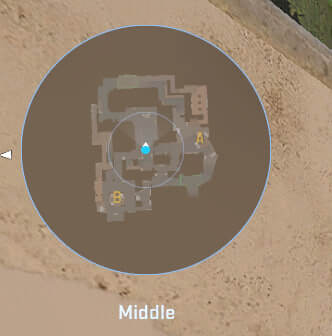
kyousuke의 레이더는 플레이어를 중앙에 두는 동시에 회전합니다. 아래 설정을 사용해 kyousuke 레이더 설정 으로 플레이하는 것이 어떤 느낌인지 직접 시험해 보세요.
레이더가 플레이어를 중앙에: 예
레이더 회전: 예
스코어보드로 모양 전환: 예
레이더 HUD 크기: 1
맵 줌: 0.3
kyousuke의 CS2 오디오 설정
CS2에서 kyousuke의 오디오 설정은 최대한의 선명함과 위치 파악을 위해 세밀하게 조정되어 있습니다. 발소리와 총성을 듣기 위해 낮은 잔향과 강조된 고주파를 갖춘 스테레오 헤드폰을 사용하는 것으로 보입니다.
마스터 볼륨: 100%
오디오 장치: 기본값
EQ 프로필: Natural
L/R 분리: 0%
원근 보정: 예
게임이 백그라운드일 때 오디오 재생: 아니오
메인 메뉴 볼륨: 20%
라운드 시작 볼륨: 0%
라운드 액션 볼륨: 0%
라운드 종료 볼륨: 40%
MVP 볼륨: 30%
폭탄/인질 볼륨: 20%
10초 경고 볼륨: 20%
데스 카메라 볼륨: 30%
양 팀에 생존자가 있을 때 MVP 음악 음소거: 아니오
kyousuke의 CS2 스킨
아직 그리 부유한 프로 선수는 아니지만 kyousuke는 놀라운 인벤토리를 갖고 있습니다. 가장 비싼 아이템으로는 다음이 있습니다:
Kyousuke의 컬렉션을 영감으로 삼거나 취향에 맞는 다른 스킨을 Skin.Land에서 골라 보세요. 이곳에서는 프로 선수들의 컬렉션에 있던 다양한 스킨을 빠르고 안전하게, 그리고 합리적인 가격으로 구매할 수 있습니다.







댓글 작성