
XANTARES CS2 마우스 설정 - 감도 및 DPI
그의 시그니처인 빛처럼 빠른 엿보기와 빠른 조준을 실행하기 위해 XANTARES는 평균적인 Counter-Strike 2 전문가에 비해 상대적으로 높은 감도로 플레이합니다.
현재 ZOWIE FK1-C를 휘두르는 그는 게임 내 감도 2.3에 400 DPI로 플레이하며, 그 결과 eDPI가 920으로 높아집니다. 이렇게 높아진 eDPI는 그의 폭발적인 플레이 스타일을 뒷받침하는 엔진으로, 마우스 패드를 가로질러 팔을 크게 움직이지 않고도 공격적으로 각도를 클리어하고 빠른 로봇식 스프레이 전송을 가할 수 있습니다. 그의 구성을 마무리하기 위해 그는 기본값보다 약간 높은 1.1의 줌 감도를 실행하여 조준경이 있는 무기 움직임의 반응성을 조금 더 높이는 동시에 업계 표준 1000Hz 폴링 속도와 6/11 Windows 감도로 고정되었습니다.
마우스: ZOWIE FK-1-C
DPI: 400
감도: 2.3
eDPI: 920
줌 감도: 1.10
헤르츠: 1000
윈도우 감도: 6
아직도마우스 설정이 어떻게 작동하는지 모르시나요? 가이드 여기를 확인하세요.
CS2에 대한 XANTARES 십자선 설정
XANTARES 십자선은 고전적인 정적이며 녹색으로 표시됩니다. 십자선 코드 CSGO-Ts59P-UHNG6-Nsnwp-eBrtF-Ln2AC를 입력하거나 다음 매개변수를 수동으로 복사하여 활성화할 수 있습니다.
스타일: 클래식 정적
반동 따르기: 아니요
도트: 아니요.
길이: 3
두께: 0.5
간격: -2
개요: No
색상(RGB): 녹색
빨간색: 50
녹색: 255
블루: 50
알파: 예
알파 값: 200
T 스타일: 아니요
배치무기간격 : 없음
스나이퍼 폭: 0

다른 옵션을 살펴보고 싶다면 최고의 CS2 십자선 코드 여기에 대한 가이드를 확인하세요.
CS2에 대한 XANTARES 비디오 설정
Global Offensive에서 전환한 많은 노련한 전문가와 마찬가지로 XANTARES는 확장된 4:3 화면비의 전통적이고 집중된 느낌을 선호합니다. 그는 전체 화면으로 확장된 1024x768 해상도로 플레이하므로 그의 특유의 속사포 결투 중에 플레이어 모델이 훨씬 더 넓어지고 공격하기 쉬워집니다.
프레임 속도를 절대 한계까지 끌어올리고 540Hz ZOWIE XL2586X 모니터를 최대한 활용하기 위해 그는 모델, 셰이더 및 입자 세부 묘사를 포함하여 거의 모든 고급 비디오 설정을 가장 낮은 값으로 유지합니다. 하지만 그는 "플레이어 대비 강화"를 활성화하고 4x MSAA를 사용하여 복잡한 배경에서도 적의 실루엣이 뚜렷하게 돋보이도록 합니다. 이 순전히 경쟁적인 구성은 최대 성능을 위해 시각적 충실도를 희생하여 혼돈의 폭탄 현장에 들어갈 때 제로 입력 지연과 시각적 선명도를 보장합니다.
플레이어 대비 부스트: 활성화됨
모델/텍스처 디테일: 낮음
셰이더 디테일: 낮음
입자 세부정보: 낮음
텍스처 필터링: 이방성 4x
앤티앨리어싱: MSAA 4개
그림자 품질: 낮음
동적 그림자: 모두
주변 폐색: 비활성화됨
FidelityFX 초해상도: 비활성화됨(최고 품질)
V-Sync: 비활성화됨
NVIDIA Reflex 낮은 대기 시간: 활성화됨
NVIDIAG-Sync: 비활성화됨
높은 동적 범위: 품질
해상도: 1024*768
종횡비: 4:3 늘림
모드: 전체 화면
스케일링 모드: 확장됨
밝기: 100%
CS2에 대한 XANTARES 모니터 설정
고성능 PC와 공격적인 플레이 스타일을 보완하기 위해 XANTARES는 비교할 수 없는 모션 선명도를 제공하는 최첨단 540Hz 모니터인 BenQ ZOWIE XL2586X를 사용합니다. 혼란스러운 총격전 중에 가시성을 극대화하고 적을 즉시 발견하기 위해 그는 특정 하드웨어 수준의 색상 프로필을 활용합니다. 그는 모니터의 사진 모드를 "게이머 2"로 설정하고 밝기와 대비를 모두 70까지 높였습니다.
더 중요한 것은 Black eQualizer를 최대 20까지 올렸다는 점입니다. 이는 Mirage 및 Inferno와 같은 지도에서 하이라이트를 날려버리지 않고 어두운 모서리를 극적으로 밝게 하는 중요한 설정입니다. 플레이어 모델을 칙칙한 배경에서 돋보이게 하는 Color Vibrance 설정 13과 모션 블러를 줄이기 위해 "Premium"로 설정된 ZOWIE의 DyAc 기술이 결합된 XANTARES는 정신없이 스프레이를 옮기는 중에도 목표를 놓치지 않도록 보장합니다.
여기에서 XANTARES 모니터 설정을 찾을 수 있습니다:
DyAc: 프리미엄
블랙 이퀄라이저: 20
컬러 바이브런스: 13
낮은 청색광: 0
사진 모드: 게이머 2
밝기: 70
대비: 70
선명도: 8
감마: 감마 2
색온도: 보통
AMA: 높음
CS2에 대한 XANTARES 뷰 모델 설정
이 젊은 신동은 다른 CS2 프로 선수들과 유사한 뷰 모델 설정을 가지고 있습니다. 수평 오프셋은 2.5이고 수직 오프셋은 -1.5입니다. 이러한 설정을 사용하면 조준과 사격이 편리해지고 무기 모델이 시야를 너무 많이 가리지 않게 됩니다.
viewmodel_fov 60
viewmodel_offset_x 1
viewmodel_offset_y 1
viewmodel_offset_z -1
viewmodel_presetpos 1
이를 원하는 대로 조정하는 방법 뷰모델 설정을 배우는 것도 유용합니다.
CS2에 대한 XANTARES 실행 옵션
XANTARES가 사용하는 CS2의 시작 옵션을 살펴보십시오.
-noforcemaccel -noforcemspd -noforcemparms -freq 360 -novid -console -tickrate 128 -d3d9ex
최고의 CS2 실행 옵션을 찾고 있다면 가이드을 확인해 보세요.
CS2에 대한 XANTARES 레이더 설정
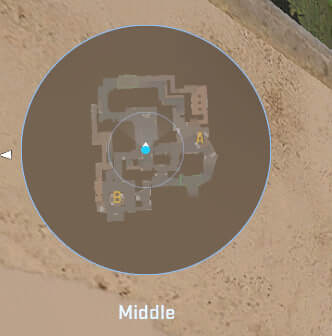
그의 레이더는 플레이어의 중심을 잡고 동시에 회전합니다. 다음 설정을 사용하여 XANTARES 레이더 설정로 플레이하는 느낌을 직접 시험해 보세요.
레이더 센터 플레이어: 예
레이더 회전 중: 예
점수판으로 모양 전환: 예
레이더 HUD 크기: 0.98
지도 확대/축소: 0.35
CS2에 대한 XANTARES 오디오 설정
소리 신호는 XANTARES의 공격적인 진입 프래깅에 매우 중요하며, 한 번의 실수만 들어도 엄청난 정확도로 각도를 미리 발사할 수 있기 때문에 빛처럼 빠른 조준만큼 중요합니다. 모든 오디오 디테일을 포착하기 위해 그는 일상 업무에 HyperX Cloud III Wireless 헤드셋을 사용하며, 혼란스러운 LAN 무대에서 경쟁할 때 소음 제거 귀마개 아래 Razer Hammerhead Pro V2 인이어 모니터로 전환하는 경우가 많습니다.
마스터 볼륨: 100%
오디오 장치: 기본값
EQ 프로필: 자연
L/R 절연: 0%
관점 수정: 예
백그라운드에서 게임할 때 오디오 재생: 아니요
메인 메뉴 볼륨: 20%
라운드 시작 볼륨: 0%
라운드 액션 볼륨: 0%
라운드 종료 볼륨: 40%
MVP 볼륨: 30%
폭탄/인질 볼륨: 20%
10초 경고 볼륨: 20%
데스 카메라 볼륨: 30%
양 팀 선수가 살아 있을 때 MVP 음악 음소거: 아니요
잔타레스 Skins
게임 내 로드아웃과 관련하여 XANTARES는 폭발적인 플레이 스타일에 어울리는 inventory를 자랑하며 높은 등급의 인기 있는 skins. 로 가득 차 있습니다.
XANTARES 컬렉션을 청사진으로 사용하거나 Skin.Land을 탐색하여 개인 스타일에 맞는 skins을 찾으세요. 빠르고 안전하며 예산 친화적인 구매를 위해 오늘 프로선수 skins의 광범위한 카탈로그를 살펴보세요.







댓글 작성