
Aleksib CS2 configurações do mouse - sensibilidade e DPI
Aleksib atualmente joga com um DPI de 800 emparelhado com uma sensibilidade no jogo de 1,06, dando-lhe um DPI efetivo (eDPI) de 848. Isso se enquadra confortavelmente na faixa padrão para profissionais.Contra-ataque 2 jogadores, oferecendo o equilíbrio perfeito entre a precisão de baixa sensibilidade necessária para microajustes e a velocidade necessária para limpar ângulos rapidamente. Ele mantém a sensibilidade do zoom no padrão 1.0, garantindo que a mira permaneça perfeitamente consistente com o movimento padrão do rifle. Para eliminar qualquer aceleração indesejada do mouse ou salto de pixel, ele usa a sensibilidade básica do Windows de 6/11 e executa o mouse a uma taxa de pesquisa padrão de 1000 Hz para entradas nítidas e sem atrasos.
Mouse: Logitech G Pro X Superlight Vermelho
DPI: 800
Sensibilidade: 1,06
eDPI: 848
Sensibilidade de zoom: 1
Hz: 1000
Sensibilidade do Windows: 6
Não sabe como funcionam as configurações do mouse? Confira nosso guia here.
Configurações de mira de Aleksib para CS2
Para copiar instantaneamente sua configuração exata em seu próprio jogo, você pode importar o código de mira atualizado mais recentemente, CSGO-JEZQz-do64M-3tQec-mTteY-oM88F.
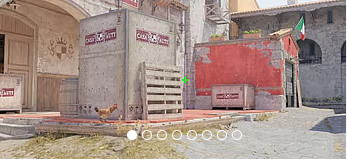
Estilo: clássico estático
Seguir recuo: Não
Ponto: Não.
Comprimento: 1
Espessura: 1
Lacuna: -4
Esboço: Não
Cor (RGB): Verde
Vermelho: 50
Verde: 250
Azul: 50
Alfa: Sim
Valor alfa: 255
Estilo T: Não
Lacuna de arma implantada: Não
Largura do atirador: 0
Não gosta da mira dele? Não se preocupe, se você quiser explorar outras opções, confira nosso guia para os melhores CS2 códigos de mira here.
Configurações de vídeo Aleksib para CS2
Quando se trata de clareza visual, Aleksib otimiza seu jogo para desempenho puro e visibilidade máxima do inimigo, em vez de fidelidade visual. Ele joga em uma proporção de 4:3 com uma resolução estendida personalizada de 1440x1080, que amplia os modelos de jogadores na tela e pode fazer com que os alvos pareçam mais fáceis de rastrear durante rodadas rápidas. Para garantir altas taxas de quadros e atraso mínimo de entrada, ele executa o jogo no modo Tela Cheia com o brilho do jogo definido para 93%.
Para seus gráficos avançados, ele conta com uma combinação calculada feita sob medida para jogos competitivos: Global Shadow Quality e Shader Detail são definidos como High para garantir que ele possa ver sombras críticas do jogador, enquanto Modelo/Textura e Detalhes de Partículas são mantidos em Low para evitar confusão visual e maximizar o FPS. Ele também mantém o Boost Player Contrast ativado para ajudar a detectar inimigos em fundos escuros, utiliza 2x MSAA para suavização de bordas e desativa completamente a Oclusão de Ambiente.
Aumentar o contraste dos jogadores: ativado
Detalhe do modelo/textura: baixo
Detalhe do shader: alto
Detalhe da partícula: Baixo
Filtragem de Textura: Bilinear
Anti-aliasing: 2x MSAA
Qualidade da sombra: alta
Sombras dinâmicas: todas
Oclusão de Ambiente: Desativado
Super resolução FidelityFX: desativado (qualidade mais alta)
V-Sync: Desativado
NVIDIA Reflex Baixa Latência: Desativado
NVIDIA G-Sync: desativado
Alta faixa dinâmica: qualidade
Resolução: 1440x1080
Proporção: 4:3
Modo: tela cheia
Modo de escala: esticado
Brilho: 93%
Configurações do monitor Aleksib para CS2
Para maximizar sua vantagem visual no servidor, Aleksib joga em um monitor BenQ ZOWIE XL2566K com taxa de atualização de 360Hz.
Aqui você pode encontrar as configurações do monitor Aleksib:
DyAc: Premium
Equalizador preto: 6
Vibração da cor: 11
Luz Azul Baixa: 0
Modo de imagem: Padrão
Brilho: 82
Contraste: 62
Nitidez: 8
Gama: Gama 3
Temperatura de cor: Normal
AMA: Premium
Configurações do modelo de visualização Aleksib para CS2
Para manter sua tela o mais organizada possível durante ataques críticos em locais, Aleksib empurra seu modelo de arma para fora do caminho usando um campo de visão (FOV) maximizado. Ele define seu viewmodel_fov para o valor mais alto permitido de 68, garantindo que a arma pareça menor e mais distante. Para o posicionamento exato, ele utiliza um deslocamento de 2,5 no eixo X, 0 no eixo Y e -1,5 no eixo Z. Isso puxa a arma para baixo e para a extrema direita, liberando o máximo de espaço na tela para localizar inimigos e alinhar lançamentos utilitários táticos. Você pode replicar instantaneamente esta configuração colando viewmodel_fov 68; visualizarmodel_offset_x 2,5; viewmodel_offset_y 0; viewmodel_offset_z -1.5; viewmodel_presetpos 2 diretamente no console do desenvolvedor do Counter-Strike 2.
viewmodel_offset_x 2.5
viewmodel_offset_y 0
viewmodel_offset_z -1.5
viewmodel_presetpos 2
Também é útil aprender como viewmodel settings funciona para ajustá-los de acordo com sua preferência.
Opções de lançamento do Aleksib para CS2
Aleksib usa opções de inicialização muito simples e úteis:
-freq 360 -console -novid -tickrate 128
Se você está procurando as melhores opções de lançamento do CS2, confira nosso guide.
Configurações do radar Aleksib para CS2
Seu radar centraliza o jogador e gira simultaneamente. Use as configurações a seguir para experimentar por si mesmo como é tocar com o Aleksib radar settings.
Radar centraliza o jogador: Sim
O radar está girando: Sim
Alternar forma com placar: Não
Tamanho do radar Hud: 1
Zoom do mapa: 0,45
Configurações de áudio Aleksib para CS2
Como líder no jogo, a comunicação clara e os sinais sonoros precisos não são negociáveis para Aleksib. Para manter a consciência situacional perfeita, ele executa seu Master Volume em 80% (0,8). Isso garante que sinais de áudio críticos, como passos e plantas de bombas, sejam facilmente audíveis, sem sobrecarregar completamente as comunicações de voz de sua equipe.
Para eliminar qualquer confusão auditiva desnecessária durante situações tensas, ele reduz completamente o volume da música para 0% e reduz significativamente o volume ambiente. Embora as preferências exatas do equalizador possam ocasionalmente mudar dependendo do fone de ouvido, os profissionais que confiam nesta linha de base normalmente o emparelham com o Crocante Perfil de equalização e um padrão Isolamento 50% L/R para aprimorar nitidamente sons de alta frequência, como recargas de armas e corridas distantes, enquanto mantém um movimento panorâmico direcional altamente preciso.
Skins de Aleksib
O loadout de um jogador é uma declaração no servidor, e Aleksib arrasa com um inventory vibrante e de alto nível que se destaca nos cenários sombrios de Counter-Strike 2.







Escrever comentário