
Can You Buy CS2 Skins with PayPal?
Yes. On Skin.Land you top up your account balance with PayPal and buy skins with that balance — which means PayPal works across the whole catalog: CS2 (CS:GO), Dota 2, and Rust skins alike. Your CS:GO skins and CS2 skins are the same items in one inventory, so buying either with PayPal happens in the very same CS2 market. There's no need to hand your card to the store or top up some obscure wallet: you pay using PayPal, your balance covers the purchase, and the skin comes to your Steam account.
Why Buy Skins with PayPal?
PayPal is a favorite payment method for skin buyers for good reasons:
Familiar and trusted worldwide. It's one of the most widely used payment systems on the planet — no learning curve, no doubts about whether it's legit.
Secure — your card stays private. You pay through PayPal without exposing your card or bank details to the marketplace.
Buyer confidence. PayPal is built around safe online payments, which makes a first purchase on a new site far less nerve-wracking.
Fast. Log in, confirm, done — no manual bank transfers or waiting around.
Trusted marketplace. Skin.Land is an established CS2 marketplace, an official partner of Team Vitality, with a 4.7 "Excellent" Trustpilot score — so both the payment and the store are covered.
How to Buy CS2 Skins with PayPal — Step by Step
On Skin.Land, PayPal tops up your account balance and you buy skins with that balance — so it works for every skin on the site. Here's the flow:
Step 1 — Log in. Sign in with your Steam account first — without logging in you can't top up your balance or make a purchase.
Step 2 — Find your skin. Browse the market (CS2, CS:GO, Dota 2, or Rust) and buy right from the catalog — hit the cart or Buy Now on the skin's card — or open the item's page first. Each listing shows its delivery time right on the card (Instant or up to 12 hours), so you know how fast it'll arrive before you buy — and our 3D viewer lets you inspect the exact wear and pattern from every angle.
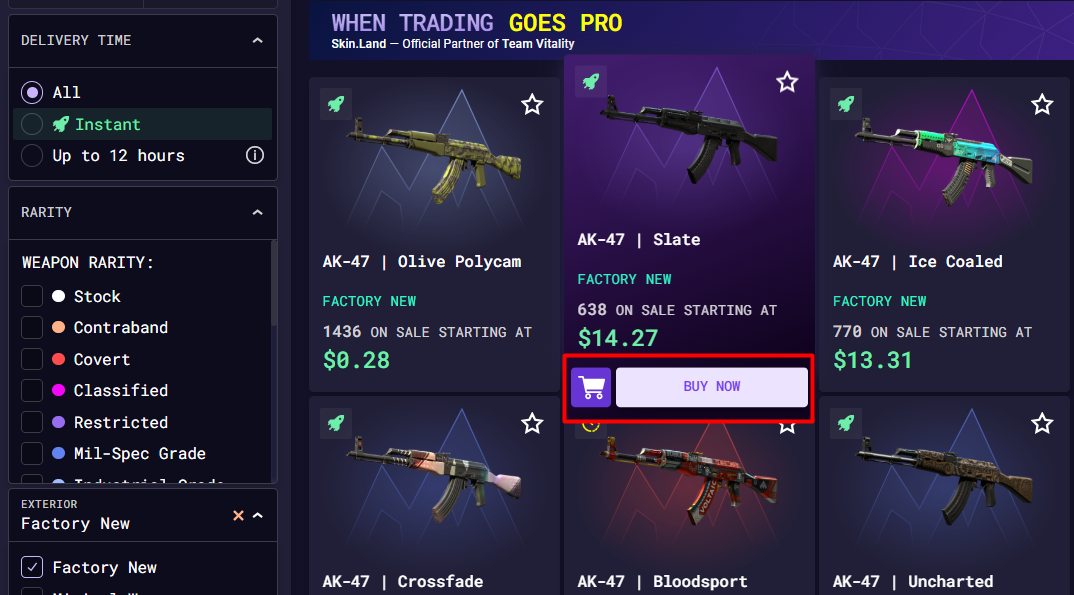
Step 3 — Start the purchase. If your balance already covers the price, just choose Pay using balance and you're done. If it doesn't, you'll see an Insufficient balance prompt showing the exact amount you need to add.
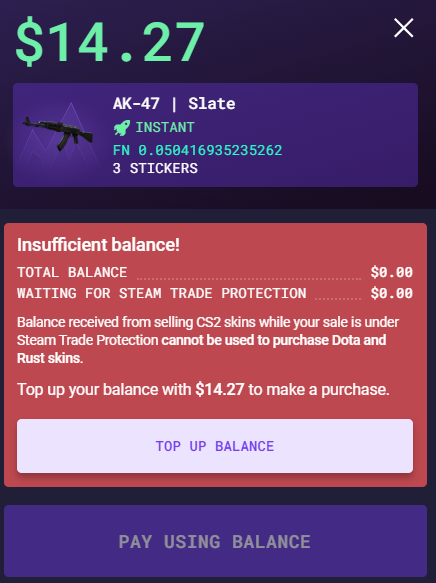
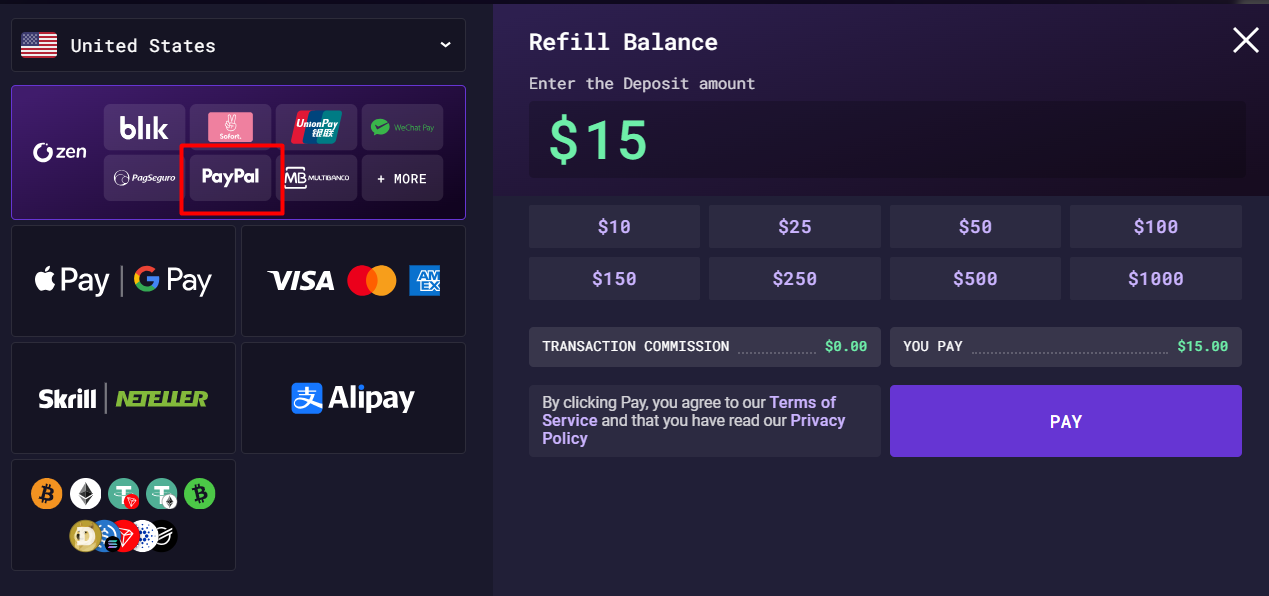
Step 4 — Top up with PayPal. Click Top up balance, choose PayPal as the method, and pay the amount.
Step 5 — Get your skin. Finish the purchase with your topped-up balance. The skin is delivered to your Steam inventory at the speed shown on its listing — instantly for many, or within up to 12 hours for others.
Tips for Buying Skins Safely
Paying with PayPal is the easy part — spending wisely is the rest:
Inspect before you buy. Check the exact wear, float, and pattern in the 3D viewer, and read our guide on what to look at when buying CS2 skins so there are no surprises.
Understand float. Two copies of the same skin can look very different — our CS2 skins float guide explains why the number matters.
Buying cheap skins with PayPal? You don't need deep pockets — see the cheapest CS2 knives and the best CS2 knives under $100 for great-value picks from the CS2 knife market you can grab with PayPal.
Thinking long-term? If you're buying to hold, our best CS2 skins to invest in guide covers what tends to keep its value.

FAQ
Can you buy CS2 skins with PayPal?
Yes. On Skin.Land you top up your account balance with PayPal and buy skins with that balance, so it works for CS2 (CS:GO), Dota 2, and Rust skins. Pick your skin, and if your balance is short you top up with PayPal and complete the purchase — the item is delivered to your Steam inventory.
Where can I buy CS:GO skins with PayPal?
Right here on Skin.Land — since CS:GO skins and CS2 skins are the same items, the CS2 market is where you'll find them. Top up your balance with PayPal, pick your skin, and it's delivered straight to your Steam inventory — no third-party middleman like G2A in between.
How does buying with PayPal work on Skin.Land?
PayPal is used to top up your account balance, not as a separate per-item checkout. You hit buy on a skin; if your balance covers it, you pay from the balance; if not, you choose Top up balance → PayPal, add the amount, and finish the purchase. From then on that balance can buy any skin on the site.
Is it safe to buy skins with PayPal?
Very. PayPal keeps your card and bank details private and is built around secure online payments, and Skin.Land is an established marketplace — an official Team Vitality partner rated 4.7 "Excellent" on Trustpilot. You receive your skin through Steam's own trade system.
Which games' skins can I buy with PayPal?
CS2 (CS:GO), Dota 2, and Rust — the whole Skin.Land catalog, since PayPal simply funds the balance you buy with. Browse everything on the Skin.Land market.
How fast will I get my skin?
Delivery depends on the listing, and the time is shown right on each skin's card: many are marked Instant, while others arrive within up to 12 hours. You can also filter the catalog by delivery time to see only instant items.






コメントを書く