
Twistzz CS2 การตั้งค่าเมาส์ - ความไวและ DPI
เมื่อพูดถึงการตั้งค่าเมาส์ Twistzz อาศัยการกำหนดค่าที่ให้ความสมดุลที่สมบูรณ์แบบระหว่างความแม่นยำในการปรับแต่งระดับไมโครและความสามารถในการสะบัดที่เชื่อถือได้ ปัจจุบันเขาเล่นด้วยความละเอียด 400 DPI แบบคลาสสิกรวมกับความไวในเกมที่ 1.7 ส่งผลให้ eDPI โดยรวมอยู่ที่ 680 ในขณะที่ผู้เล่นมืออาชีพบางคนโน้มตัวไปทางสุดขั้วของสเปกตรัม การตั้งค่าของ Twistzz อยู่ในจุดที่เหมาะสมที่สุดสำหรับปืนไรเฟิลระดับโลก และ IGL— ช่วยให้การติดตามราบรื่นอย่างเหลือเชื่อ และภาพเฮดช็อตที่คมชัด พิกเซลสมบูรณ์แบบโดยไม่กระทบต่อการเคลื่อนไหวของเขา ช่างเครื่อง.
เพื่อให้มั่นใจถึงการตอบสนองสูงสุดและความล่าช้าเป็นศูนย์ด้วยฮาร์ดแวร์ของเขา (โดยทั่วไปแล้วจะเป็นเมาส์ Razer ระดับสูงสุดเช่น DeathAdder หรือ Viper V4 Pro) เขาใช้อัตราการโพลที่รวดเร็วเป็นพิเศษ 4000 Hz สำหรับช่วงเวลาที่เขาต้องหยิบปืนสีเขียวตัวใหญ่ ความไวในการซูมของเขาถูกตั้งค่าไว้ที่ 1.1 ทำให้เขาได้ความเร็วเพิ่มขึ้นเล็กน้อยขณะเล็งกล้องเข้าไป
เมาส์: Razer Viper V4 Pro สีขาว
จุดต่อนิ้ว: 400
ความไว: 2.3
eDPI: 920
ความไวในการซูม: 1.1
เฮิร์ตซ์: 4000
ความไวของ Windows: 6
Donไม่รู้ว่าการตั้งค่าเมาส์ทำงานอย่างไร? ลองอ่านคำแนะนำของเรา here
การตั้งค่า Twistzz Crosshair สำหรับ CS2
เป้าเล็งของผู้เล่นชาวบราซิลเป็นแบบคงที่และเป็นสีเขียว คุณสามารถเปิดใช้งานได้โดยป้อนรหัส crosshair CSGO-VjF2S-HLdS4-jSpcw-GrdHu-2yDRE หรือโดยการคัดลอกพารามิเตอร์ต่อไปนี้ด้วยตนเอง:
สไตล์: คลาสสิกแบบคงที่
ติดตามการหดตัว: ไม่
จุด: ไม่.
ความยาว: 1
ความหนา: 0
ช่องว่าง: -7
โครงร่าง: ไม่ใช่
สี (RGB): กำหนดเอง
สีแดง: 0
สีเขียว: 255
สีฟ้า: 135
อัลฟ่า: ใช่
ค่าอัลฟ่า: 255
สไตล์ T: ไม่
ความกว้างของสไนเปอร์: 0
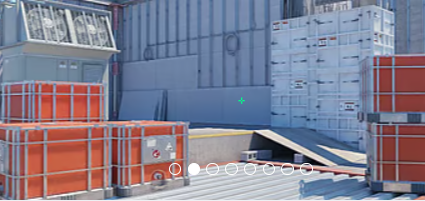
ไม่ชอบเป้าเล็งของเขาเหรอ? ไม่ต้องกังวล หากคุณต้องการสำรวจตัวเลือกอื่นๆ โปรดดูคำแนะนำของเราสำหรับรหัสเล็งเล็ง CS2 ที่ดีที่สุด here
การตั้งค่าวิดีโอ Twistzz สำหรับ CS2
เช่นเดียวกับทหารผ่านศึก Counter-Strike หลายๆ คน Twistzz ให้ความสำคัญกับอัตราเฟรมดิบและความคมชัดของภาพมากกว่าความเที่ยงตรงของกราฟิก โดยรันเกมในอัตราส่วนภาพ 4:3 แบบคลาสสิกที่ความละเอียด 1280x960 การเล่นแบบยืดออกแทนที่จะใช้แถบสีดำ โมเดลผู้เล่นจะดูกว้างขึ้นเล็กน้อยและเคลื่อนที่เร็วขึ้นบนหน้าจอ ซึ่งมืออาชีพหลายคนรู้สึกว่าทำให้การติดตามและโจมตีเป้าหมายง่ายขึ้น เพื่อเพิ่ม FPS ของเขาให้สูงสุดและลดความล่าช้าของอินพุตในระหว่างการแข่งขันที่มีเดิมพันสูงกับ Team Liquid การตั้งค่าวิดีโอขั้นสูงส่วนใหญ่ของเขา เช่น คุณภาพเงาโดยรวม และรายละเอียดโมเดล/พื้นผิวจะถูกเก็บไว้ที่ระดับต่ำหรือปานกลาง/ium
อย่างไรก็ตามเขาไม่ได้ละทิ้งคุณภาพของภาพไปโดยสิ้นเชิง โดยทั่วไป Twistzz จะใช้ 8x MSAA (Multisampling Anti-Aliasing) เพื่อทำให้ขอบหยักเรียบขึ้น เพื่อให้แน่ใจว่าเส้นเล็งที่เป็นพิกเซลจะไม่ทำลายการดวลระยะไกล เมื่อจับคู่กับจอภาพที่มีอัตราการรีเฟรชสูง การตั้งค่าเหล่านี้จะสร้างประสบการณ์ภาพที่ราบรื่นและปราศจากสิ่งรบกวน ซึ่งออกแบบมาเพื่อความเหนือกว่าในการแข่งขันโดยเฉพาะ
เพิ่มความคมชัดของผู้เล่น: เปิดใช้งาน
รายละเอียดรุ่น/พื้นผิว: ต่ำ
รายละเอียดเชเดอร์: ต่ำ
รายละเอียดอนุภาค: ต่ำ
การกรองพื้นผิว: แอนไอโซทรอปิก x16
ป้องกันนามแฝง: 4x MSAA
คุณภาพของเงา: ต่ำ
เงาแบบไดนามิก: ทั้งหมด
การบดเคี้ยวโดยรอบ: ปานกลาง
FidelityFX Super Resolution: ปิดใช้งาน (คุณภาพสูงสุด)
V-Sync: ปิดใช้งาน
NVIDIA Reflex เวลาแฝงต่ำ: ปิดการใช้งาน
NVIDIAG-Sync: ปิดการใช้งาน
ช่วงไดนามิกสูง: คุณภาพ
ความละเอียด: 1280*960
อัตราส่วนภาพ: ขยาย 4:3
โหมด: เต็มจอ
โหมดการปรับขนาด: ยืดออก
ความสว่าง: 92%
การตั้งค่าจอภาพ Twistzz สำหรับ CS2
เช่นเดียวกับผู้เล่น Counter-Strike มืออาชีพชั้นนำส่วนใหญ่ Twistzz ใช้ฮาร์ดแวร์ ZOWIE สำหรับการแสดงผล โดยเฉพาะ ZOWIE XL2546K ที่ทำงานที่อัตราการรีเฟรช 240Hz แม้ว่าจอภาพจะให้การติดตามที่ราบรื่นอย่างไม่น่าเชื่อ แต่การตั้งค่าภายในที่ทำให้เขาได้เปรียบในการแข่งขันอย่างแท้จริง
เขาใช้ DyAc (ความแม่นยำแบบไดนามิก) ที่เป็นเอกสิทธิ์ของ ZOWIE ซึ่งตั้งค่าเป็นพรีเมี่ยม ซึ่งช่วยลดความเบลอของการเคลื่อนไหวได้อย่างมากในระหว่างการควบคุมแรงถีบกลับและการสะบัดช็อตอย่างรุนแรง ทำให้ภาพเงาของศัตรูคมชัด เพื่อให้แน่ใจว่าผู้เล่นไม่สามารถรวมเข้ากับมุมมืดบนแผนที่อย่าง Mirage หรือ Inferno ได้อย่างง่ายดาย เขาจึงเพิ่ม Black eQualizer เป็น 12 และตั้งค่า Color Vibrance เป็น 12—ทำให้โมเดลผู้เล่นปรากฏบนพื้นหลังที่จืดชืด
เขาใช้โหมดภาพ FPS 1 จับคู่กับความสว่างสูงสุดที่ 100 และแกมมา 3 เพื่อการมองเห็นโดยรวมที่ยอดเยี่ยม สุดท้าย อุณหภูมิสีของเขาถูกกำหนดไว้เอง (แดง 91, เขียว 91, น้ำเงิน 100) และตั้งค่า AMA (Advanced Motion Acceleration) ไว้ที่สูงเพื่อลดแสงโกสต์ระหว่างการเคลื่อนไหวของกล้องอย่างรวดเร็ว
คุณจะพบการตั้งค่าจอภาพของ Twistzz ที่นี่:
DyAc: พรีเมี่ยม
อีควอไลเซอร์สีดำ: 12
ความสดใสของสี: 12
แสงสีฟ้าต่ำ: 0
โหมดภาพ: FPS 1
ความสว่าง: 100
คอนทราสต์: 50
ความคมชัด: 8
แกมมา: แกมมา 3
อุณหภูมิสี: กำหนดโดยผู้ใช้
อามะ: สูง
การตั้งค่า Twistzz Viewmodel สำหรับ CS2
ชาวแคนาดามีการตั้งค่าโมเดลมุมมองที่คล้ายกับการตั้งค่าของผู้เล่นมืออาชีพ CS2 คนอื่นๆ มีออฟเซ็ตแนวนอน 2.5 และออฟเซ็ตแนวตั้ง -1.5 การตั้งค่าเหล่านี้ทำให้การเล็งและการยิงสะดวก และให้แน่ใจว่าโมเดลอาวุธไม่ไม่บดบังขอบเขตการมองเห็นมากเกินไป
viewmodel_fov 68
มุมมองmodel_offset_x 2.5
viewmodel_offset_y 0
มุมมองmodel_offset_z -1.5
viewmodel_presetpos 2
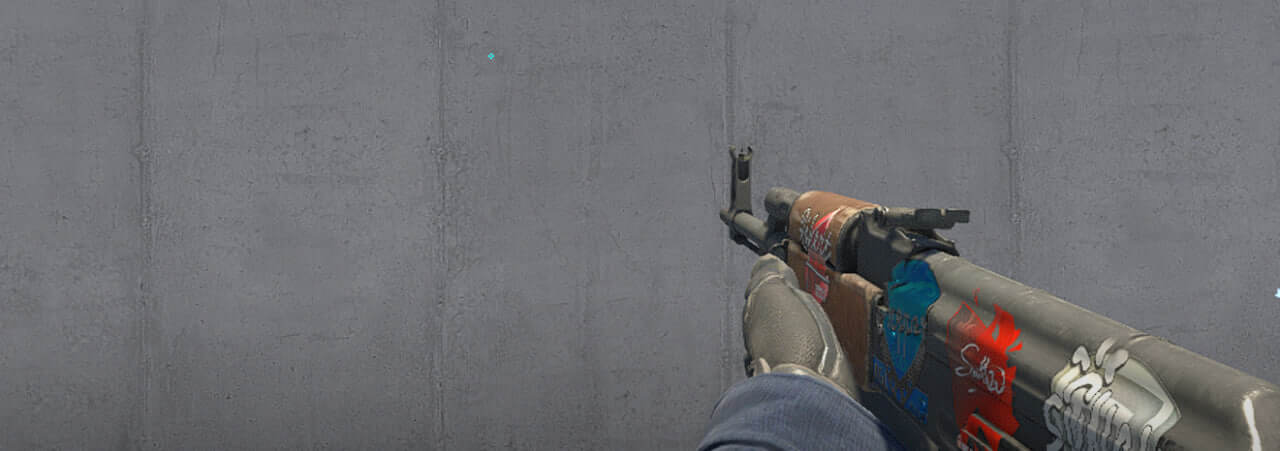
นอกจากนี้ยังมีประโยชน์ในการเรียนรู้วิธีการทำงานของ viewmodel settings เพื่อปรับเปลี่ยนให้เข้ากับความต้องการของคุณ
ตัวเลือกการเปิดตัว Twistzz สำหรับ CS2
Twistzz มีตัวเลือกการเปิดตัวที่ช่วยให้พวกเขาดำเนินการในระดับสูงสุดได้
-novid -ติ๊กเรท 128 -allow_third_party_software -noreflex
หากคุณกำลังมองหาตัวเลือกการเปิดตัว CS2 ที่ดีที่สุด ลองดู guide ของเรา
การตั้งค่าเรดาร์ Twistzz สำหรับ CS2
เรดาร์ของเขาตั้งศูนย์กลางผู้เล่นและหมุนในเวลาเดียวกัน ใช้การตั้งค่าต่อไปนี้เพื่อทดลองด้วยตัวเองว่าการเล่น Twistzz radar settings รู้สึกอย่างไร
ศูนย์เรดาร์ ผู้เล่น: ใช่
เรดาร์กำลังหมุน: ใช่
สลับรูปร่างด้วยกระดานคะแนน: ใช่
ขนาดเรดาร์ฮัด: 1.15
ซูมแผนที่: 0.4
การตั้งค่าเสียง Twistzz สำหรับ CS2
ใน Counter-Strike 2 การระบุรอยเท้าของศัตรูและอรรถประโยชน์ที่ลดลงอาจหมายถึงความแตกต่างระหว่างการคว้าชัยชนะและการถูกกำจัด เพื่อให้บรรลุถึงการรับรู้ในสถานการณ์ที่ยอดเยี่ยม Twistzz อาศัยชุดหูฟัง SteelSeries Arctis Nova Pro Wireless ซึ่งเป็นที่รู้จักในด้านเสียงที่มีความแม่นยำสูง
หากต้องการจำลองเวทีเสียงที่แข่งขันกันในเกม คุณควรตั้งค่าโปรไฟล์ EQ ของคุณเป็น Crisp การตั้งค่านี้ปรับปรุงโทนเสียงกลางและความถี่สูงโดยเฉพาะ ทำให้การก้าวเท้าและการโหลดอาวุธง่ายขึ้นมากในการแยกตัวออกจากความวุ่นวาย และทำหน้าที่เป็นในเกมที่เทียบเท่ากับ SteelSeries Sonar แบบกำหนดเอง "โปรไฟล์ Twistzz" ที่เขาช่วยสร้างความนิยมในยุค CS:GO
เพื่อความแม่นยำของเสียงทิศทาง การรักษาการแยก L/R (ซ้าย/ขวา) ของคุณให้อยู่ระหว่าง 50% ถึง 70% จะสร้างความสมดุลที่สมบูรณ์แบบ สิ่งนี้ช่วยให้คุณแยกแยะได้ชัดเจนว่าศัตรูกำลังรุกจากด้านไหน โดยไม่รู้สึกว่าเสียงสั่นสะเทือนหรือแยกออกจากกันอย่างผิดธรรมชาติ สุดท้าย ตรวจสอบให้แน่ใจว่าตั้งค่าการแก้ไขเปอร์สเปคทีฟเป็นใช่ ซึ่งจะปรับเสียงที่เข้ามาแบบไดนามิกตามมุมมองปัจจุบันของคุณ ทำให้มั่นใจได้ว่าเป้าเล็งและหูของคุณจะซิงค์กันอย่างสมบูรณ์แบบเสมอเมื่อเหวี่ยงมุมที่คับแคบ
สกิน Twistzz
ไม่น่าแปลกใจเลยที่หนึ่งในผู้เล่นที่ได้รับการตกแต่งมากที่สุดในประวัติศาสตร์ CS อเมริกาเหนือมี inventory ที่คู่ควรกับมรดกของเขา การโหลด Twistzzs เป็นมาสเตอร์คลาสในการสะสมระดับสูง โดยมีระดับความหายากที่เป็นที่ต้องการมากที่สุดและ pattern รูปแบบต่างๆ ในเกม's economy. His signature melee setup typically pairs an ultra-rare M9 Bayonet | Doppler (Ruby) or a Butterfly Knife | Gamma Doppler (Emerald) with Specialist Gloves | Crimson Kimono—specifically seeking out those highly สีแดงสูงสุดที่ต้องการ patterns ที่มีมูลค่ามหาศาลในตลาดพรีเมียม
สำหรับปืนไรเฟิลหลักของเขา เขาได้นำปืนที่นักหวดที่หนักหน่วงที่สุดออกมา tapping the Covert-tier AK-47 | Wild Lotus or the AK-47 | Gold Arabesque on theT-side, while relying on the legendary Contraband-status M4A4 | Howl on defense. When he occasionally wields the big green ปืน มันs usually his striking AWP | Desert Hydra. These aren't just flashy cosmetics; they เป็นไอเทมของนักสะสมชั้นยอดที่เข้ากับศักดิ์ศรีของแชมป์ Intel Grand Slam หลายสมัยได้อย่างสมบูรณ์แบบ







เขียนความคิดเห็น