
What is Trade Protection in CS2?
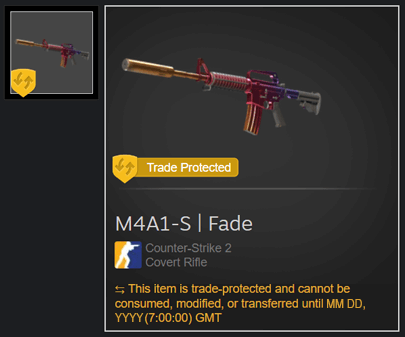
It’s a new Valve feature that that places a temporary seven-day trade lock on items you receive through trading. You can't re-trade, sell or transfer them for seven days. But you can use them in the game.In this way, Valve aims to enhance account security and reduce the number of scams among CS2 players.
So during the first seven days after the trade was complete, items:
Cannot be traded again
Cannot be consumed or used in contracts
Cannot be modified
Can be reversed if needed
So actually if you was hacked and someone decides to trade all your items to another account, you will be able to cancel it and bring it back.
How To Sell Skins Before and After The Trade Protection Update
After this major update, the mechanism of selling skins was changed. Take a look on new changes, so you will be warned about new updates.
Aspect | Before Trade Protection Update | After Trade Protection Update |
Protection against scammers | Many users got scammed and lost their skins. Only Steam Support could help them | You can now cancel any CS2 trade within 7 days via your Steam Trade History—no need for support |
Hold for trading | 7 days after purchase | New “Trade Protection” flag applies for 7 days. Reversed trades cause items to re-enter protection with another 7-day delay |
Time for receiving money | Instant | If you’re selling skins for cash via third-party sites, payouts must now wait 7 days—they won’t release funds until protection expires |
Trading skins from different games | No restrictions | Only CS2-to-CS2 trades are allowed under Trade Protection. Cross-game exchanges (e.g. Rust, Dota 2, TF2) are blocked |
Valve brings more protection for users, especially against scammers. But for the majority of third-party markets, the new rules have changed the job dramatically. While small-scale or hobby traders get added protection, high-frequency and cross-platform traders face a slower paced market with increased overhead.
Check out this video walkthrough for a deeper dive into the CS2 Trade Protection system, its impact on the skin market, and how to reverse trades safely:
Selling CS2 Skins on Skin.Land: What Changed After the Trade Protection Update?
We are happy to announce that you can now buy and sell CS2 skins on Skin.Land again. We're the best market with a huge amount of skins and favorable price.
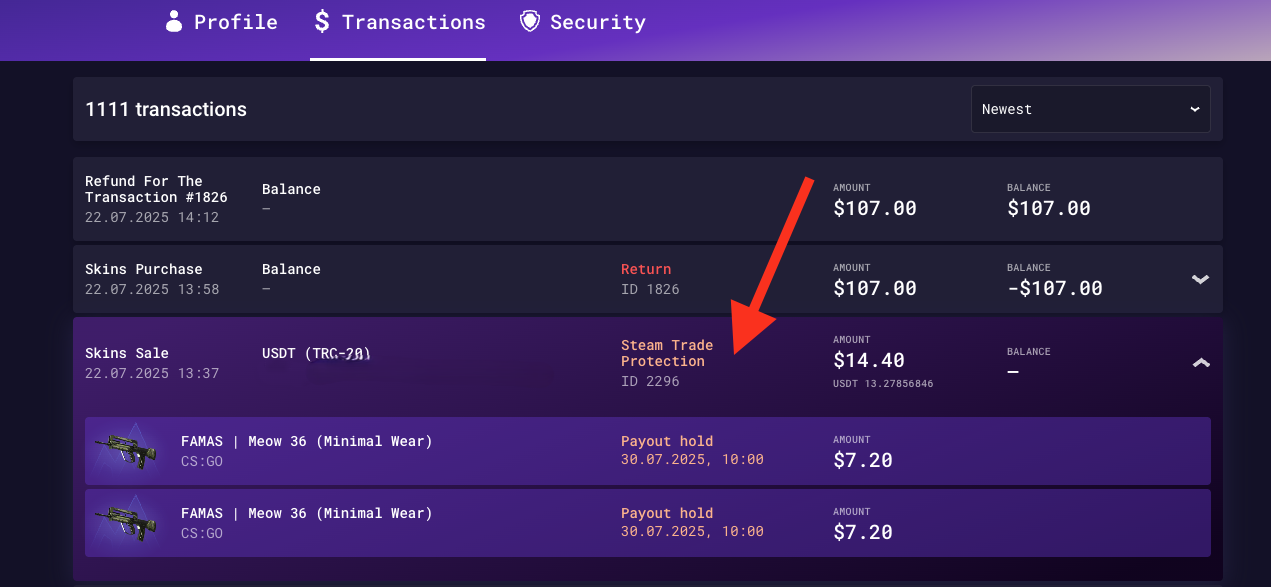
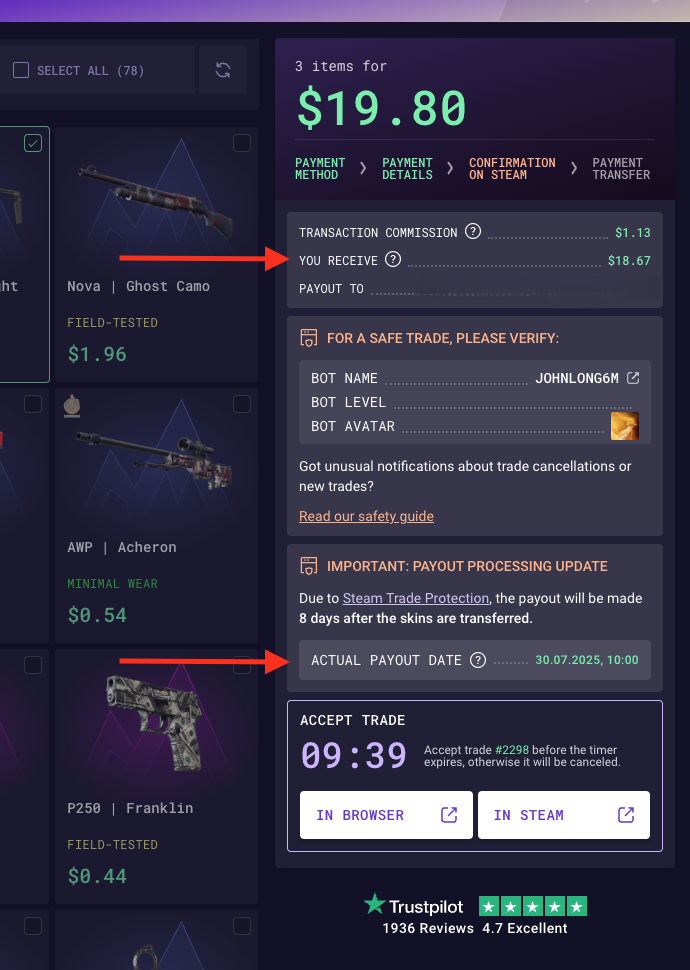
But we implement a new rule. Following recent changes to Steam’s trade system, we’ve made some adjustments to how sales work on our marketplace. Now you’ll receive your payout 8 days after the item’s trade protection period ends - unless the trade is reversed on Steam.
If you want to sell and get crypto for your skins, the rate calculation will take place on the day Steam Trade Protection ends. You will also always be able to track the unlock day on your account.
Despite the new trade regulations, Skin.Land remains the best and most secure place to sell your CS2 skins. We offer a wide variety of payment methods — including crypto, bank cards, and regional options — so you can choose what’s most convenient for you.

How To Cancel The Skins Trade in CS2?
So let’s imagine that someone stole your skins. First, secure your Steam account. To do this go to Steam Support, select “My Account was stolen, and I need help recovering it.” Follow the instructions, change the password, remove unauthorized access, and enable Steam Guard Mobile Authenticator if it was disabled.
Okay, you got your Steam account back, open the client and check the trade history. Click "Inventory", then "Trade Offers" and here select "View Trade History". Now you will see the list of your last trades, if the hacker made them, with Trade Protection you can cancel it.Click the “Reverse This Trade” button on any eligible trade. Steam will prompt you to confirm the reversal.
Again, the steps to cancel the trade:
Go to your Steam Trade History.
Look for trades with the yellow “Trade Protected” icon.
Click the button to Reverse Trades.
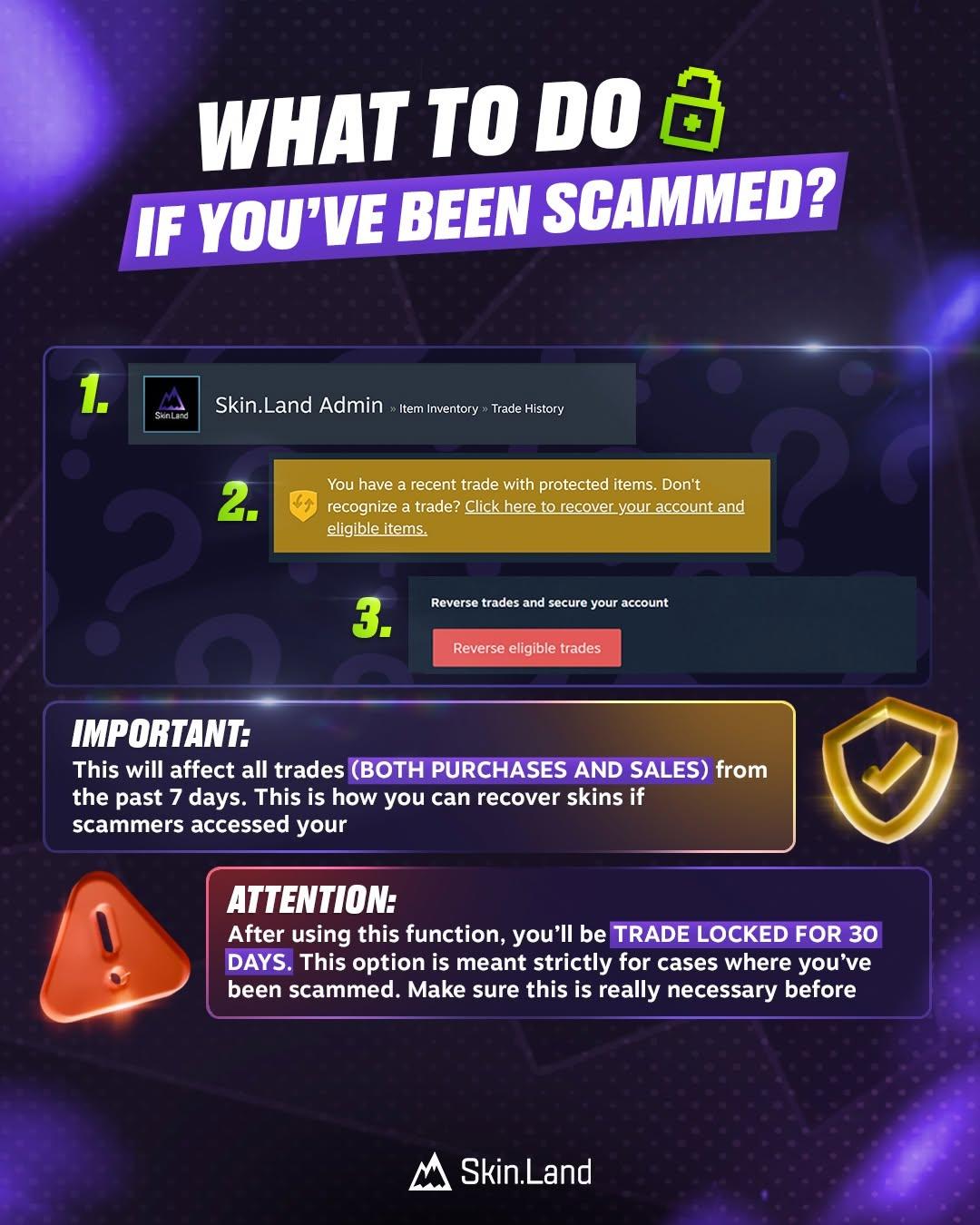
So all items in this trade will go back to you. Don’t forget that for this, you don’t need to contact Steam Support one more time, and all trade protected items will be reversed. But remember that there is a consequence - your account will get a 30-day cooldown from trading and using the Steam Market.
How Does it Affect the CS2 Trading Market?
It has a lot of impact on the trading market in CS2. Firstly, it’s going to be safer. All parties, new and old traders, will be more confident in trading. It’s gonna be delayed reselling. Since items can’t be traded for 7 days, some resellers might slow down. And the last one - market prices. Limited reselling may tighten supply, possibly raising prices for certain rare skins.
Since the update, the skins market survived the fall. More than $600 million dollars has already been lost, and the situation is not yet improving. It is still unknown what to expect next from the market.
What Will Happen to CS2 Skin Prices?
It’s still unknown how it’s gonna impact the skin market. On the one hand, you can be afraid of price cuts, especially on various marketplaces outside of Steam. But at the same time, the skin market in CS2 went through different times, and always found stability. So it is better not to panic, and just observe the situation.
Maybe it's great time for investment. Some skins price can be historically decreased, but has a chance to get back to normal after sometime. Don't miss a chance to take a risk and make good investment plan.
Which Steam Games Have Trade Protected Items?
Currently, the only game supporting Trade Protected items is Counter-Strike 2. As Valve learn more about this, they have a plan to make this available to other games on Steam.
General Questions about Trade Protection in CS2
Here you can find the answers for most popular questions about Trade Protection in CS2.
What’s the difference between Trade Protection and a regular trade hold?
- Trade Protection is a newer system introduced by Valve that marks certain items as non-tradeable for a 7 days after receiving them in a trade or from a market purchase A Trade Hold delays the trade itself for up to 15 days if security requirements aren’t met.
Can I turn off Trade Protection for my CS2 items?
- No, you can't. The Trade Protection is automatically applied by Steam to all accounts.
Why does one of my skins show as Trade Protected while others don’t?
- If the trade was completed before the adding of Trade Protection, your skins are not under this new system.
Why are items with protection not showing up in my inventory?
- If you trade something to your main account for example, they won't show up in Steam inventory for 7 days, but you will see them in game.
Can I use my skins in-game while they’re protected?
- Yes, you can. All skins under Trade Protection are eligible to use in the game.
Can I apply stickers or charms on CS2 skins under Trade Protection?
- No, you cannot apply stickers or charms to CS2 skins while they are under trade protection. Trade protection in CS2 prevents any modifications to items, including applying stickers or charms, during the 7-day cooldown period.
Payments and Security
When do I get paid if I sell Trade Protected CS2 skins?
- You will get your money after 8 days since the trade.
Are Trade Protected skins dropping in value?
- Yes, trade protected skins in CS2 are generally dropping in value. First and foremost, buyers can’t trade or sell them for 7 days, which makes them less attractive to traders and investors who want liquidity.
After purchasing items on the site, do I still have to wait 7 days before I receive them?
- No, you don't need to wait 7 days. You will receive the trade with skins immediately after the purchase.
Is it still possible for scammers to get around Trade Protection?
- Yes, it's still possible. Many CS2 players are actively reporting about scam cases even after the adding of Trade Protection system. Learn more about Steam API Scam, so you gonna be more careful with trades. You should always choose the trusted platforms like Skin.Land.
Frequently Asked Questions About How to Reverse Trades
Which trades can I actually reverse?
- You can reverse your trades that have "Trade Protection" mark during the first 7 days.
I hit “Reverse” by mistake — what can I do now?
- Unfortunately, nothing. The trade has already been canceled, your items have been returned to your inventory, and you will not be able to use the Steam Market for 30 days.
Will Steam Support help remove the 30-day trade cooldown after reverse?
No, it's a basic rule that Valve added with Trade Protection. Every Steam user who reversed the trade will get this ban.







James
I'm torn, but ultimately, I think this "Trade Protected" system is a necessary evil, if that makes sense. On one hand, Valve finally giving us a direct, no-BS way to reverse trades after a scam or account hijack? That's huge. The peace of mind for anyone with a valuable inventory is almost priceless. Knowing you don't have to battle Steam Support for weeks to recover a stolen knife or an expensive set of gloves is a massive win for player confidence. It's about time!
Its an okay update I guess. As for selling on your site funds can be also locked 7 days until released. I don't see other workaround, I would like to be able to sell skins for real money again.
Write comment