
jL CS2 マウス設定 - 感度と DPI
マウス設定に関して、jL は、素早いフリックと安定した正確なトラッキングのバランスをとった設定を使用しています。多くの現代プロと同様、彼は古い標準の 400 ではなく 800 のベース DPI を好みます。彼はこれをゲーム内感度 1.0 と組み合わせることで、実効 DPI (eDPI) 800 になります。これにより、彼はプロの感度範囲の真ん中にしっかりと位置します—十分に高速で、アングルをクリアしてフラッシュから向きを変えることができますが、長距離の決闘でピクセル完璧な十字線の配置を維持するには十分低いです。最大限の応答性を確保するために、jL はマウスで 4000 Hz のポーリング レートを使用し、標準ズーム感度 1.0 とベースライン Windows ポインタ速度 6/11 を使用しています。
マウス: Razer Deathadder V4 Pro ホワイト
DPI: 800
感度: 1
eDPI: 800
ズーム感度: 1
Hz: 4000
Windows 感度: 6
マウスの設定がどのように機能するか知りませんか?ガイド here をご覧ください。
CS2 の jL クロスヘア設定
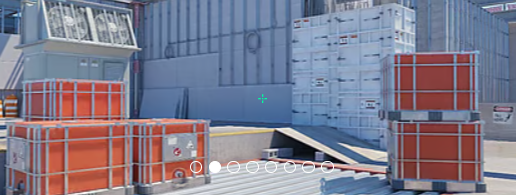
ブラジル人プレーヤーの十字線は、古典的な静的で緑色です。これを有効にするには、十字線コード CSGO-XBJXx-FbQRU-5tCvV-j83HR-4JDhP を入力するか、次のパラメータを手動でコピーします。
スタイル: クラシックスタティック
フォローリコイル: いいえ
ドット: はい
長さ: 1
厚さ: 0
ギャップ: -3
概要:いいえ
色 (RGB): カスタム
赤:0
緑: 255
青:160
アルファ: はい
アルファ値: 255
T スタイル: いいえ
配備された武器のギャップ: はい
スナイパー幅: 0
彼の十字線が気に入らないですか?心配はいりません。他のオプションを検討したい場合は、最適な CS2 十字線コード here のガイドをご覧ください。
CS2 の jL ビデオ設定
jL はビデオ設定に関して、視覚的な忠実度よりも競争上の優位性と最大フレーム レートを優先しています。多くの経験豊富なプロフェッショナルと同様に、彼は通常 1280x1024 (5:4) または 1280x960 (4:3) の拡張解像度を選択します。これにより、敵プレイヤーのモデルがより広く見え、攻撃しやすくなります。彼は、視覚的な乱雑さを軽減しパフォーマンスを向上させるために、シェーダー ディテールやパーティクル ディテールなどのほとんどのグラフィック設定を「低」のままにしていますが、決定的に重要なのは、「グローバル シャドウ クオリティ」を「高」のままにしていることです。これは、対戦相手が実際に見える前に、曲がり角や光源の下から投影される敵の影を見つけることができるため、トップティアのプレーヤーの間で一般的な戦術です。入力ラグを最小限に抑えるために、jL はV-Sync と FidelityFX Super Resolution を無効にし、同時に NVIDIA Reflex Low Latency を有効にして、混乱したチームの戦いでもゲームの応答性を可能な限り高めます。
プレイヤーのコントラストを高める: 無効
モデル/テクスチャの詳細: 中
シェーダーの詳細: 低
粒子の詳細: 低
テクスチャ フィルタリング: 異方性 4x
アンチエイリアス: 2x MSAA
影の品質: 低
ダイナミックシャドウ: すべて
アンビエント オクルージョン: 中
FidelityFX 超解像度: 無効 (最高品質)
垂直同期: 無効
NVIDIA Reflex 低遅延: 無効
NVIDIAG-Sync: 無効
ハイダイナミックレンジ: 品質
解像度: 1280*960
アスペクト比: 5:4 ストレッチ
モード: フルスクリーン
スケーリングモード: ストレッチ
明るさ: 93%
CS2 の jL モニター設定
セットアップを最大限に活用するために、jL は最上位の ZOWIE モニター—を使用しており、現在最先端の ZOWIE XL2586X+—に移行中で、ペースの速いゲームプレイ中に絶対的な明瞭さを保証しています。彼は FPS 2 画像モードをベースラインとして利用し、映画のような美しさよりも競争力を高めるためにディスプレイを微調整しています。 DyAc (動的精度) をプレミアムに設定することで、モーション ブラーが大幅に軽減され、スプレーの制御と移動ターゲットの追跡がはるかに簡単になります。
彼はこれを Black eQualizer 設定 7 と組み合わせて、マップの残りの部分を露出しすぎることなく暗い隅を明るくし、敵が影に隠れることを確実にします。最後に、Color Vibrance を 13 に上げると、プレイヤー モデルが Mirage や Ancient などのマップの単調な背景に浮かび上がります。その他の標準設定には、コントラスト 50、シャープネス 10、ガンマ 3 が含まれており、高度に最適化された視覚プロファイルを完成させます。
ここで jL モニター設定を確認できます。
DyAc: プレミアム
ブラックイコライザー: 7
色の鮮やかさ: 13
低ブルーライト: 0
ピクチャーモード: FPS 2
明るさ: 100
コントラスト: 50
切れ味:10
ガンマ: ガンマ 3
色温度: ユーザー定義
赤:80
緑: 82
青:100
AMA: 高
CS2 の jL Viewmodel 設定
Major MVP のビューモデル設定は、他の CS2 プロ プレーヤーの設定と似ています。水平オフセットは 2.5、垂直オフセットは -1.5 です。これらの設定により、照準と射撃が便利になり、武器モデルが視野を過度に妨げないようにすることができます。
ビューモデル_fov 68
ビューモデル_オフセット_x 2.5
ビューモデル_オフセット_y 2
viewmodel_offset_z -1.5
viewmodel_presetpos 1
viewmodel settings がどのように機能して好みに合わせて調整するかを学ぶことも役立ちます。
CS2 の jL 起動オプション
jL は現時点では起動オプションを使用しません。
最適なCS2起動オプションをお探しの場合は、guideをチェックしてください。
CS2 の jL レーダー設定
彼のレーダーはプレーヤーを中心に置き、同時に回転します。次の設定を使用して、モロドイ radar settings でのプレイがどのような感じかを自分で試してください。
レーダーはプレーヤーを中心にします: はい
レーダーが回転しています: はい
スコアボードで形状を切り替え: はい
レーダーハッドサイズ: 1
地図ズーム: 0.4
CS2 の jL オーディオ設定
すべての足音、リロード、ユーティリティ キューを明確に聞くために、jL は一流のオーディオ ハードウェアを使用し、ゼンハイザー IE 900 Pro インイヤー モニターやワイヤレス Logitech G PRO X 2 ヘッドセットを定期的に利用しています。特定のオーディオ スライダーは非常に個人的なものですが、CS2 の内蔵サウンド設定を最適化することは、ハイレベルな競技プレイにとって非常に重要です。多くの一流プロと同様に、jL は "Crisp" または "Natural" EQ プロファイルに依存している可能性があります。鮮明な設定は、中音域と高音域をブーストするためにプロシーンで特に人気があり、混沌とした銃撃よりも敵の足音を目立たせることができます。
正確な空間認識を実現するには、L/R アイソレーションのバランスを 0% から 50% の間で維持し、遠近感補正を無効にすると、プレーヤーの直接の視野に関係なく、指向性サウンドが物理的に正確で一貫した状態に保たれます。最後に、高圧クラッチの状況で不必要な気が散るのを排除するために、重要でないゲーム内音楽はすべてミュートされ、爆弾解除中に時間を適切に管理するために重要な 10 秒の警告音量のみがアクティブなままになります。
jL Skins
彼は液体アイテムの健全なローテーションを維持していますが、彼のコレクションの真のハイライトは、彼の卓越したナイフとグローブの組み合わせと珍しい sticker 工芸品にあります。彼はウルトラレア Doppler finish を頻繁にローテーションしており、Butterfly Knife サファイアとスポーツ グローブ パンドラのボックス、または Butterfly Knife エメラルドとスポーツ グローブ Hedge Maze を組み合わせることは有名です。 Case Hardened の愛好家のために、jL は非常に人気の pattern シード 241 をフィーチャーした Talon Knife も提供しており、Vice グローブと完璧に組み合わせられています。
ライフル側では、彼の傑出したプレイスキンには、カトヴィツェ 2014 sticker で飾られた StatTrak AK-47 ファイヤー サーペント、超レアな AWP グングニール、そして Clan-Mystik (ホロ) とクラウン (フォイル) クラフトを特徴とするデュアル M4A1-S ナイトが含まれます。彼のピストルの装備も同様にプレミアムであり、4 つの Cloud9 (Holo) DreamHack 2014 sticker を誇る Desert Eagle Printstream によって強調されており、高層市場への投資と希少層に対する彼の目がサーバーでの狙いと同じくらい鋭いことを証明しています。






コメントを書く