
How Does Trade Protection Work Now?
In the recent update, released in summer 2025, Valve introduced a new set of restrictions aimed at combating scammers. Now, the trade can be reverted even after it was finalized. As a result, new restrictions were added, in addition to previously existing restrictions to trading an item or giving it away to another player, all other actions with the item were also prohibited. In addition, the item cannot be modified or used in trade-up contracts. You can learn more about the trade protection update in the following article.
It’s worth noting that, while the main goal of the update was to reduce the risk of scams and of players losing their collection, it has significantly impacted the market, slowing it down and demanding third-party services and players to adapt, if they want to sell skins cs2 without delay. After the Trade Protection update was released, players and third-party markets faced the following restrictions:
After the items are traded, a new “Trade protection” flag will be applied to them. It remains active for seven days, and within the period, a player can reverse a trade.
Cross-game item exchange isn’t allowed now, so you can trade CS2 skins for other skins from the same game, but trading CS2 skins for Rust or Dota2 skins are no longer possible.
The changes affected how withdrawal restrictions work on CS2 websites: most of them had to introduce payout delays, releasing funds to their customers only after the protection period expired.
How to Sell CS2 Skins Instantly After the Trade Protection Update
The delay seems to be inevitable, as third-party websites need a way to ensure the seller will not reverse a trade after being paid. However, we trust our customers and want to ensure that they get the best experience when they trade skins at Skin.Land. To achieve this, we have found a way to give our users an opportunity to get paid instantly for the skins they sell. Skin.Land is one of the first CS2 instant payout marketplaces to implement such an option, so do not miss your chance to sell CS2 skins instantly in the most convenient way.
Here is how it works at Skin.Land now:
KYC Verification. You need to complete a KYC verification procedure, which includes providing your ID data.
Minimum Sales. You need to sell skins for at least $50 (not necessary in one deal).
Withdrawal Limit. The total instant payout available to you is limited to 10% of your total purchase, up to $200 maximum.
Auto Refresh. The limit refreshes automatically each time after the Steam Trade Protection period for your selling deals expires.
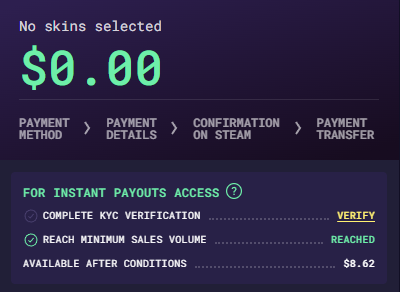
For example, if you have sold CS2 items on Skin.Land with a total value of $100 and have completed KYC verification, your instant withdrawal limit will be $10 (10% of the total sold amount).
As a result, in this case, if you want to sell CS2 skins with instant withdrawal, you need to choose items worth no more than $10 in total. Check it for yourself - follow the link to sell CS2 skins and find out what sum of instant withdrawal is available for your account.

Key Facts About Instant Withdrawal Changes
Let’s look at a side-by-side comparison of how funds withdrawal worked before instant payments were introduced, and how it works now with Skin.Land. instant payouts.
Before Instant Payments | With Instant Payments at Skin.Land |
Wait up to 7–8 days before getting real money | Get paid instantly after the deal is completed. |
If you plan to buy skins right after selling the ones you have, you will have to wait until the Trade Protection expires. | You can get your funds for selling skins within the instant payout limits and use it to purchase new skins without waiting. |
No withdrawal limits, but you have to deal with the Trade Protection period. | The instant withdrawal limit is 10% of purchases, up to $200 |
The payout is made 8 days after the skins are transferred. | Withdraw directly to bank card or crypto |
No KYC required, but waiting is unavoidable | KYC verification unlocks access to instant withdrawals |
How to Sell CS2 Skins Without Hold
While the Trade Protection update introduced some changes, the process of getting instant CS2 skins cashout at Skin.Land looks as follows:
Complete the KYC verification if you haven’t done so yet.
Choose the skins for a total sum within your instant payout limit
You will see the sum available for instant withdrawal.
Choose the preferred payout options.
You will receive the funds within a few minutes after confirming the operation.
Here is an example of how a completed sale with an instant payout looks like:
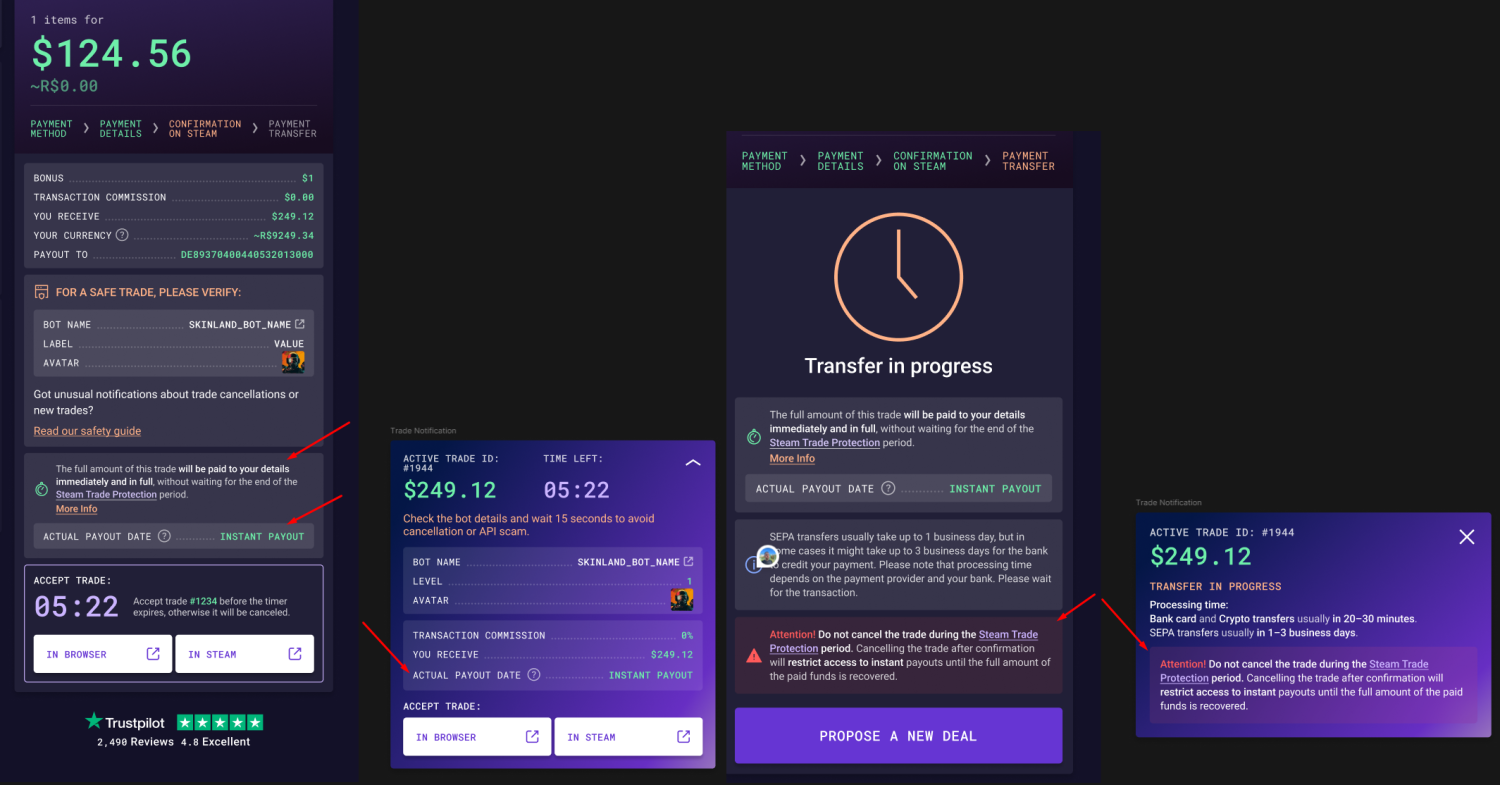
Note that the sum of the sale cannot be broken down into two parts, so if the total cost exceeds your withdrawal limit, instant payment won’t be available. However, the limit will increase as you will sell more skins through the website. Note, that the limit is updated after the Trade Protection for these skins expires.
Getting an instant payout for your cS2 skins is a convenient solution for those who value their time and need to get the payout for selling skins at the CS2 skins marketplace right away. Complete a simple verification procedure and get access to a faster way to trade items at Skin.Land. Sell CS2 skins for crypto instantly or get paid to your bank card - use what option is convenient for you at Skin.Land!
FAQ
Is it possible to withdraw money from Skin.Land instantly?
Yes, absolutely, but within a withdrawal limit, which may vary for different users. Choose your preferred payout method and get your profits directly to your bank account or an e-wallet. Note that the list of available payment options can depend on your location.
Where can I check my instant withdrawal limit?
You will see it directly when you are doing a sale. If the limit isn’t displayed, check if you have fulfilled all the necessary conditions.
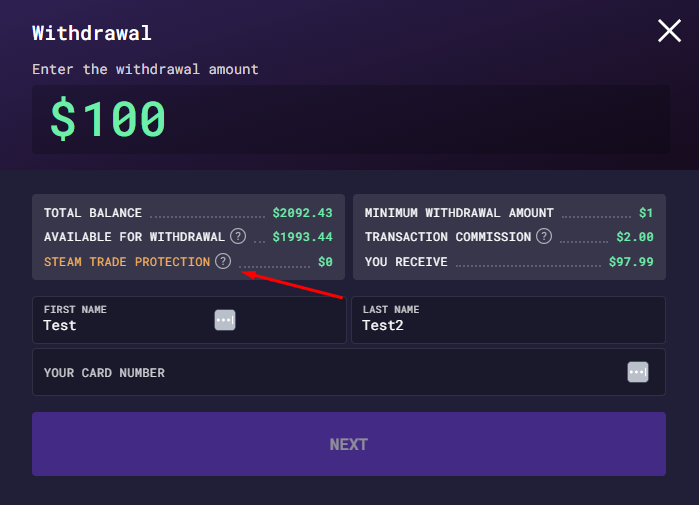
Is the withdrawal limit applied to each deal separately?
No, each deal subtracts from the total limit. It renews as the Steam Trade Protection period for the previous deals expires.
If I register at Skin.Land and pass the KYC procedure, will the instant withdrawal be available to me right away?
No, you need to sell some skins first: the instant withdrawal limit is calculated as the 10% of your total sales. They count towards the limit only after the Trade Protection on each sale expires. You can check the current amount on your account page.
Can I withdraw the money from my Skin.Land account balance through the same instant payment option?
No, instant payment is available only at the moment of sale. If you choose to acquire payment on your Skin.Land balance, you will be able to use the money instantly to buy other CS2 skins, but to withdraw them you will need to wait for Trade Protection on that sale to expire.
Who will have access to my data that I provide through the KYC procedure?
The KYC procedure is completed through our certified partner in accordance with international security standards. We do not give access to your data to any third parties.
What if I do not want to complete the KYC procedure?
Completing the KYC procedure is not necessary to buy and sell skins at Skin.Land. However, if you do not complete it, you will be unable to use our instant payment feature. So, to get the best experience, just complete the easy and safe KYC procedure and start using the instant payout option at Skin.Land.






Write comment