
karrigan CS2 Mouse Settings - Sensitivity and DPI
To execute his precise tactical vision, karrigan relies on a steady and controlled mouse configuration that favors consistency over rapid, flashy flicks. He currently plays with a DPI of 400 and an in-game Sensitivity of 1.8, which results in an overall eDPI of 720 (though he occasionally switches to 800 DPI with a 0.9 to 0.95 sensitivity, keeping him in that same 720–760 eDPI range). His Zoom Sensitivity is locked at the standard 1.0, ensuring a reliable 1:1 feel when scoped in with weapons like the AUG or AWP.
Rounding out his aim mechanics, karrigan typically runs a 1000Hz or 4000Hz Polling Rate, depending on whether he is wielding the Razer DeathAdder V3 HyperSpeed or the Viper V3 Pro, and keeps his Windows Sensitivity at 4. This lower-sensitivity setup is typical for veteran In-Game Leaders, providing the stability needed for perfect crosshair placement and reliable micro-adjustments under major tournament pressure.
Mouse: Razer DeathAdder V3 HyperSpeed
DPI: 800
Sensitivity: 0,9
eDPI: 720
Zoom Sensitivity: 1
Hz: 1000
Windows Sensitivity: 6
Don’t know how mouse settings work? Check out our guide here.
karrigan Crosshair Settings for CS2
If you want to try the exact aiming setup of the IEM Cologne Major champion, you can import his most recent crosshair code directly into your settings: CSGO-D6dUn-aMsd3-YtsC6-ZHMPB-mzxsP
Style: Classic Static
Follow Recoil: No
Dot: No
Length: 2.5
Thickness: 1
Gap: -4
Outline: No
Color (RGB): Custom
Red: 255
Green: 255
Blue: 255
Alpha: Yes
Alpha Value: 200
T Style: No
Deployed Weapon Gap: No
Sniper Width: 0
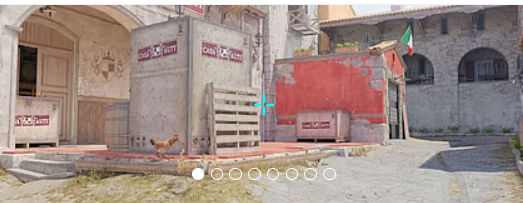
Don’t like his crosshair? No worries, if you want to explore other options, check out our guide for the best CS2 crosshair codes here.
karrigan Video Settings for CS2
To guarantee maximum frame rates and clear visibility of opponents, karrigan uses a heavily optimized video configuration. Like many Counter-Strike veterans, he prefers a 4:3 Aspect Ratio with a 1280x960 Resolution, played on Stretched scaling to make enemy player models appear slightly wider. He keeps his overall brightness at 93% and enables Boost Player Contrast to ensure targets stand out against map backgrounds.
In his advanced video settings, karrigan balances raw performance with crucial competitive advantages. He sets Global Shadow Quality to High and Dynamic Shadows to All, which is essential for spotting enemy shadows around corners before they swing.
To reduce unnecessary visual clutter and maintain high FPS, he drops Model / Texture Detail, Shader Detail, and Particle Detail to Low. He relies on 8x MSAA for anti-aliasing and Anisotropic 8x for texture filtering to smooth out jagged edges, alongside Medium Ambient Occlusion and Quality High Dynamic Range. Finally, to minimize input lag, he disables V-Sync and FidelityFX Super Resolution while keeping NVIDIA Reflex Low Latency enabled.
Boost Players Contrast: Enabled
Model/Texture Detail: Low
Shader Detail: Low
Particle Detail: Low
Texture Filtering: Anisotropic 8x
Anti-Aliasing: 8x MSAA
Shadow Quality: High
Dynamic Shadows: All
Ambient Occlusion: Medium
FidelityFX Super Resolution: Disabled (Highest Quality)
V-Sync: Disabled
NVIDIA Reflex Low Latency: Disabled
NVIDIA G-Sync: Disabled
High Dynamic Range: Quality
Resolution: 1280x960
Aspect Ratio: 4:3
Mode: Fullscreen
Scaling Mode: Stretched
Brightness: 93%
karrigan Monitor Settings for CS2
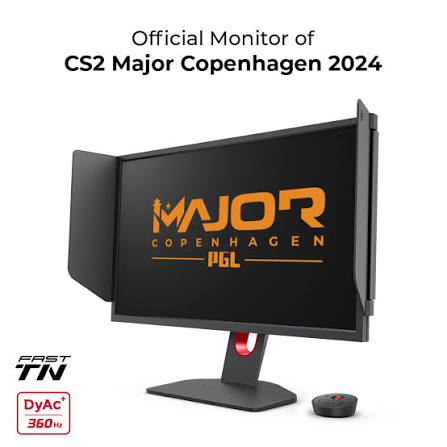
To maintain visual clarity during chaotic executes and quick aim duels, karrigan relies on the industry-standard ZOWIE XL2566K, a 24.5-inch monitor boasting a massive 360Hz Refresh Rate.
Here you can find karrigan monitor settings:
DyAc: Premium
Black eQualizer: 10
Color Vibrance: 11
Low Blue Light: 0
Picture Mode: FPS 1
Brightness: 75
Contrast: 50
Sharpness: 6
Gamma: Gamma 3
Color Temperature: User Define
Red: 93
Green: 93
Blue: 100
AMA: High
karrigan Viewmodel Settings for CS2
To further open up his peripheral vision, he maximizes the weapon field of view with a viewmodel_fov of 68, locking these values in with a viewmodel_presetpos of 2. This specific combination reduces visual clutter, pushing the rifle into the bottom right corner of the screen and ensuring that his focus remains entirely on mid-round calls, reading the opponent's setups, and executing site takes.
viewmodel_offset_x 2.5
viewmodel_offset_y 0
viewmodel_offset_z -1.5
viewmodel_presetpos 2
It’s also useful to learn how viewmodel settings work to adjust them to your preference.
karrigan Launch Options for CS2
karrigan doesn’t use any of the launch options at this moment.
If you’re looking for the best CS2 launch options, check out our guide.
karrigan Radar Settings for CS2
His radar centers the player and rotates simultaneously. Use the following settings to try out for yourself what playing with the karrigan radar settings feels like.
Radar Centers The Player: Yes
Radar is Rotating: Yes
Toggle Shape With Scoreboard: No
Radar Hud Size: 1.2
Map Zoom: 0.4
karrigan Audio Settings for CS2
Sound is arguably the most critical source of information for an In-Game Leader, and karrigan ensures he never misses a footstep or a grenade pin by using top-tier audio gear and optimized in-game settings. He relies on the SteelSeries Arctis Nova Pro headset (often the Wireless White edition or in-ear monitors like the Sennheiser IE 300 for LAN environments), known for its exceptional clarity and precise spatial audio. In CS2, where directional sound is paramount, most pros utilize the Crisp EQ Profile to boost the high-frequency sounds of footsteps and reloads, cutting through the muddy bass of explosions. For his soundstage, a standard L/R Isolation around 50% to 60% provides a natural but accurate directional blend, while enabling Perspective Correction makes it significantly easier to track moving targets around corners. To ensure his communication with the team is flawless, he keeps distracting main menu and round-action music muted—leaving only the vital Ten Second Warning Volume slightly turned up—allowing him to focus entirely on mid-round calls and reading the opponent's rotations.
karrigan Skins
While karrigan is celebrated more for his tactical genius than flashy individual plays, his CS2 inventory is undeniably top-tier and packed with some of the most coveted items in the game.







Write comment