
XANTARES CS2 Mouse Settings - Sensitivity and DPI
To execute his signature lightning-fast peeks and snappy aim, XANTARES plays on a relatively high sensitivity compared to the average Counter-Strike 2 professional.
Currently wielding a ZOWIE FK1-C, he plays on 400 DPI with an in-game sensitivity of 2.3, which results in a high eDPI of 920. This elevated eDPI is the engine behind his explosive playstyle, allowing him to clear angles aggressively and hit rapid, robotic spray transfers without needing massive, fatiguing arm movements across his mousepad. To round out his configuration, he runs a zoom sensitivity of 1.1, slightly above the default, making his scoped weapon movements a bit more responsive, all while locked in at an industry-standard 1000Hz polling rate and a 6/11 Windows sensitivity.
Mouse: ZOWIE FK-1-C
DPI: 400
Sensitivity: 2.3
eDPI: 920
Zoom Sensitivity: 1.10
Hz: 1000
Windows Sensitivity: 6
Still don’t know how mouse settings work? Check out our guide here.
XANTARES Crosshair Settings for CS2
XANTARES crosshair is classic static and colored green. You can enable it by entering a crosshair code CSGO-Ts59P-UHNG6-Nsnwp-eBrtF-Ln2AC, or by copying the following parameters manually:
Style: Classic Static
Follow Recoil: No
Dot: No
Length: 3
Thickness: 0.5
Gap: -2
Outline: No
Color (RGB): Green
Red: 50
Green: 255
Blue: 50
Alpha: Yes
Alpha Value: 200
T Style: No
Deployed Weapon Gap: No
Sniper Width: 0

If you want to explore other options, check out our guide for the best CS2 crosshair codes here.
XANTARES Video Settings for CS2
Like many seasoned professionals who transitioned from Global Offensive, XANTARES prefers the traditional, focused feel of a stretched 4:3 aspect ratio. He plays on a 1024x768 resolution scaled to full screen, which makes player models appear significantly wider and easier to hit during his signature rapid-fire duels.
To push frame rates to the absolute limit and fully utilize his 540Hz ZOWIE XL2586X monitor, he keeps almost all advanced video settings on their lowest values, including model, shader, and particle detail. However, he does enable "Boost Player Contrast" and uses 4x MSAA to ensure enemy silhouettes stand out clearly against complex backgrounds. This purely competitive configuration sacrifices visual fidelity for maximum performance, ensuring zero input lag and visual clarity when entering a chaotic bomb site.
Boost Players Contrast: Enabled
Model/Texture Detail: Low
Shader Detail: Low
Particle Detail: Low
Texture Filtering: Anisotropic 4x
Anti-Aliasing: 4x MSAA
Shadow Quality: Low
Dynamic Shadows: All
Ambient Occlusion: Disabled
FidelityFX Super Resolution: Disabled (Highest Quality)
V-Sync: Disabled
NVIDIA Reflex Low Latency: Enabled
NVIDIA G-Sync: Disabled
High Dynamic Range: Quality
Resolution: 1024*768
Aspect Ratio: 4:3 stretched
Mode: Fullscreen
Scaling Mode: Stretched
Brightness: 100%
XANTARES Monitor Settings for CS2
To complement his high-performance PC and aggressive playstyle, XANTARES relies on the BenQ ZOWIE XL2586X, a cutting-edge 540Hz monitor that offers unparalleled motion clarity. To maximize visibility and spot enemies instantly during chaotic firefights, he utilizes specific hardware-level color profiles. He sets his monitor's Picture Mode to "Gamer 2" with the Brightness and Contrast both cranked up to 70.
More importantly, he pushes the Black eQualizer up to 20 - a crucial setting that dramatically brightens dark corners on maps like Mirage and Inferno without blowing out the highlights. Combined with a Color Vibrance setting of 13 to make player models pop against drab backgrounds and ZOWIE's DyAc technology set to "Premium" to reduce motion blur, XANTARES ensures he never loses track of a target, even in the middle of a frantic spray transfer.
Here you can find XANTARES monitor settings:
DyAc: Premium
Black eQualizer: 20
Color Vibrance: 13
Low Blue Light: 0
Picture Mode: Gamer 2
Brightness: 70
Contrast: 70
Sharpness: 8
Gamma: Gamma 2
Color Temperature: Normal
AMA: high
XANTARES Viewmodel Settings for CS2
The young prodigy has viewmodel settings that are similar to those of many other CS2 pro players. It has a horizontal offset of 2.5 and a vertical offset of -1.5. These settings make aiming and shooting convenient and ensure that the weapon model doesn’t obstruct too much of the field of view.
viewmodel_fov 60
viewmodel_offset_x 1
viewmodel_offset_y 1
viewmodel_offset_z -1
viewmodel_presetpos 1
It’s also useful to learn how viewmodel settings work to adjust them to your preference.
XANTARES Launch Options for CS2
Take a look at the launch options for CS2, which XANTARES uses:
-noforcemaccel -noforcemspd -noforcemparms -freq 360 -novid -console -tickrate 128 -d3d9ex
If you’re looking for the best CS2 launch options, check out our guide.
XANTARES Radar Settings for CS2
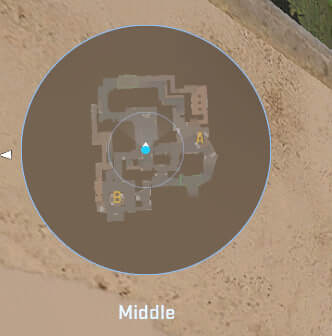
His radar centers the player and rotates at the same time. Use the following settings to try out for yourself what playing with the XANTARES radar settings feels like.
Radar Centers The Player: Yes
Radar is Rotating: Yes
Toggle Shape With Scoreboard: Yes
Radar Hud Size: 0.98
Map Zoom: 0.35
XANTARES Audio Settings for CS2
Sound cues are just as vital to XANTARES's aggressive entry fragging as his lightning-fast aim, as hearing a single misstep allows him to pre-fire angles with devastating accuracy. To capture every audio detail, he relies on the HyperX Cloud III Wireless headset for his daily grind, often switching to Razer Hammerhead Pro V2 in-ear monitors under noise-canceling earmuffs when competing on chaotic LAN stages.
Master Volume: 100%
Audio Device: Default
EQ Profile: Natural
L/R Isolation: 0%
Perspective Correction: Yes
Play Audio When Game in Background: No
Main Menu Volume: 20%
Round Start Volume: 0%
Round Action Volume: 0%
Round End Volume: 40%
MVP Volume: 30%
Bomb/Hostage Volume: 20%
Ten Second Warning Volume: 20%
Death Camera Volume: 30%
Mute MVP Music when players on both teams are alive: No
XANTARES Skins
When it comes to his in-game loadout, XANTARES boasts an inventory that matches his explosive playstyle, filled with high-tier, highly sought-after skins.
Use XANTARES’s collection as your blueprint, or browse Skin.Land to find skins that match your personal style. Explore our extensive catalog of pro-player skins today for quick, secure, and budget-friendly purchasing.







Write comment