

Why Should I Make My Steam Profile Public?
There are several reasons players prefer to use a public Steam inventory. The main advantages in comparison to keeping a private one are the following:
The ability to send and receive items, such as Steam Gifts or CS2 skins, as well as other digital items.
Trading skins with other players.
Connecting your account to third-party websites to analyze it and buy or sell skins for better prices than at the official Steam Market.
While it is perfectly safe to set your Steam inventory public, do not forget the basic rules of cyber security and protecting your account, especially if you have a valuable inventory. (By the way, here you can learn how to check your inventory value). Here are the most important rules to remember:
Always carefully check your trade before confirming them.
Do not add unknown users as friends and never click on any links you get from them.
Last but not least, use only reliable websites to sell and buy skins. Skin.Land pays great attention to security while offering very pleasant prices. The website is a great place to buy and sell skins of all kinds, from rarities to common skins that clutter your inventory.
Following these simple rules, you can set your Steam inventory to the public without any risks and use it freely to exchange or sell CS2 skins.
How To Make Your Steam Profile and Inventory Public?
To set your Steam inventory from private to public, perform the following actions:
Open your Steam profile page in a browser or in a Steam app. Log in, if you haven’t done it yet.
Click on your name in the upper-right corner and locate Edit Profile options.
Choose “Privacy Settings” below.
Within Privacy Settings, locate the section called “My Profile”. The item you need belongs to the “Inventory” parts.
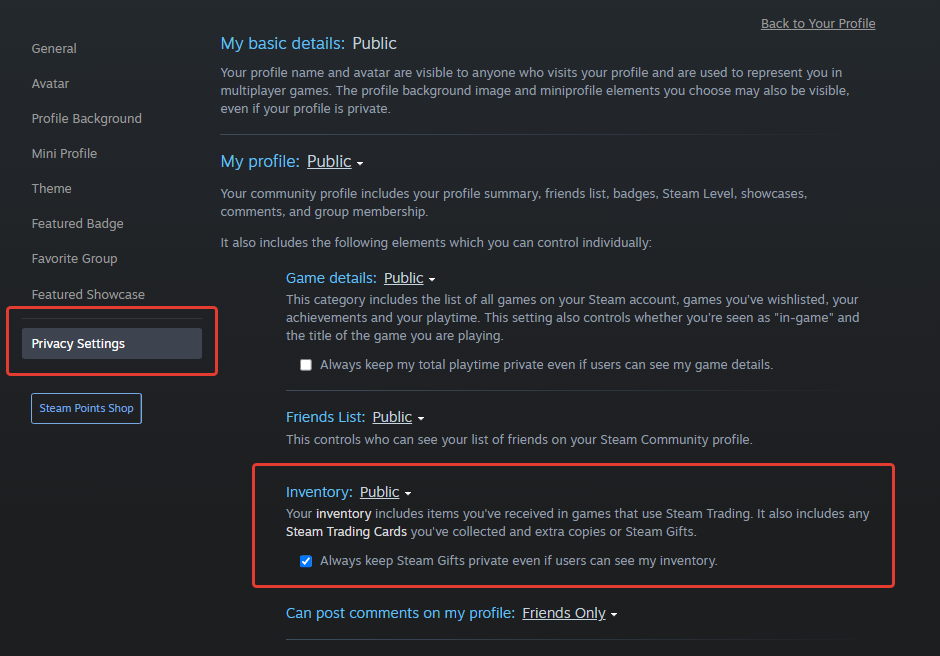
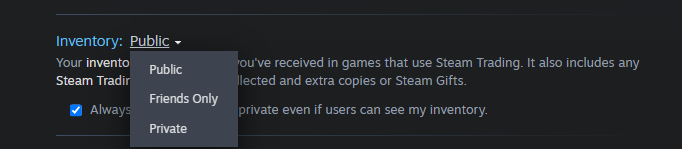
Choose the desired options. There are three options – Public, Friends Only, and Private.
Now other users are able to see your profile and send you trade requests.
To trade items or exchange with other players, you may also need a trade link. You can learn more about it in a separate article and use it as a convenient way to get trade requests from other users.
Why I Can't Set Steam Inventory Settings to Public
There are several reasons why you cannot put your inventory to the public. To fix this issue, try out the following options:
Check the settings of your profile. If your profile as a whole isn’t set to public, you need to adjust this setting as well.
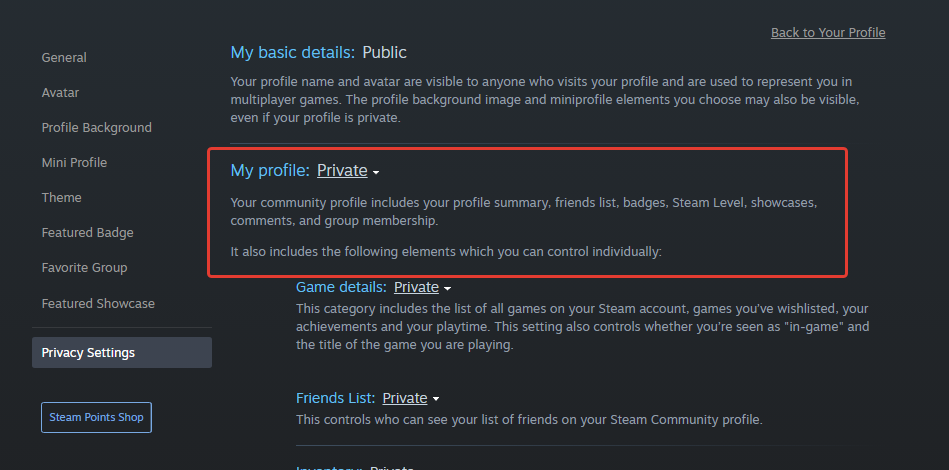
Try to do the action above from a different device. Use the browser if you are using a PC app and vice versa.
Clear the browser cache and try to repeat the process.
Check for additional restrictions that can limit your capability to trade skins. For example, if you change your profile name, you need to wait for several hours for the trades to become available.
With this advice you will resolve the most common issues. However, they occur very infrequently, because changing your account to public is a pretty straightforward process. Use it to discover great opportunities for skins trading and exchange at Skin.Land!






Write comment