
How to Practice CS2 Smokes and Grenades?
The most common way to practice grenades in CS2 is to load one of the popular maps in practice mode and then repeatedly use smokes and grenades from certain reference points to perfect your throws. For the most efficient training, you can use the following practice setup. First ensure, that you have your console enabled (to learn more about console read this article), then perform the following actions:
Launch a custom training server with the map of your choice.
Enable cheats.
Kick all bots.
Get the maximum available amount of money.
Get the maximum available number of grenades and smokes.
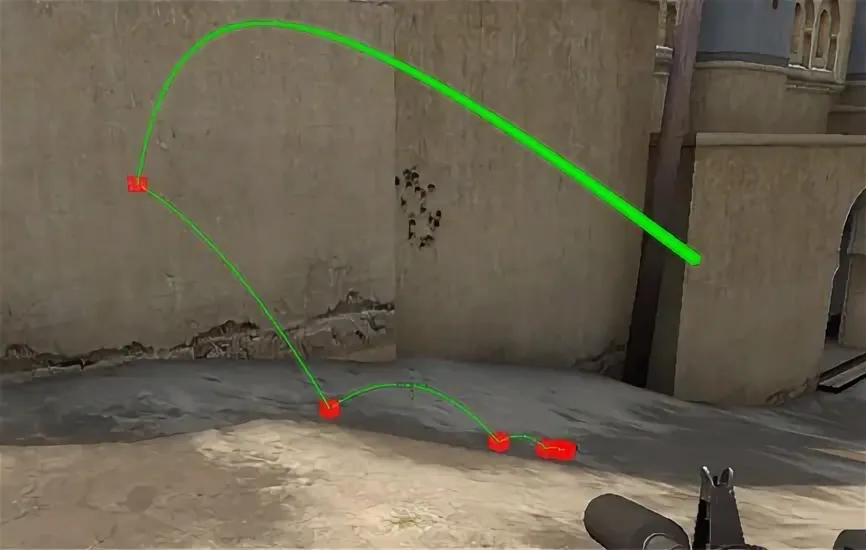
Enable grenade trajectory preview.
Later we will explain what commands in particular are used to set up your practice session. To speed up the preparations, instead of typing them all out manually, you can just compile the commands in a text file and then paste them into your console to execute all of them at once. If you want to practice grenades often, you may need a more advanced option: to save your time, create a config file that stores all the necessary commands to set up your CS2 smoke training server.
To learn what throws you need to practice first, google community guides or use ones presented at Skin.Land. Check the best grenade and smoke lineups (for example, here is our guide for the best Mirage smokes) and practice them to ensure you can perform the throw precisely in the heat of an actual competitive game. Recently, Valve has added some lineups as well, which can be viewed when in practice mode and help new players familiarize themselves with common tactics. However, this feature isn’t available for all maps yet, so you still need some external sources.
All Best Commands for Practicing Smokes in CS2
Besides the console commands that allow you to start the practice session, as described above, there are several other commands that are useful to know, specific to practice smokes in CS2.
Enable cheats: sv_cheats 1
Unlimited ammo: sv_infinite_ammo 1
Allow carrying all grenades: ammo_grenade_limit_total 5
Preview grenade trajectory before throwing: sv_grenade_trajectory_prac_pipreview 1
Set trajectory trail time: sv_grenade_trajectory_prac_trailtime 15
Display impact points: sv_showimpacts 1
Set impact visibility duration: sv_showimpacts_time 10
Extend round time: mp_roundtime 60
Remove bots: bot_kick
All Commands for Practicing Grenades in CS2
In a similar fashion, here are the best console commands that you need to practice with infinite grenades in CS2. You may notice that the first part of both lists has some commands in common. It is because the setup of the practice is the same, as the grenades and smokes are basically the varieties of the same weapon from the gameplay point of view.
Enable cheats: sv_cheats 1
Unlimited ammo: sv_infinite_ammo 1
Allow carrying all grenades: ammo_grenade_limit_total 5
Display grenade trajectory after throwing: sv_grenade_trajectory 1
Set trajectory visibility duration: sv_grenade_trajectory_time 10
Rethrow last thrown grenade: sv_rethrow_last_grenade
Show impact points: sv_showimpacts
Set impact visibility duration: sv_showimpacts_time 10
Extend round time: mp_roundtime 60
Remove bots: bot_kick
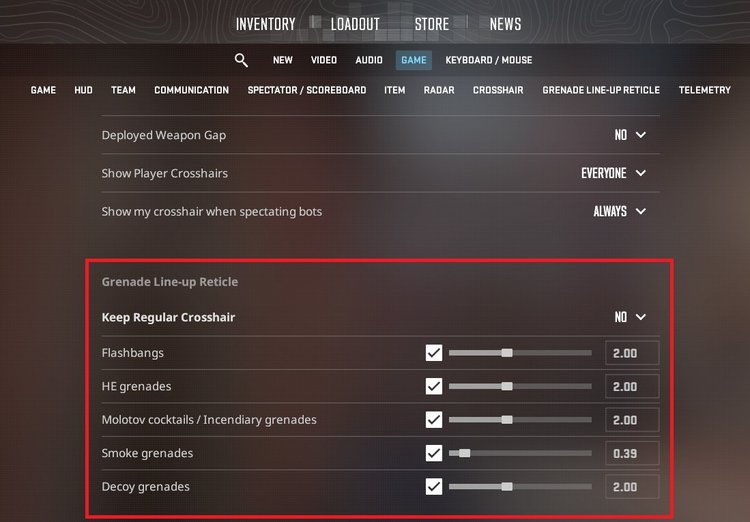
In addition, you can use CS2 settings to enable Grenade Line-up Reticle to help you aim precisely. Its parameters can be adjusted separately for different grenade types, such as smokes, Molotov cocktails, and flashbangs. You can also choose if you want to keep your regular crosshair on screen while aiming a grenade.
Best Tips for Practicing CS2 Smokes and Grenades in 2026
Here are some additional tips that will help you to advance faster, improve your performance and gain tactical advantage in your matches masterfully using smokes and grenades.
Use different sources of information and learn what works best for you. Tutorial videos, visual guidelines for different maps, screenshots represent key reference points – the CS2 community has created all sorts of guides you can use to master the necessary skills.
Use websites, similar to CSNades.GG, to learn about the most popular lineups recommended by other players. Keep the website at hand while practicing to check which throw to practice next.
Practice consistently. Getting the best throws of grenades and smokes is a matter of muscle memory, so you need to repeat each throw multiple times in the correct way to perform them intuitively. Plan your training routine and balance the practice of different skills, such as aiming, throwing grenades, or learning the structure of the map and the callouts.
Focus on practicing with current competitive maps. Keep an eye on your stats to learn your strong and weak sides and adjust your practice accordingly.
Following this advice, you will master smokes and grenades in your time and gain a significant advantage over your opponents! To add even more fun to the game, buy colorful skins at Skin.Land to win your matches in style.






Write comment