
sh1ro CS2 Mouse Settings - Sensitivity and DPI
When it comes to his mouse configuration, sh1ro opts for a setup that perfectly balances stability for holding tight AWP angles and enough speed for quick flick shots. He currently plays at 800 DPI with an in-game sensitivity of 1.04, resulting in an eDPI of 832. This is slightly lower than the average pro eDPI, giving him the micro-adjustment precision required for top-tier AWPing. His zoom sensitivity is kept at a standard 1.0, ensuring a consistent 1:1 feel when scoped in.
Powering these settings is his mouse of choice: the wireless Logitech G Pro X2 SUPERSTRIKE, which he runs at a high 2000 Hz polling rate for ultra-low latency, alongside the standard Windows sensitivity of 6 (6/11) with raw input enabled.
Mouse: Logitech G Pro X 2 Superlight
DPI: 800
Sensitivity: 1.04
eDPI: 832
Zoom Sensitivity: 1
Hz: 2000
Windows Sensitivity: 6
If you’re still curious about how gaming mouse works and which settings are the best, check out our guide here.
sh1ro Crosshair Settings for CS2
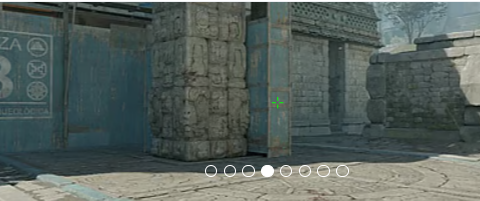
sh1ro crosshair is classic static and colored green. You can enable it by entering a crosshair code CSGO-Ts59P-UHNG6-Nsnwp-eBrtF-Ln2AC, or by copying the following parameters manually:
Style: Classic Static
Follow Recoil: No
Dot: No
Length: 1.5
Thickness: 0.6
Gap: -3
Outline: No
Color (RGB): Custom
Red: 0
Green: 250
Blue: 0
Alpha: Yes
Alpha Value: 200
T Style: No
Deployed Weapon Gap: No
Sniper Width: 0
If you want to explore other options, check out our guide for the best CS2 crosshair codes here.
sh1ro Video Settings for CS2
When it comes to his visual setup, sh1ro relies on the incredibly popular 4:3 aspect ratio stretched to fit his screen, specifically using a 1280x960 resolution. This stretched scaling makes enemy player models appear wider and move slightly faster, which many AWPers prefer for landing crucial flick shots. He plays in Fullscreen mode with his brightness cranked up to 93% for maximum visibility in dark map areas.
In the Advanced Video settings, sh1ro balances performance with visual clarity. He keeps Boost Player Contrast enabled to easily spot enemies against tricky backgrounds. While many pros lower all settings for maximum frames, sh1ro keeps his Shader Detail and Particle Detail on High, Ambient Occlusion on Medium, and High Dynamic Range set to Quality. To smooth out jagged edges without heavily sacrificing his framerate, he utilizes 4X MSAA and 4X Anisotropic Filtering. This combination ensures his game looks sharp enough to spot pixel-peeking enemies while maintaining the ultra-high framerates required for his 600Hz ZOWIE XL2586X+ monitor.
Boost Players Contrast: Enabled
Model/Texture Detail: High
Shader Detail: High
Particle Detail: High
Texture Filtering: Anisitropic 2x
Anti-Aliasing: 4x MSAA
Shadow Quality: High
Dynamic Shadows: All
Ambient Occlusion: Medium
FidelityFX Super Resolution: Disabled (Highest Quality)
V-Sync: Disabled
NVIDIA Reflex Low Latency: Enabled
NVIDIA G-Sync: Disabled
High Dynamic Range: Quality
Resolution: 1280*960
Aspect Ratio: 4:3 stretched
Mode: Fullscreen
Scaling Mode: Stretched
Brightness: 93%
sh1ro Monitor Settings for CS2
To fully capitalize on his high in-game framerates, sh1ro relies on the industry-leading ZOWIE XL2586X+, a 24-inch esports monitor boasting a massive 600Hz refresh rate. Because CS2 demands absolute visual clarity during fast camera movements, he utilizes ZOWIE's DyAc (Dynamic Accuracy) technology set to Premium, which drastically reduces motion blur during aggressive AWP flicks and fast rifle sprays. For his base picture profile, he selects the FPS 1 mode combined with a Gamma 3 curve.
To ensure enemy models instantly pop against dull map textures, sh1ro cranks his Color Vibrance to 20 and sets his Black eQualizer to 10. This specific combination illuminates targets hiding in dark corners without overexposing the brighter areas of the map. He rounds out his hardware configuration with his Brightness at 80, Contrast at 50, and Sharpness at 8, while leaving the low blue light filter completely off (0) to maintain raw, unfiltered visibility during official matches.
Here you can find sh1ro monitor settings:
DyAc: Premium
Black eQualizer: 10
Color Vibrance: 20
Low Blue Light: 0
Picture Mode: FPS 1
Brightness: 80
Contrast: 50
Sharpness: 8
Gamma: Gamma 3
Color Temperature: User Define
AMA: high
sh1ro Viewmodel Settings for CS2
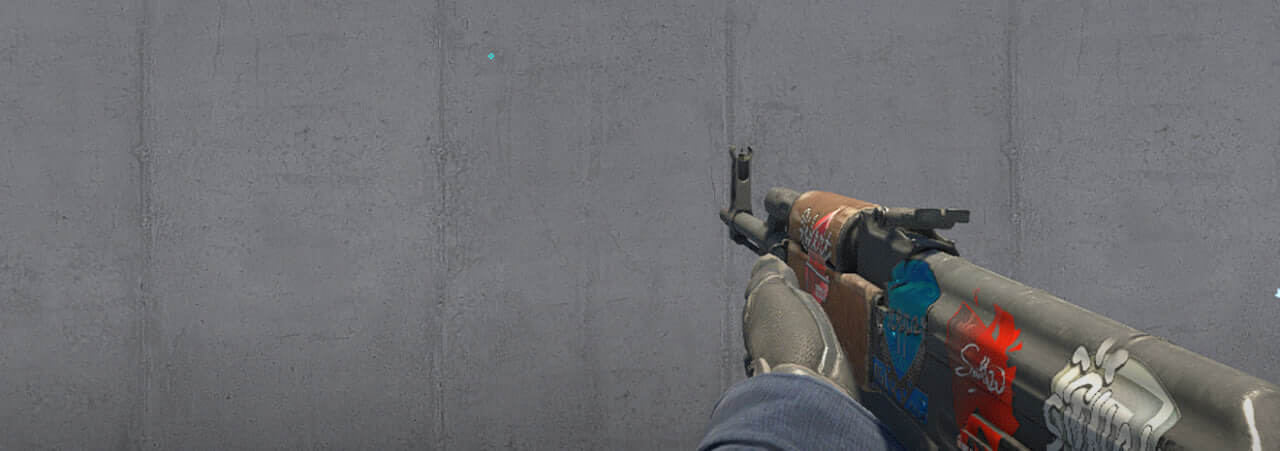
The Team Spirit sniper has viewmodel settings that are similar to those of many other CS2 pro players. It has a horizontal offset of 2.5 and a vertical offset of -1.5. These settings make aiming and shooting convenient and ensure that the weapon model doesn’t obstruct too much of the field of view.
viewmodel_fov 68
viewmodel_offset_x 2.5
viewmodel_offset_y 0
viewmodel_offset_z -1.5
viewmodel_presetpos 2
It’s also useful to learn how viewmodel settings work to adjust them to your preference.
sh1ro Launch Options for CS2
The Team Spirit main sniper uses very default launch settings:
-console +exec autoexec.cfg
If you’re looking for the best CS2 launch options, check out our guide.
sh1ro Radar Settings for CS2
His radar centers the player and rotates at the same time. Use the following settings to try out for yourself what playing with the sh1ro radar settings feels like.
Radar Centers The Player: Yes
Radar is Rotating: Yes
Toggle Shape With Scoreboard: Yes
Radar Hud Size: 1.05
Map Zoom: 0.4
sh1ro Audio Settings for CS2
To complete his competitive setup, sh1ro relies on pinpoint audio accuracy to gather crucial information on enemy movements and timings. He currently uses the HyperX Cloud II, an industry-standard closed-back wired headset renowned for its reliable directional audio and comfortable fit during marathon LAN tournaments.
In CS2 audio settings, professional AWPers typically set their L/R Isolation around the 50% mark to ensure distinct panning without sacrificing the game's natural depth. To maximize his ability to hear subtle cues: like distant footsteps, enemy AWP scopes, or bomb-plant taps, over the chaos of a mid-round execute, the EQ Profile is a vital setting. Keeping this set to Crisp or Natural significantly reduces muddy, overwhelming bass from heavy gunfire and explosions, ensuring that sh1ro always has the auditory advantage in high-stakes clutches.
sh1ro Skins
As many CS2 pros’, sh1ro has one the most expensive inventories among top players. The list of prestige skins consists of:
Use sh1ro’s collection as inspiration or pick other skins to your taste at Skin.Land. Here you will find a wide selection of skins from pro players' collections, available for you to buy quickly, securely, and for an affordable price.







Write comment